

Reviewed by: TrusteraAI Cybersecurity Research Team
Last Updated: June 2026
Methodology: Tools evaluated on deployment complexity, maintenance burden, community support, startup suitability, and security coverage depth.
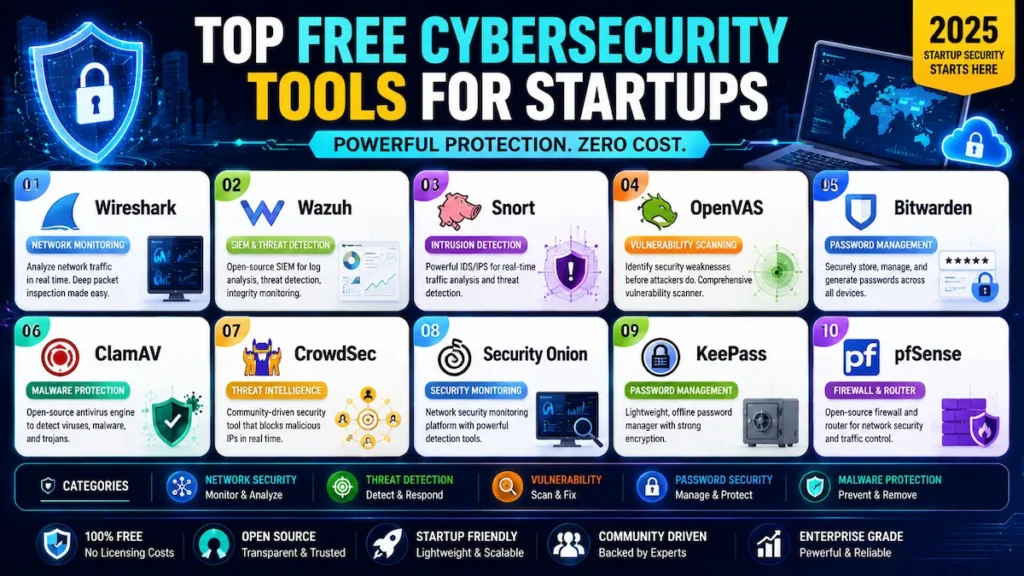
Choosing the right free cybersecurity tools for startups 2025 has become one of the most important decisions for founders trying to reduce cyber risk without increasing operational costs. With ransomware, phishing, and cloud security threats continuing to evolve, startups need practical security solutions that deliver protection before security budgets scale.
Your startup does not have to be large to be a target. Cybercriminals actively pursue smaller organizations because they assume the defenses will be thin. If you are building a SaaS product, managing customer data, or handling payment information, your exposure is real — and a breach at an early stage can be existential.
The good news is that some of the most effective security tools available today cost nothing. Open-source platforms have matured to the point where they compete directly with commercial products that cost tens of thousands of dollars per year.
This guide covers the ten best free cybersecurity tools for startups in 2025 — where they fit in your stack, who should skip them, and how to deploy them in a logical sequence that matches your actual growth stage.
Quick Answer: Best Free Cybersecurity Tools for Startups 2025
| If You Need | Best Free Tool |
|---|---|
| Password Security | Bitwarden |
| Firewall Protection | pfSense |
| SIEM / Monitoring | Wazuh |
| Intrusion Prevention | CrowdSec |
| Vulnerability Scanning | OpenVAS |
| Network Forensics | Wireshark |
| Endpoint Antivirus | ClamAV |
| Network IDS | Snort |
| Threat Hunting | Security Onion |
| Offline Secrets Storage | KeePass |
1. Why Startups Need Cybersecurity in 2025
As cyber threats continue to target smaller organizations, understanding why businesses invest in free cybersecurity tools for startups 2025 helps founders build stronger defenses without slowing growth.
The Threat Is Real and Growing
According to the Verizon 2024 Data Breach Investigations Report, small businesses accounted for a significant share of confirmed breaches, with credential theft and ransomware leading attack categories. The FBI’s IC3 reported over 880,000 cybercrime complaints in 2023, with total losses exceeding $12.5 billion — a record high at the time of reporting.
This is one reason why free cybersecurity tools for startups 2025 have become essential rather than optional for modern startups.
Why Startups Are Prime Targets
Founders often assume their company is too small to attract attention. This assumption is exactly what attackers rely on. Startups hold everything cybercriminals want: customer PII, intellectual property, payment credentials, and integration access to larger enterprise partners. Immature security controls make that data easier to reach than the same data inside a mature enterprise.
According to the 2023 Hiscox Cyber Readiness Report, the median cost of a cyber incident for small businesses has risen sharply year over year, with many small firms reporting recovery costs that threatened their continued operation.
Many founders begin implementing free cybersecurity tools for startups 2025 only after a security scare, but proactive adoption is far more effective.
If you have no dedicated IT team, you are not starting from zero — you are starting from the same place most early-stage founders do. The guide to cybersecurity for startups with no IT team covers how to approach this realistically.
2. The Startup Security Maturity Model™
The Startup Security Maturity Model™ helps organizations deploy free cybersecurity tools for startups 2025 in the correct sequence rather than chasing advanced solutions too early.
Before selecting tools, understand which stage your startup currently occupies. Deploying a threat hunting platform before you have basic password hygiene is a common and costly mistake. This model sequences your investment correctly.
| Stage | Name | Core Focus | Tools |
|---|---|---|---|
| Stage 1 | Survival | Eliminate the most exploited weaknesses | Bitwarden + MFA |
| Stage 2 | Control | Protect your network and endpoints | pfSense + ClamAV |
| Stage 3 | Visibility | Detect threats before they escalate | Wazuh + CrowdSec |
| Stage 4 | Resilience | Proactively identify and close gaps | OpenVAS + Incident Response Plan |
| Stage 5 | Maturity | Threat hunting and continuous improvement | Security Onion + MITRE ATT&CK mapping |
Most pre-Series A startups should be operating solidly at Stage 2 before thinking about Stage 4 or 5. Getting credential security and firewall control right prevents more breaches than any advanced detection platform.
3. The 10 Best Free Cybersecurity Tools for Startups in 2025
These free cybersecurity tools for startups 2025 were selected based on startup suitability, deployment complexity, community support, and security coverage.
1. Bitwarden — Password Management
Best For: Every startup, from day one, regardless of technical level.
Skip If: You already have a paid password manager fully deployed across your team.
Weak and reused passwords remain the most commonly exploited attack vector in small business environments. Bitwarden is an open-source password manager with end-to-end encrypted vaults, browser extensions, mobile apps, strong password generation, and MFA support—all free for individuals and small teams.
Pros: Truly free for core use. Independently audited open-source codebase. Self-hosting option available for regulated environments. Seamless cross-device sync.
Cons: Team admin policies and advanced sharing require the paid Teams plan ($4/user/month). Adoption requires enforcement—browser-saved passwords sitting alongside Bitwarden defeat the purpose entirely.
Implementation Tip: Enable “Master Password Re-prompt” on sensitive vault entries. Create an organization vault immediately so no single person holds all credentials. This becomes critical when co-founders separate or employees leave.
Read next: Minimum viable security for a startup—credential security is Step 1 of the full checklist.
2. pfSense — Open-Source Firewall
Best For: Startups that control their own network infrastructure or host on-premises servers.
Skip If: You are entirely serverless or SaaS-hosted with no infrastructure—your cloud provider’s native security groups likely cover your perimeter needs at that scale.
pfSense is free, open-source firewall and router software built on FreeBSD. It delivers stateful packet inspection, OpenVPN and WireGuard support, VLAN segmentation, traffic shaping, and Snort or Suricata integration—all on commodity hardware or virtual machines.
Pros: Enterprise-grade perimeter control at zero licensing cost. Web UI makes rule management accessible without deep networking expertise. Active development and a large community.
Cons: Requires dedicated hardware or a VM. Misconfigured rules have serious downstream consequences. Firewall blocks do not generate logs unless logging is explicitly enabled on each rule—verify this manually during setup.
Implementation Tip: Segment your network into at minimum three zones: development, staging, and production. Never expose database ports to the public internet. Feed pfSense logs into Wazuh from day one for centralized visibility.
3. Wazuh — Free SIEM and XDR
Best For: Any startup with two or more servers, cloud instances, or endpoints to monitor.
Skip If: You manage only one or two endpoints with no interest in log analysis—CrowdSec plus Windows Defender will serve you better at that scale.
Wazuh is the most capable free cybersecurity platform available to startups today. It combines SIEM and XDR into a single stack covering log analysis, file integrity monitoring, vulnerability detection, configuration assessment, incident response automation, and compliance reporting against PCI-DSS, HIPAA, and GDPR.
Pros: Fully self-contained — no paid tiers, no cloud dashboard upsells, no vendor lock-in. Scales from a single server to thousands of endpoints. Pre-built compliance dashboards accelerate SOC 2 evidence collection.
Cons: Initial setup requires Linux familiarity. The OpenSearch backend adds resource overhead that under-provisioned servers will struggle with. Expect two to three days of tuning before alerts become genuinely actionable.
Implementation Tip: Start with a single Wazuh manager node and roll out lightweight agents to critical servers first. Use compliance dashboards to begin generating audit evidence from day one. For teams exploring how AI network security monitoring extends Wazuh’s detection capabilities, that combination gives small teams meaningful coverage without additional headcount.
4. CrowdSec — Collaborative Intrusion Prevention
Best For: Startups running any public-facing web applications or APIs.
Skip If: Your infrastructure has no internet-facing services.
CrowdSec is a modern open-source intrusion prevention system built around community threat intelligence. When one participant identifies and blocks an attacking IP, that signal is shared across all users—giving your startup the benefit of a continuously updated, crowdsourced blocklist at no cost.
Pros: Installs in under 30 minutes on most Linux servers. Behavioral analysis catches threats that signature-based tools miss. Crowdsourced intelligence improves automatically as the community grows.
Cons: Advanced threat intelligence tiers and centralized dashboards require a paid subscription. The free tier provides solid core blocking, but complex multi-server deployments will surface Pro upsells frequently.
Implementation Tip: Install the Nginx or Apache bouncer immediately after deploying the CrowdSec agent. This blocks flagged IPs at the application layer before requests reach your application code. For deeper context on how machine learning intrusion detection works at the startup level, that guide pairs well with a CrowdSec deployment.
5. OpenVAS — Vulnerability Scanning
Best For: Startups preparing for enterprise customer security reviews, compliance audits, or pre-launch infrastructure assessments.
Skip If: Your stack is entirely managed PaaS—cloud provider security advisories cover your primary vulnerability surface in that scenario.
OpenVAS, part of the Greenbone Community Edition, runs over 80,000 network vulnerability tests against your servers and network devices. It functions as a recurring penetration test at zero cost—identifying what attackers would find before they find it themselves.
Pros: Scheduled scanning, authenticated and unauthenticated modes, HTML and XML reporting, and ticketing system integration. Scan history becomes credible security evidence for investor and customer reviews.
Cons: Resource-intensive—full scans can run several hours. Requires a dedicated Linux host. Results require triage: not every finding demands immediate remediation.
Implementation Tip: Prioritize critical findings within 72 hours, high within 7 days, and medium within 30 days. Document every scan. This becomes one of your most credible artifacts when an enterprise prospect’s security team runs a vendor assessment.
6. Snort — Network Intrusion Detection
Best For: Startups adding network-layer detection to complement pfSense.
Skip If: You have no one available to review and tune IDS alerts weekly—untuned Snort generates alert fatigue that becomes actively counterproductive.
Snort analyzes network traffic against thousands of known attack signatures in real time. Deployed as a pfSense package, it adds network-layer visibility without additional hardware or licensing.
Pros: Industry-standard rule sets (Emerging Threats, free). Tight pfSense integration. Covers SQL injection attempts, known malware command-and-control traffic, and aggressive port scanning.
Cons: Rule maintenance is ongoing. Tuning false positives requires networking knowledge. Snort detects; it does not automatically block. Alerts still require human review and response.
Implementation Tip: Start with the free Emerging Threats rule set. Review alerts weekly for the first month to build a baseline understanding of your normal traffic patterns before expanding rule coverage.

7. Wireshark — Network Forensics
Best For: Investigating suspected incidents, verifying that encryption is functioning, and diagnosing unusual network behavior.
Skip If: You need real-time alerting—Wireshark is a forensic tool, not a monitoring platform.
Wireshark captures and analyzes traffic at the packet level, providing deep protocol visibility that enterprise security teams pay for in commercial tools. When something unusual is happening on your network, Wireshark shows you exactly what, from which source, and to which destination.
Pros: The industry standard for network forensics. Free, cross-platform, actively maintained. Irreplaceable for investigating data exfiltration or unexpected outbound connections.
Cons: Reactive, not preventive. Requires meaningful networking knowledge to interpret results accurately. Not a substitute for ongoing monitoring.
Implementation Tip: Use Wireshark in targeted sessions filtered by IP or protocol. Running it continuously on production systems generates unmanageable data volumes and introduces performance overhead.
8. ClamAV — Open-Source Antivirus
Best For: Linux-based servers or mail gateways where commercial antivirus is unavailable or cost-prohibitive.
Skip If: Your endpoints run Windows or macOS—Windows Defender is superior in those environments and already built in at no cost.
ClamAV is a free, open-source antivirus engine maintained by Cisco Talos. It scans files and email attachments for malware, updates its signature database multiple times daily, and integrates with popular mail transfer agents and file storage systems.
Pros: Cisco Talos signatures provide credible coverage. Real-time scanning via the clamd daemon. Effective for scanning user-uploaded files before storage or distribution.
Cons: Detection rates on newer polymorphic malware trail commercial alternatives. Works best as one layer within a defense-in-depth stack rather than a standalone endpoint solution.
Implementation Tip: Run clamd in real-time mode rather than scheduled batch scans only. Pair with Wazuh’s file integrity monitoring for a complete picture of endpoint health across your Linux infrastructure.
9. Security Onion — Threat Hunting Platform
Best For: Startups with at least one technically proficient team member who can own security monitoring as a dedicated function.
Skip If: You have no security-focused technical owner—Security Onion without someone to interpret its output creates a false sense of security rather than genuine protection.
Security Onion is a free Linux distribution that bundles Zeek, Suricata, and Elastic Stack into a single deployable monitoring environment. It eliminates the integration work of building a detection stack from scratch — everything connects out of the box.
Pros: Enterprise-level network visibility, full packet capture, integrated dashboards, and case management without separate licensing. Used by SOC teams at organizations of every size.
Cons: Requires minimum 16GB RAM and 200GB storage. Significant learning curve. A Stage 5 capability on the Startup Security Maturity Model — not a starting point for most founders.
Implementation Tip: Deploy in Evaluation Mode first. When you are ready to scale, explore how AI security tools for startups can complement Security Onion’s detection capabilities for deeper coverage with a small team.
10. KeePass — Offline Secrets Storage
Best For: Storing highly sensitive credentials that should never touch a cloud service—server root passwords, cryptographic keys, API master secrets, and HSM PINs.
Skip If: You need seamless team sharing and browser integration for everyday credentials—Bitwarden handles those better.
KeePass stores credentials in a locally encrypted database using AES-256 or ChaCha20 encryption. The KeePassXC fork extends this with cross-platform support and a modern interface. There is no cloud component and no vendor to breach.
Pros: Zero cloud dependency. Portable encrypted database. Composite master key support (password plus key file) for maximum protection.
Cons: Team sharing requires a shared encrypted network drive with manual synchronization — version conflicts are a real operational risk.
Implementation Tip: Use KeePass specifically for your most sensitive infrastructure secrets. Use Bitwarden for everyday team credentials. These two tools serve distinct purposes and work better in combination than either does alone.
4. Building Your Startup Security Stack
Building an effective security stack with free cybersecurity tools for startups 2025 requires layering controls across password security, firewall protection, monitoring, and threat detection.
Deploy tools in sequence, not all at once. This table maps each tool to its security layer, NIST function, and the right deployment timing.
| Security Layer | Free Tool | NIST Function | Deploy When |
|---|---|---|---|
| Password Management | Bitwarden | Protect | Day 1 |
| Firewall | pfSense | Protect | Day 1 |
| Endpoint Antivirus | ClamAV | Protect | Week 1 |
| SIEM / XDR | Wazuh | Detect / Respond | Week 1–2 |
| Intrusion Prevention | CrowdSec | Detect / Protect | Week 2 |
| Network IDS | Snort | Detect | Week 2–3 |
| Vulnerability Scanning | OpenVAS | Identify | Month 1 |
| Network Forensics | Wireshark | Respond | As needed |
| Threat Hunting | Security Onion | Detect / Respond | Month 2+ |
| Offline Secrets | KeePass | Protect | As needed |
The sequencing matters as much as the tools themselves. pfSense and Bitwarden in week 1 protect against the most commonly exploited attack vectors. Wazuh and CrowdSec in Week 2 add active detection and blocking. OpenVAS in Month 1 closes the gap between your assumed security posture and your actual one.
5. Free vs. Paid: What You Actually Get
Comparing free cybersecurity tools for startups 2025 against commercial alternatives helps founders understand where free solutions excel and where paid platforms provide additional value.
| Criterion | Free Tools Stack | Paid Solutions |
|---|---|---|
| Licensing Cost | $0 | $5,000–$100,000+/year |
| Setup Complexity | Medium–High | Low–Medium (vendor-assisted) |
| Feature Depth | High (with configuration) | Very High (out of the box) |
| Compliance Reporting | Manual configuration | Often pre-mapped to frameworks |
| Support | Community forums | Dedicated SLA-backed support |
| Best Fit | Pre-Series A startups | Growth-stage and enterprise |
The free stack delivers approximately 80–90% of the protection paid solutions provide. The primary trade-off is time: free tools require more hands-on configuration, tuning, and maintenance. As your startup scales and handles more sensitive data, the investment in paid tools pays for itself in reduced overhead and faster incident response.
For detailed guidance on when and where to start spending, read the startup cybersecurity budget guide and the focused breakdown of building a startup cybersecurity budget under $500 per month.
6. Common Mistakes Startups Make
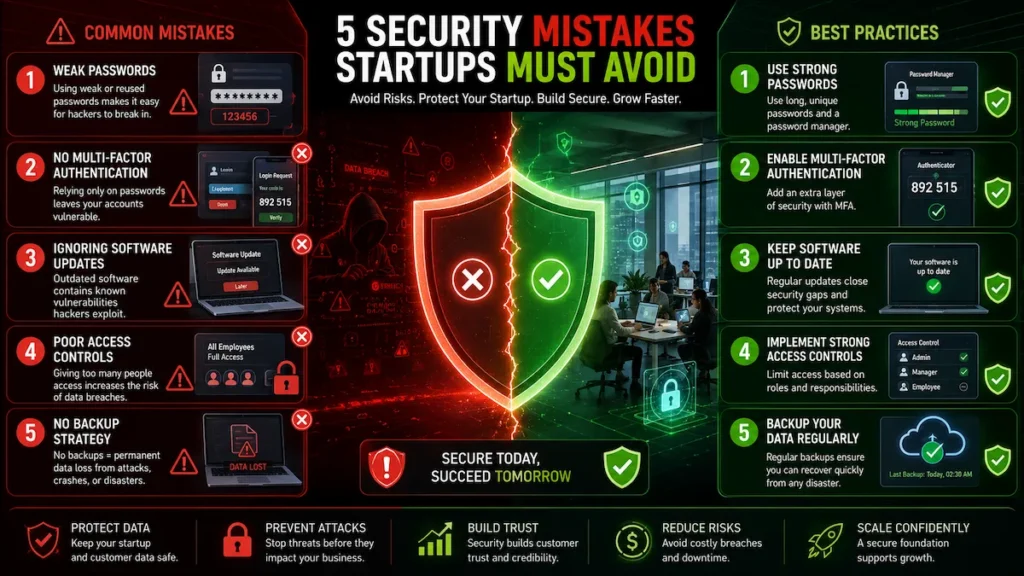
Even organizations using free cybersecurity tools for startups 2025 can remain vulnerable if basic security practices are ignored.
Weak passwords and no MFA. A strong password without multi-factor authentication is still a single point of failure. Enable MFA on every critical account — email, cloud provider console, code repositories, payment platforms, and your password manager itself. Free options like Google Authenticator require zero investment and take minutes to configure.
Poor patch management. Unpatched systems are the primary entry point for ransomware. Establish a patching cadence: critical CVEs within 72 hours, high severity within 7 days, medium within 30 days. Use OpenVAS to verify patches are actually closing the vulnerabilities they claim to address.
Overpermissioned accounts. Every team member should access only what their role requires. Overpermissioned accounts dramatically expand your blast radius when credentials are compromised. Audit access control lists quarterly, or use Wazuh’s configuration assessment module to flag excessive privileges automatically.
No backup strategy. Ransomware protection ultimately depends on clean, tested backups. The 3-2-1 rule applies at every company size: three copies, two different media types, one offsite. Restic is a free, open-source backup tool that runs on Linux, macOS, and Windows.
No employee training. According to the SANS Security Awareness Report, human error remains one of the leading contributors to security incidents across organizations of every size. Run phishing simulations quarterly. Train your team to verify unexpected wire transfer or data access requests by phone rather than email alone.
7. Your 90-Day Security Roadmap
This roadmap shows how to implement free cybersecurity tools for startups 2025 in a structured way without overwhelming a small team.
Week 1 — Stages 1 and 2: Deploy Bitwarden, enforce MFA on every critical account, and configure pfSense. These three actions address the most exploited attack vectors and can be completed by a non-specialist within a single week.
Month 1 — Stage 3: Install Wazuh on critical servers, deploy CrowdSec on public-facing applications, and run your first OpenVAS scan. Review results through the lens of the MITRE ATT&CK framework to understand which adversary tactics your current stack addresses and which it does not.
Months 2–3 — Stage 4: Document your security policies in writing. Even a two-page incident response plan and acceptable use policy signal security maturity to enterprise customers and investors. Map your free tool stack against the NIST Cybersecurity Framework to communicate your posture in terms auditors and procurement teams recognize.
| NIST Function | Free Tool(s) | What It Delivers |
|---|---|---|
| Identify | OpenVAS | Asset and vulnerability inventory |
| Protect | pfSense, Bitwarden, ClamAV | Firewall, access control, malware prevention |
| Detect | Wazuh, Snort, CrowdSec | Threat detection and alerting |
| Respond | Wazuh, Security Onion | Incident investigation and response |
| Recover | Restic, Backblaze | Data restoration after incident |
Budget-Friendly Upgrade Path:
- $0: Full free stack as described in this guide
- Under $50/month: Add Cloudflare Pro for DDoS protection and WAF coverage
- Under $100/month: Add a managed vulnerability scanning service for cleaner compliance reporting
- Under $200/month: Engage a fractional security consultant for monthly review sessions
For startups exploring how AI-powered tools extend this stack, the free AI cybersecurity tools guide covers the options that integrate well with the open-source foundation described here.
8. Frequently Asked Questions
These frequently asked questions address the most common concerns about deploying free cybersecurity tools for startups 2025 in real startup environments.
What are the best free cybersecurity tools for startups in 2025?
The strongest free tools are Wazuh (SIEM/XDR), pfSense (firewall), CrowdSec (intrusion prevention), OpenVAS (vulnerability scanning), Bitwarden (password management), ClamAV (antivirus), Snort (IDS), Wireshark (network forensics), Security Onion (threat hunting), and KeePass (offline secrets storage). Together they address every critical layer of a startup security stack at zero licensing cost.
Is Wazuh truly free for startups?
Yes. Wazuh is released under the GNU General Public License. All detection rules, compliance dashboards, and agent capabilities are included in the open-source package with no paid tier required for core functionality.
What is the best free firewall for a small business?
pfSense is the most capable free firewall for small businesses—stateful packet inspection, VPN support, traffic shaping, and intrusion detection via add-on packages, all at zero licensing cost, running on commodity hardware or a VM.
Can free tools meet compliance requirements?
Monthly for most startups, and immediately after any significant infrastructure change. Quarterly is a reasonable minimum if monthly scans are not operationally feasible. Treat every scan result as a prioritized remediation queue, not a report to file and forget.
What should I deploy first if I have no IT staff?
Start with Bitwarden, pfSense, and CrowdSec. These three tools address the most commonly exploited vulnerabilities with the lowest setup complexity. The full startup cybersecurity checklist walks through a complete non-technical implementation sequence.
Can free tools meet compliance requirements?
Free tools can generate most evidence required for SOC 2, HIPAA, and GDPR compliance. The reporting and audit-readiness work that paid GRC platforms handle automatically must be done manually. The capability is present — the convenience is not.
What are the most important free cybersecurity tools for startups in 2025?
The most important free cybersecurity tools for startups 2025 depend on the stage of the business, but most startups should begin with password management, firewall protection, vulnerability scanning, and security monitoring. A practical starter stack includes Bitwarden for credentials, pfSense for firewall protection, OpenVAS for vulnerability management, and Wazuh for centralized monitoring and threat detection.
Can startups build a secure environment using only free cybersecurity software?
Yes, many early-stage companies can establish a strong security baseline using free cybersecurity tools for startups 2025, especially when they focus on layered protection rather than individual tools. Combining password security, endpoint protection, firewall controls, vulnerability scanning, and employee security awareness can significantly reduce common cyber risks before investing in commercial platforms.
How should startups prioritize cybersecurity tools when working with limited budgets?
When budgets are limited, startups should implement free cybersecurity tools for startups 2025 in phases. Start with password management and multi-factor authentication, then add firewall protection, vulnerability management, and security monitoring. This phased approach improves security coverage while keeping operational overhead manageable.
Conclusion
The most effective free cybersecurity tools for startups 2025 are not necessarily the most complex—they are the tools that solve the right security problems at the right stage of growth.
Building a credible security program as a startup does not require a six-figure budget. The ten free tools in this guide — Bitwarden, pfSense, Wazuh, CrowdSec, OpenVAS, Snort, Wireshark, ClamAV, Security Onion, and KeePass — cover every critical layer of a startup security stack at zero licensing cost.
Use the Startup Security Maturity Model™ to deploy in the right sequence. Start at Stage 1, get credential security right before anything else, then build upward. The founders who suffered breaches in 2025 are not primarily the ones who lacked budget—they are the ones who assumed security could wait until the next funding round.
Your customer data, your intellectual property, and your reputation cannot wait.
The tools are free. The protection is real. The only thing left is to start.
Next Steps: