
Quick Answer Box
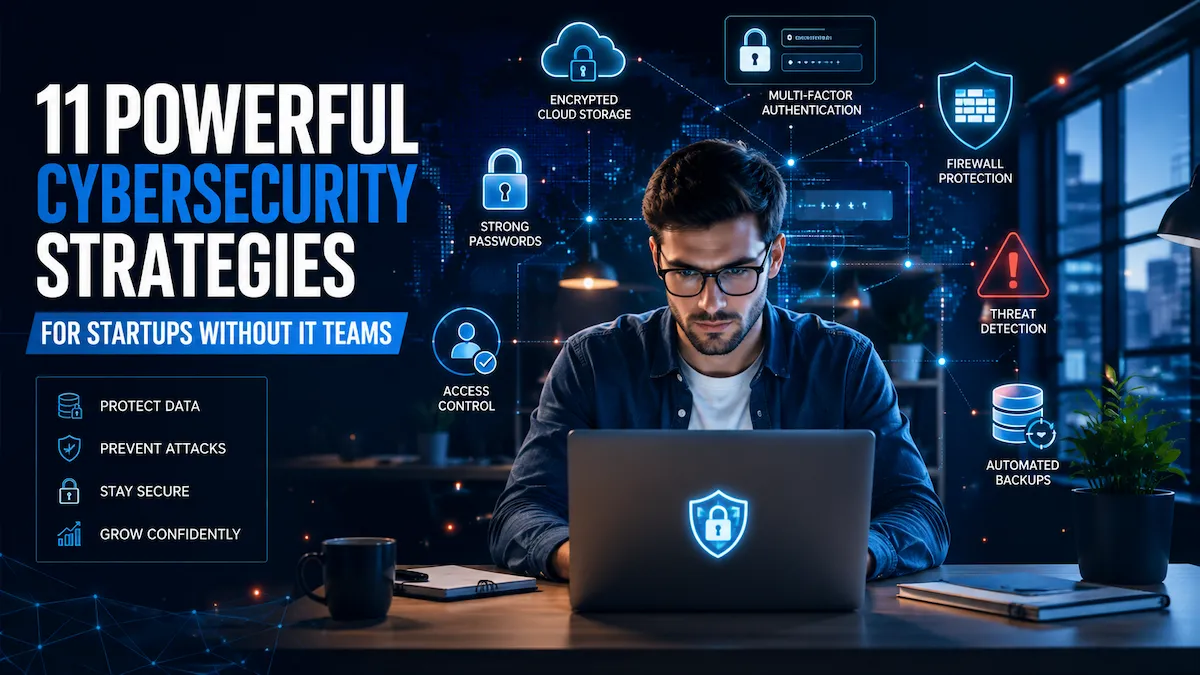
What is cybersecurity for startups with no IT team? Cybersecurity for startups with no IT team involves implementing affordable security controls, employee awareness training, cloud protection measures, strong authentication practices, and incident response planning to reduce cyber risks without hiring a full IT department.
At a Glance: Security Priority by Startup Stage
| Startup Stage | Biggest Risk | First Security Priority |
|---|---|---|
| Solo Founder | Account compromise | MFA on all accounts |
| Team of 5 | Shared passwords | Password manager |
| Team of 20 | Access sprawl | IAM + access audits |
| Team of 50+ | Compliance gaps | SOC2 + monitoring |
Key Takeaways
- According to Verizon’s 2024 Data Breach Investigations Report, 46% of all cyber breaches hit businesses with fewer than 1,000 employees
- MFA and a password manager are your two most important first steps — both free
- The NIST Cybersecurity Framework gives you a proven structure: Identify, Protect, Detect, Respond, Recover
- Cloud security, endpoint protection, and employee training are all achievable without an IT team
- Cyber insurance typically costs $1,500–$5,000/year — far less than a single breach
- SOC2 and GDPR compliance can begin early, without a security hire
Introduction
Cybersecurity for Startups With No IT Team has become one of the biggest business challenges facing founders in 2026. As cyber threats continue to evolve, startups without dedicated security staff must find practical ways to protect customer data, cloud infrastructure, and business operations without significantly increasing costs.
You built your startup to solve a problem, not to become a cybersecurity expert. But here’s the hard truth: hackers don’t care how small you are.
According to IBM’s 2024 Cost of a Data Breach Report, the average cost of a data breach now exceeds $4.88 million globally — and most startups don’t survive it. Yet the majority of early-stage companies have no firewall, no security policy, and no plan for when something goes wrong.
If you don’t have an IT team — and most founders don’t — your startup is more exposed than you realize. But this is fixable. This guide gives you a practical, affordable, step-by-step cyber protection roadmap for 2026 — no technical degree required.
Why Startups Without IT Teams Are High-Value Targets
Cybersecurity for startups with no IT team presents unique challenges because founders often balance growth, funding, hiring, and product development while managing security responsibilities that would normally be handled by dedicated IT professionals.
Attackers love startups for three specific reasons:
1. You hold valuable data but have weak defenses. Even a five-person SaaS startup stores customer emails, payment data, and proprietary code. That’s worth real money on the dark web — and most startups have no access controls, no firewall rules, and no security policies guarding it.
2. You move fast and cut corners. Teams share passwords over Slack, use personal devices for work, and skip security reviews to hit launch deadlines. Speed is your biggest advantage and your biggest liability.
3. Nobody is watching. Large companies run security operations centers (SOC), SIEM tools, and threat detection systems 24/7. Startups have nothing. There’s no one to notice the unusual login at 3 a.m. from Eastern Europe.
Real-World Example: A 7-person SaaS startup reused admin passwords across multiple tools. After one employee’s credentials were exposed in a third-party breach, attackers gained access to Stripe and customer records within hours. The startup spent $40,000 in legal fees and customer notification costs — and lost two enterprise clients.
Biggest Cybersecurity Risks Startups Face in 2026
Understanding the most common threats is essential when developing cybersecurity for startups with no IT team because attackers frequently target organizations with limited security resources and immature defenses.
Understanding your threats is the first step to managing them.
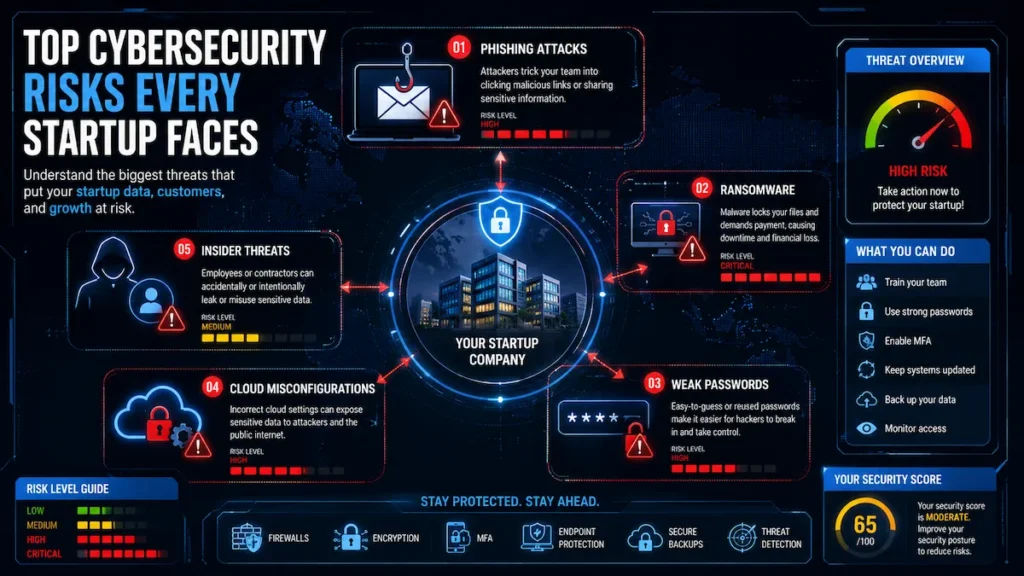
Phishing Emails — The #1 attack vector. An employee clicks a fake DocuSign or Google Drive link, credentials are stolen, and the attacker is inside your systems. According to CISA, over 90% of successful cyberattacks begin with phishing.
Ransomware — Encrypts your files and demands $10,000–$500,000 to restore them. Startups without solid backups often have no choice but to pay.
Real-World Example: A healthtech startup delayed MFA implementation “until after launch.” Three weeks before their Series A close, a phishing attack compromised the CEO’s email. Attackers accessed investor communications and nearly derailed the funding round.
Weak or Reused Passwords — The average person reuses the same password across 14 accounts. One exposed credential gives attackers access everywhere through credential stuffing.
Cloud Misconfigurations — An S3 bucket left public, a Google Drive folder shared with “anyone with the link.” Cloud misconfigurations expose more startup data than sophisticated hacking ever does.
Unpatched Software — Attackers scan the internet for outdated systems automatically. A missing patch on your WordPress site or an outdated npm package is all they need.
Insider Threats — A contractor who still has access after their engagement ends. Unrevoked access is a silent risk that costs nothing to fix — if you catch it.
The NIST-Based Security Framework Every Startup Should Follow
The NIST Cybersecurity Framework is the global gold standard for building a security program — and you don’t need an IT team to apply it. Here’s how it maps to startup reality.
Identify
List your “crown jewels” — customer data, source code, financial accounts, employee credentials. These are your top protection priorities.
Protect
Deploy controls: MFA everywhere, password managers, software updates, endpoint protection, employee training. This is where most of your early effort belongs.
Detect
Set up alerts. Review login activity weekly. Use your cloud provider’s security dashboard. Subscribe to Have I Been Pwned for your domain. You don’t need a SIEM — you need visibility.
Respond
Write a one-page incident response plan. Know who to call, what to isolate first, and how to notify users and regulators if a breach occurs.
Recover
Test backups quarterly. Confirm they actually restore. Document a recovery process before you ever need it.
This five-step model is what CISA recommends for organizations of all sizes — startups included.
Cybersecurity Basics Every Startup Must Implement This Week
The foundation of cybersecurity for startups with no IT team starts with a small set of high-impact controls that significantly reduce risk without requiring advanced technical expertise.
These steps cost almost nothing and eliminate the majority of your risk.
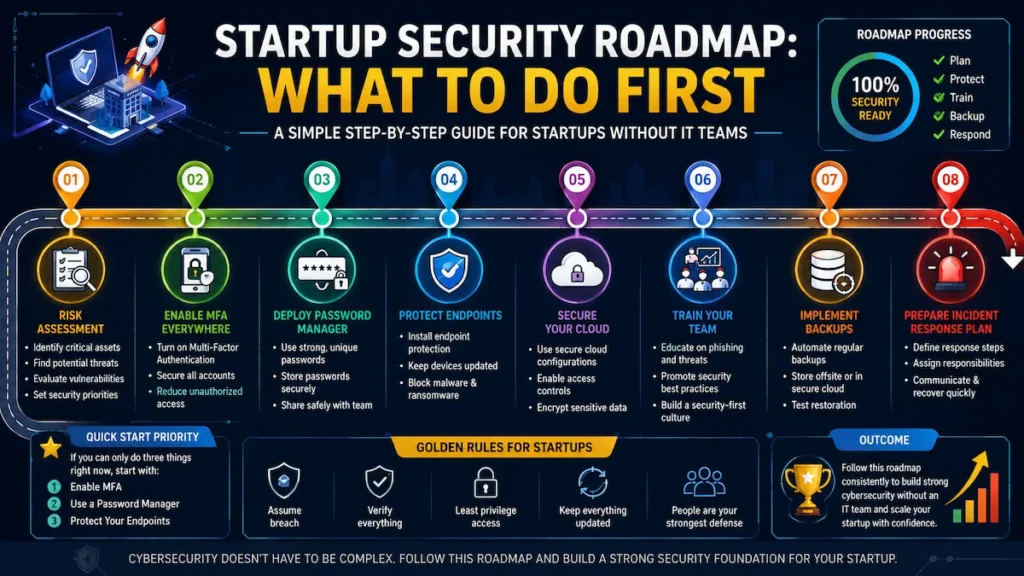
1. Enable MFA on Everything
MFA blocks over 99% of automated credential attacks. Enable it on Google Workspace, GitHub, AWS, Stripe, QuickBooks, and your domain registrar. Use an authenticator app like Google Authenticator or Authy — not SMS, which can be intercepted.
2. Use a Password Manager
Every team member needs one. Bitwarden is free and open source. 1Password is excellent for teams. No more passwords shared in Slack, no more “Password1!” on your AWS root account.
3. Keep Software Updated
Enable automatic updates on all devices. This single habit closes the majority of known vulnerabilities before attackers can exploit them.
4. Follow the 3-2-1 Backup Rule
- 3 copies of your data
- 2 different storage types
- 1 offsite or cloud backup
Use Backblaze, AWS S3, or Google Drive for offsite storage. Tests are restored every quarter—a broken backup is worse than no backup.
5. Audit and Clean Up Access
List every tool your team uses and who has access. Remove anyone who doesn’t need it. Apply least privilege: minimum access to do the job, nothing more.
For the complete version of this process, the startup cybersecurity checklist for 2026 walks through every step in order.
Founder Security Maturity Model
Use this to identify your current stage and focus only on what matters next.
| Stage | Team Size | Top Security Priorities |
|---|---|---|
| Founder Stage | 1–5 | MFA + Password Manager + Backups |
| Early Startup | 5–20 | Endpoint Security + Access Audits + Email Filtering |
| Growth Stage | 20–50 | Compliance (SOC2/GDPR) + IAM + Security Training |
| Scale Stage | 50+ | SOC Monitoring + MSSP + vCISO |
Most founders reading this are at Stage 1 or 2. Focus there first. Don’t build a SOC before you’ve enabled MFA on every account.
Best Security Tools for Non-Technical Founders (Free to Affordable)
Choosing the right tools is an important part of cybersecurity for startups with no IT team because founders need solutions that provide strong protection while remaining affordable and easy to manage.
How to Choose Security Tools
Before picking any tool, evaluate it on five criteria:
- Ease of deployment — Can a non-technical founder set it up in an afternoon?
- Cost per user — Is it scalable as the team grows?
- Compliance support — Does it help with SOC2, GDPR, or HIPAA evidence collection?
- Integration capabilities — Does it fit your existing stack?
- Startup scalability — Can you start free and upgrade as you grow?
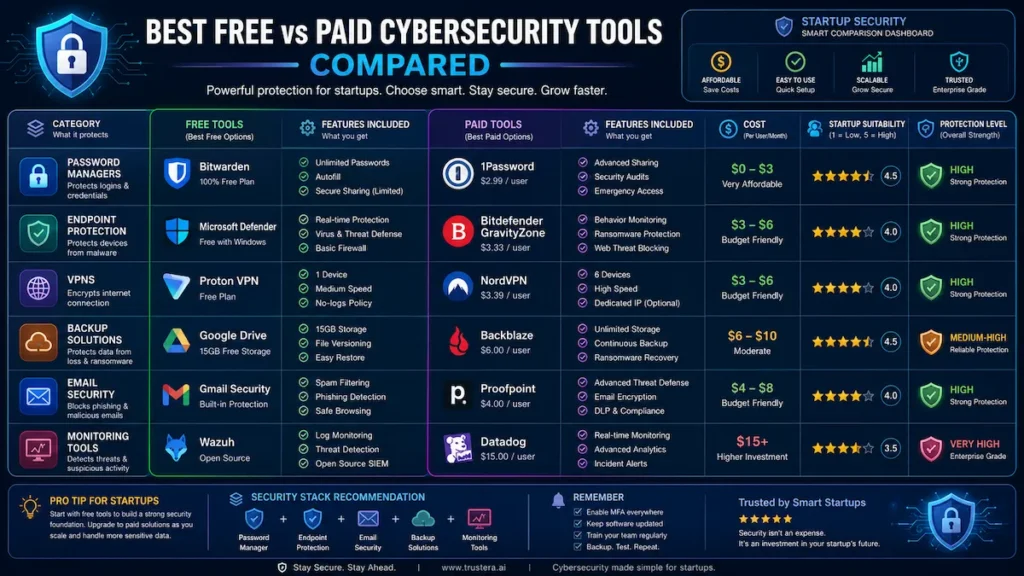
Free Starter Stack
| Tool | Purpose | Cost |
|---|---|---|
| Bitwarden | Password manager | Free |
| Google Authenticator / Authy | MFA | Free |
| Cloudflare | DNS protection, DDoS mitigation | Free tier |
| Have I Been Pwned | Breach monitoring | Free |
| Windows Defender / macOS Gatekeeper | Endpoint protection | Free (built-in) |
Paid Stack ($50–$300/month for a team of 10)
| Tool | Purpose | Approx. Monthly Cost |
|---|---|---|
| 1Password Teams | Password manager | ~$20/mo |
| Malwarebytes Teams | Endpoint protection | ~$40/mo |
| Cloudflare Pro | Advanced web security | ~$20/mo |
| Backblaze Business | Cloud backup | ~$7/user/mo |
| Vanta or Drata (starter) | Compliance automation | ~$200–$500/mo |
The guide to AI security tools on a startup budget breaks down exactly which tools to prioritize at each spend level, including several free AI cybersecurity tools for startups worth deploying today.
Startup Data Protection Strategies That Prevent Costly Breaches
Data protection isn’t just about firewalls. It’s about knowing what data you have, where it lives, and who can touch it.
Data Classification — Not all data carries the same risk. Label your data into three tiers: public (marketing content), internal (team communications), and sensitive (customer PII, financial records, credentials). Apply stricter controls to sensitive data automatically.
Encryption at Rest and in Transit — Encrypt sensitive files stored in the cloud and ensure all data transmitted between your app and users travels over HTTPS/TLS. Most cloud providers enable this by default; verify that yours has.
Data Retention Policies — Don’t keep data you don’t need. Old customer records, unused backups, and stale employee data are all liabilities. Define how long each data type is retained, then delete it on schedule.
Least Privilege by Default — Engineers shouldn’t have access to production customer data unless they need it for a specific task. Segment your data environments so development, staging, and production are separated.
Secure Sharing Practices — Replace “share with anyone who has the link” with password-protected shares, expiring links, or folder-level permissions. Train your team that convenience in sharing is risk in disguise.
Pair these practices with strong AI network security monitoring to detect unusual access patterns before they become incidents.
Cloud Security Best Practices for SaaS Startups
Cloud misconfigurations are one of the top causes of startup data exposures. Tighten these immediately:
- Audit storage permissions — Nothing public unless it’s intentionally a public asset
- Enable cloud provider security tools—AWS GuardDuty, Google Security Command Center, and Azure Defender all have free tiers
- Review IAM policies—No service account should carry admin access unless absolutely necessary
- Enable logging—Turn on CloudTrail (AWS) or equivalent; you cannot investigate what you did not log
- Use secrets management — Never hardcode API keys; use AWS Secrets Manager or HashiCorp Vault
For startups running AI infrastructure, machine learning intrusion detection adds an intelligent layer of threat visibility that traditional tools miss.
Zero Trust Security for Small Teams
“Zero Trust” means never automatically trusting any user or device—even inside your own network. For startups, this is not a complex enterprise initiative. It’s a handful of practical rules:
- Require MFA for every login, every time — no exceptions for “internal” tools
- Use a VPN or identity-aware proxy (like Cloudflare Access) for internal dashboards
- Segment access so developers cannot reach customer billing data by default
- Treat every device as potentially compromised—enforce device health checks before granting access
- Review and revoke access on a quarterly schedule
Zero Trust is increasingly the baseline expectation in enterprise sales cycles and SOC 2 audits. The practical guide to securing a startup with AI tools shows how to implement these principles without a dedicated security hire.
How AI Can Help Startups Improve Cybersecurity
AI-powered security tools have fundamentally changed what’s possible for lean teams. Here’s where AI delivers the biggest value for startups without IT departments:
AI Threat Detection — Tools like Darktrace and CrowdStrike Falcon use machine learning to identify abnormal behavior pattern—ann employee logging in from a new country at 2 a.m. or a service account suddenly querying hundreds of records—and alert you before damage is done.
AI Phishing Detection — AI-powered email security (Google Workspace Advanced Protection, Microsoft Defender for Office 365) analyzes sender patterns, link destinations, and language to catch sophisticated phishing emails that bypass traditional filters.
AI Log Analysis — Manually reviewing security logs is impossible for a small team. AI log analyzers (Panther, Sumo Logic) surface only the anomalies that matter, cutting noise by over 90%.
AI Compliance Monitoring — Platforms like Vanta and Drata use AI to continuously monitor your environment against SOC2 and GDPR controls, flagging gaps automatically instead of waiting for an annual audit.
AI Security Automation — Routine tasks like access reviews, vulnerability scanning, and patch status checks can be automated through AI-assisted platforms, freeing founders to focus on product rather than security hygiene.
For a deeper look at what’s available today, the guide to free AI cybersecurity tools for startups covers the best no-cost entry points.
Employee Security Training Without an IT Team
Employee education remains a critical component of cybersecurity for startups with no IT team because human error continues to be one of the leading causes of security incidents and data breaches.
Your team is your biggest vulnerability — and your strongest defense. You don’t need a dedicated trainer to build a security-aware culture.
Monthly Security Minute — 5 minutes in your standup. Week 1: spotting phishing. Week 2: password hygiene. Week 3: What to do if you click something suspicious. Week 4: safe document sharing.
Simulated Phishing Tests — Tools like KnowBe4 or GoPhish (free, open source) send fake phishing emails to your team. The goal is training through real experience, not punishment.
One-Page Security Policy — Every hire reads and signs it. Cover: password requirements, device usage rules, incident reporting, and who to contact. This creates accountability without complexity.
30-Minute Security Onboarding — A walkthrough for every new hire covering your tools, policies, and expectations. It costs nothing and compounds over time.
Compliance and Legal Requirements for Startups
As cybersecurity for startups with no IT team matures, founders should also understand compliance obligations that may affect customer trust, regulatory requirements, and business growth.
GDPR (If You Have European Users)
Have a clear privacy policy, collect only what you need, allow data deletion requests, and report breaches within 72 hours. The guide to GDPR compliance tools for startups compares the best options for lean teams.
CCPA (If You Have California Users)
Disclose what data you collect, provide opt-out options, and do not sell personal data without explicit consent.
SOC2 (If You Sell B2B SaaS)
Not legally required, but increasingly demanded by enterprise buyers. Compliance automation tools make SOC2 achievable without a dedicated security team. The SOC2 compliance tools guide for AI startups breaks down what to expect and how to prepare.
HIPAA (If You Touch Health Data)
Requires formal controls, Business Associate Agreements (BAAs) with vendors, and encryption standards. Bring in a compliance consultant early if you’re in healthtech — penalties for non-compliance are severe.
Cyber Insurance: What Startups Need to Know
Cyber insurance covers the costs of data breaches, ransomware, and related incidents—including legal fees, customer notification, and sometimes ransom payments.
Cost Comparison: With vs. Without Insurance
| Scenario | Without Insurance | With Insurance |
|---|---|---|
| Data Breach | Full legal + notification costs out of pocket | Coverage for legal fees, notification, credit monitoring |
| Ransomware Attack | Direct financial loss + downtime | Partial or full reimbursement depending on policy |
| Customer Lawsuits | Self-funded legal defense | Policy covers defense costs |
| Regulatory Fines | Personal liability | Some policies cover regulatory penalties |
Most early-stage startups pay $1,500–$5,000/year for a basic cyber policy—less than one hour of breach response from a cybersecurity law firm. Get it as soon as you’re storing customer data.
Recommended Security Stack by Budget
Under $50/month
MFA (free), Bitwarden (free), Cloudflare free tier, Windows Defender / macOS Gatekeeper. This combination alone neutralizes the majority of commodity attacks.
$50–$200/month
Add 1Password Teams (~$20/mo), Malwarebytes Teams (~$40/mo), and Backblaze Business (~$7/user/mo). You now have managed password security, endpoint protection, and automated cloud backup.
$200–$500/month
Add Cloudflare Pro (~$20/mo) and a compliance automation starter plan (Vanta or Drata). At this level you’re actively monitoring, protecting, and building an audit trail for SOC2.
$500+/month
Add identity and access management (Okta, JumpCloud) and advanced endpoint detection (CrowdStrike Falcon), and consider a part-time virtual CISO (vCISO) engagement to guide your program strategy.
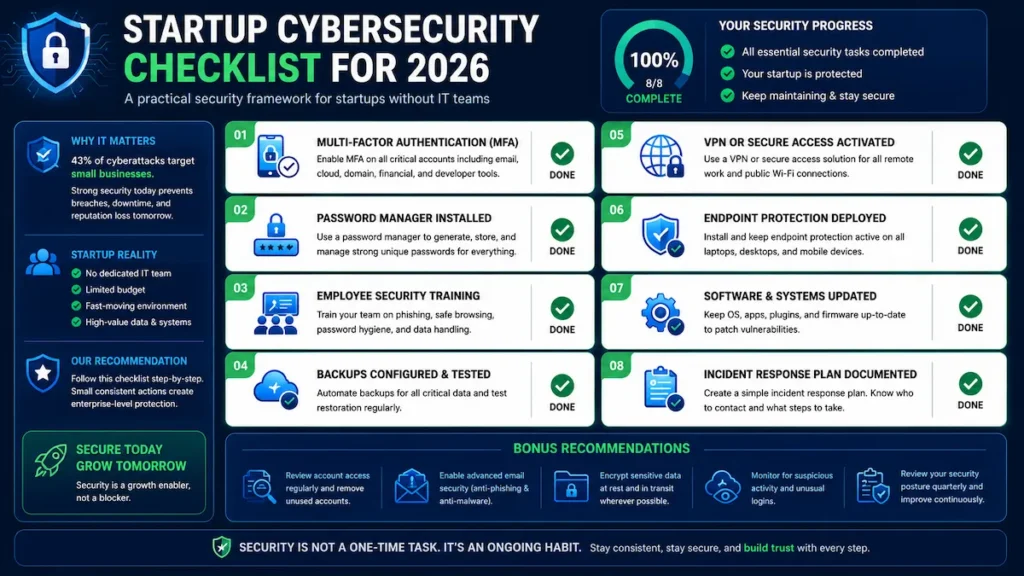
Startup Cybersecurity Checklist
This cybersecurity for startups With no IT team, a checklist provides a practical framework that founders can follow to strengthen their security posture and reduce operational risk.
This Week
- Enable MFA on all accounts (email, cloud, code repos, finance)
- Deploy a password manager for the entire team
- Enable automatic updates on all devices
- Audit access — remove anyone who doesn’t need it
- Set up free Cloudflare DNS protection
Month 1
- Create a one-page security policy
- Add security training to employee onboarding
- Enable full-disk encryption on all work devices
- Set up login alerts and unusual activity notifications
- Back up critical data (3-2-1 rule) and test a restore
Months 2–3
- Implement VPN or Zero Trust access for internal tools
- Deploy endpoint protection
- Write a one-page incident response plan
- Investigate cyber insurance
- Review all cloud storage permissions and data retention policies
Quarterly
- Test backups — confirm they actually restore
- Run a phishing simulation
- Review and update your full access list
- Check HaveIBeenPwned for breached accounts on your domain
Common Mistakes Startups Make
Many cybersecurity for startups with no IT team initiatives fail because founders unknowingly repeat common security mistakes that expose their businesses to unnecessary threats.
“We’re too small to be a target.” — Automated attack tools don’t discriminate by size. Being small makes you a softer target, not an invisible one.
Sharing passwords over Slack — Every message is a permanent, searchable record. Use a password manager’s secure sharing feature instead.
Never testing backups — Many startups discover broken backups only when they need to restore. Test quarterly, not “eventually.”
Giving everyone admin access—one compromised admin account hands attackers total control. Use least privilege, always.
Skipping offboarding — When someone leaves, revoke access to every tool immediately. Build an offboarding checklist and run it without exception.
When to Hire Outside Security Help
As cybersecurity for startups with no IT team becomes more complex, startups may reach a point where external expertise delivers greater value than attempting to manage security internally.
| Option | Best For | Typical Cost |
|---|---|---|
| Virtual CISO (vCISO) | Post-seed to Series A, SOC2 prep, B2B SaaS | $2,000–$10,000/month |
| MSSP | Tools deployed but nobody monitoring them | $1,000–$5,000/month |
| Security Consultant | One-time audit, pre-SOC2, post-incident review | $3,000–$15,000/engagement |
Signs you need outside help now: you’ve had unexplained suspicious activity, an enterprise customer is demanding SOC2, you’re processing health or financial data, or your team has grown past 20 people with no security ownership in place.
People Also Ask
Q: How can a startup without an IT team protect itself from cyber attacks?
Start with MFA, a shared password manager, automatic software updates, and regular data backups. These four steps eliminate the majority of attack vectors and cost almost nothing to implement.
Q: What are the biggest cybersecurity risks for startups?
Phishing emails, reused passwords, ransomware, unpatched software, and cloud misconfigurations. Most breaches happen through human error, not sophisticated hacking.
Q: What free cybersecurity tools work for startups?
Bitwarden, Google Authenticator, Cloudflare’s free tier, HaveIBeenPwned, and built-in OS security tools (Windows Defender and macOS Gatekeeper) are all free and effective starting points.
Q: How much does startup cybersecurity cost?
A solid starter stack runs $50–$200/month for a team of 10. The free tools alone—MFA, Bitwarden, Cloudflare—provide significant protection at zero cost
Q: When should a startup get SOC2 certified?
Begin when enterprise customers start asking for it, usually around $1M ARR. Compliance automation tools make it feasible without a dedicated security team.
Q: What is Zero Trust security for startups?
Verify every user, every device, every time — never assume an internal connection is safe. Practically: MFA everywhere, VPN for internal tools, quarterly access reviews.
Q: How do startups prevent ransomware?
Keep software updated, follow the 3-2-1 backup rule, deploy endpoint protection, train employees to recognize phishing, and limit access using least privilege.
Q: What is cyber insurance, and should startups get it?
Cyber insurance covers breach costs, ransomware, legal fees, and customer notifications. A basic policy starts at ~$1,500/year — get it as soon as you’re storing customer data.
Q: Does a startup need a written security policy?
Yes. A one-page document covering passwords, device usage, incident reporting, and access rules creates accountability and a training baseline for every hire.
Q: What’s the single most important cybersecurity step?
Enable MFA on every account. It’s free, takes minutes, and blocks over 99% of automated credential attacks. Do it today.
Your Startup Security Roadmap Starts Now
Building cybersecurity for a startup with no IT team isn’t about achieving perfect security overnight. It’s about implementing the right protections in the right order and improving them consistently as your business grows.
Today
- Enable Multi-Factor Authentication (MFA) on all critical accounts.
- Install a password manager and replace reused passwords.
- Review administrator access across your business tools.
This Week
- Enable automatic software updates.
- Configure secure cloud backups.
- Audit user accounts and remove unnecessary access.
This Month
- Create a simple cybersecurity policy.
- Deploy endpoint protection on all company devices.
- Document a basic incident response plan.
This Quarter
- Conduct employee security awareness training.
- Run a phishing simulation.
- Classify sensitive business and customer data.
- Evaluate cyber insurance options.
This Year
- Build toward SOC 2 readiness if you sell to businesses.
- Explore AI-powered security monitoring and automation.
- Consider a virtual CISO (vCISO) or Managed Security Services as your startup scales.
Cybersecurity is not a one-time project. It’s an ongoing business process that protects your customers, your reputation, and your growth. Start with the fundamentals, build good habits, and strengthen your security posture one step at a time.