
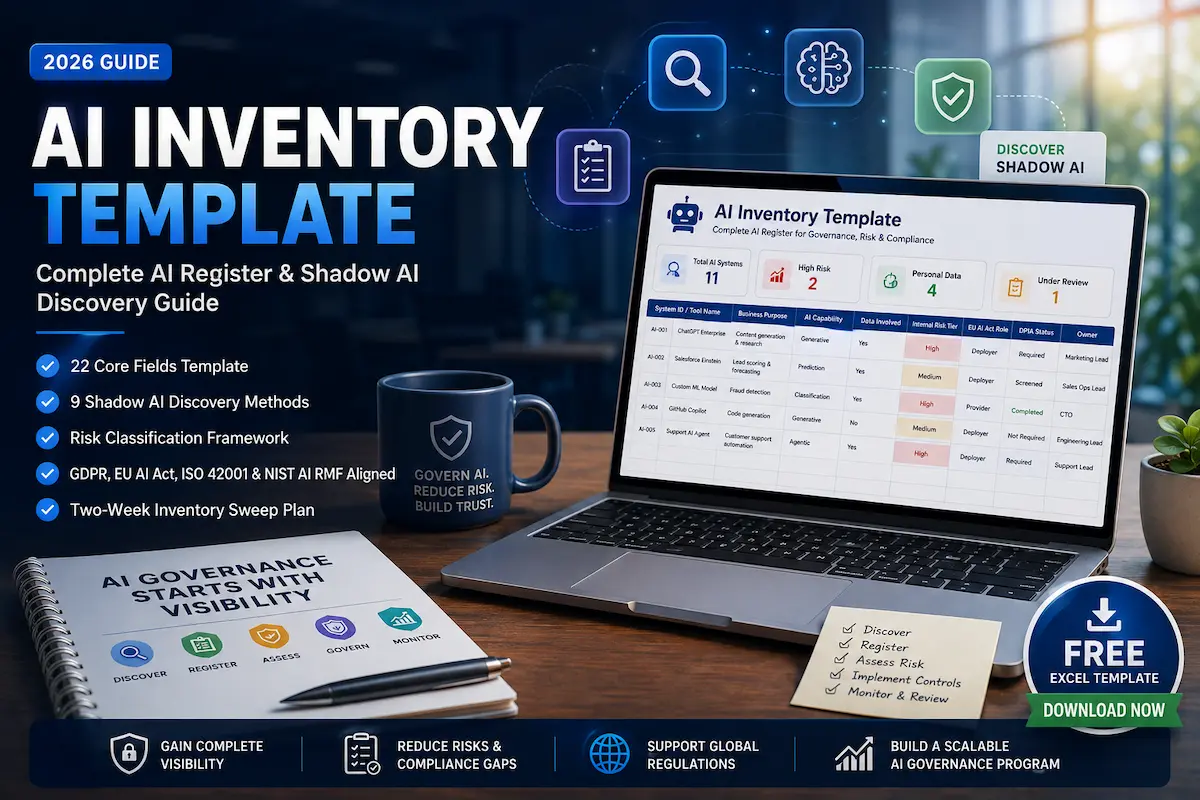
Last Updated: August 2026 · Reviewed by Irfan Ullah, Founder of TrusteraAI and creator of the TrusteraAI AI Risk Assessment Framework™.
Most companies don’t have an AI problem because they have too much AI. They have an AI governance problem because they don’t know where all of it is. An AI inventory gives security, compliance, and IT teams a single record of the AI systems, models, agents, and embedded AI capabilities operating across the organization — the foundation every other governance control depends on.
Quick Answer: An AI inventory template is a structured register that catalogs the AI systems an organization uses — including internally built models, embedded AI features in SaaS tools, AI agents, and employee-adopted tools — while tracking ownership, data flows, risk, and compliance status.
This guide provides a free 22-field AI inventory template, nine shadow AI discovery methods, a risk classification approach, a maturity model for scaling the program, and guidance on how it supports GDPR, the EU AI Act, ISO/IEC 42001, and NIST AI RMF. A Gartner survey of 302 cybersecurity leaders found that 69% of organizations suspect or have direct evidence of employees using prohibited generative AI tools, and IBM’s 2025 Cost of a Data Breach Report found that breaches involving this kind of shadow AI cost organizations $670,000 more on average than standard breaches.
🎯 Start Here
- Need the template now? → Download the AI Inventory Template (Excel)
- Building from scratch? Jump to the Two-Week Inventory Sweep Plan
- Already have an inventory? Jump to the Maturity Model to find your next step
What Is an AI Inventory?
An AI inventory is a documented register of every AI system in use across an organization — including shadow AI nobody formally approved — tracking what it does, who owns it, what data it touches, and how risky it is. It’s a living record, reviewed and updated on a fixed cadence, not a one-time list.
Quick Answer: What is an AI inventory template?
An AI inventory template is a structured worksheet used to record the AI systems, tools, models, agents, and embedded AI features an organization uses. It typically captures ownership, purpose, data inputs and outputs, model provider, risk level, regulatory status, and review dates so security, IT, privacy, and compliance teams can maintain a consistent AI register.
Most AI governance programs fail for the same reason: they start with a policy before anyone has actually looked at what AI is running. You cannot enforce a policy, assess risk, or answer an auditor’s question about a system you don’t know exists. The inventory is the discovery step every other control depends on — see our Enterprise AI Governance Framework for how it fits into the broader governance program.
What Should Be Included in an AI Inventory?
A common question once teams start this process: does every AI feature in every tool really need its own register entry? For governance purposes, organizations should generally identify AI capabilities that are materially relevant to business operations, security, privacy, compliance, decision-making, or customer-facing outcomes. Low-impact embedded AI features — a minor autocomplete suggestion inside a design tool, for instance — can often be recorded at the SaaS-platform level rather than requiring a separate entry for every individual feature. The goal is meaningful visibility, not an unmanageable list of thousands of trivial entries.
Quick Answer: What should an AI inventory template include?
A practical AI inventory template should include fields for the system or tool name, business and technical owners, purpose, AI capability, affected users, data inputs and outputs, model or provider, hosting location, training-on-input policy, contract and DPA status, internal risk tier, EU AI Act role and classification, DPIA and ROPA status, lifecycle status, and review dates. These fields provide enough context to discover, assess, and govern AI systems without making the first inventory unnecessarily complex.
With that scoping in mind, these are the categories worth reviewing:
| Category | Examples |
|---|---|
| Generative AI tools | ChatGPT, Claude, Gemini, Copilot |
| AI embedded inside existing SaaS | AI features in your CRM, help desk, email, recruiting, or analytics platform |
| Internally developed AI | Custom ML models, classification systems, recommendation engines, fraud detection |
| AI APIs | LLM APIs, embedding APIs, speech and vision APIs called from your own code |
| AI agents | Autonomous workflows, customer-service agents, coding agents |
| AI-enabled infrastructure | Security products, cloud platforms, and endpoint tools with AI-driven detection |
| Employee shadow AI | Free-tier accounts, personal accounts, browser extensions, unsanctioned tools |
The AI inventory blind spot: embedded AI can be harder to discover than shadow AI. You don’t only need to inventory AI products employees actively buy. You also need to inventory AI capabilities your existing vendors quietly activate. CRM platforms add an AI assistant. Help desks add AI summarization. Email tools add AI writing suggestions. None of these show up in an expense report — they roll out through a vendor changelog, not a purchase order. This is one of the most commonly overlooked categories in AI governance programs, alongside employee-adopted shadow AI.
AI Inventory vs. ROPA vs. Vendor Register vs. CMDB vs. Risk Register
| AI Inventory | GDPR ROPA (Art. 30) | Vendor Register | CMDB / IT Assets | AI Risk Register | |
|---|---|---|---|---|---|
| Primary purpose | Catalog AI systems and their context | Document personal data processing | Track vendor relationships | Track IT infrastructure | Track identified risks and mitigation status |
| Scope | AI tools, models, embedded features, agents | Any processing of personal data | All vendors, not just AI | All hardware/software | Risks, not systems |
| AI-specific fields | ✅ Model/provider, risk tier, AI Act role | ❌ | ❌ | ❌ | Partial |
| Legal requirement? | Not itself mandated, but supports several | ✅ Mandatory where Art. 30 applies | Best practice | Best practice | Best practice |
Quick Answer: Is an AI inventory template the same as a ROPA or risk register?
No. An AI inventory template catalogs AI systems and their governance context, while a GDPR ROPA documents personal-data processing activities and a risk register tracks identified risks and their treatment. A mature governance program connects these records rather than replacing one with another. The AI inventory acts as the system-level starting point that can feed relevant information into the ROPA, vendor register, and risk register.
An organization with mature governance doesn’t build these as five disconnected spreadsheets — the AI inventory should feed into the existing ROPA, vendor register, and risk register rather than duplicating them. See our AI Risk Assessment Checklist for the risk register side of this relationship, and our Spain GDPR Checklist for SaaS for the ROPA foundation.
The TrusteraAI AI Inventory Template (22 Fields)
Quick Answer: What is the best way to start an AI inventory?
Start with a consistent AI inventory template rather than creating a different spreadsheet for every department. Record the core governance, purpose, data, vendor, risk, compliance, and lifecycle information for each AI system, then expand the register as your governance program matures. This approach establishes visibility quickly while leaving room to add deeper security, evidence, and monitoring fields later.
| Block | Field | Why It Matters |
|---|---|---|
| Governance | System ID / Tool Name | Unique reference and name for the register |
| Business owner | Accountable when questions arise | |
| Technical owner | Point of contact for implementation detail | |
| Department | Scopes impact if the system changes or is removed | |
| Purpose & Use | Business purpose | What problem it solves, in plain language |
| AI capability | e.g., generation, classification, prediction, agentic action | |
| Intended users / population affected | Who uses it, and whose data or outcomes it touches | |
| Human decision involvement | Fully automated, human-in-the-loop, or human-reviewed | |
| Data | Data inputs (types + sources) | Feeds risk scoring and lawful-basis review |
| Personal or special-category data involved? (Y/N) | Flags whether this row is also a ROPA candidate | |
| Data outputs + destination | Where results go — critical if outputs reach customers | |
| Data retention | How long inputs/outputs are kept | |
| Vendor & Technical | Model / provider | OpenAI, Anthropic, Google, internally built, etc. |
| Hosting location / subprocessors | Relevant for cross-border transfer review | |
| Training-on-input policy | Does the vendor train on your data? | |
| Contract / DPA status | Whether a Data Processing Agreement is in place | |
| Risk & Compliance | Internal risk tier | Organizational score — see distinction below |
| EU AI Act role & applicable classification | Provider/deployer role and applicable classification based on the system’s intended purpose and use case | |
| DPIA status | Not assessed / screened / required / completed | |
| ROPA status | Not linked / linked / pending review | |
| Lifecycle | Status | Active / Under Review / Decommissioned |
| Last review + next review date | Keeps the register from going stale |
A note on scope: this 22-field core template is deliberately kept usable for a first pass. The downloadable workbook extends this to a 30+ field version — adding deployment environment, evidence documentation links, security controls, human oversight controls, approval dates, and incident history — for teams building a full enterprise governance record rather than a first-pass sweep. Start simple to establish visibility; add governance depth as your program matures.
📥 Download the Free AI Inventory Template
Get the editable Excel workbook with the 22-field core inventory plus extended governance fields, risk scoring, EU AI Act and GDPR screening tabs, the 9-method shadow AI discovery worklist, and the maturity assessment — all in one file.
Download the Excel Template →
Copy-and-Paste Template
Quick Answer: Can I use an AI inventory template in a spreadsheet?
Yes. A spreadsheet is a practical starting point for an AI inventory template, particularly for smaller organizations conducting their first inventory sweep. Begin with the core fields, assign an owner to every entry, link supporting evidence where appropriate, and establish a review cadence. As the number of systems grows, the same structure can be migrated into a dedicated governance, GRC, or asset-management platform.
For a quick first entry before you set up the full spreadsheet:
System ID / Tool Name:
Business Owner:
Technical Owner:
Department:
Business Purpose:
AI Capability:
Intended Users:
Human Decision Involvement:
Data Inputs:
Personal / Special-Category Data (Y/N):
Data Outputs + Destination:
Retention:
Model / Provider:
Hosting Location:
Training-on-Inputs Policy:
Contract / DPA Status:
Internal Risk Tier:
EU AI Act Role & Applicable Classification:
DPIA Status:
ROPA Status:
Lifecycle Status:
Last Review / Next Review:
The AI Inventory Lifecycle
A register isn’t a one-time list — each entry moves through a repeatable lifecycle:
Discover → Register → Classify → Assess → Approve → Monitor → Retire
A system is found through one of the discovery methods below, logged with its core fields, classified by risk and regulatory role, formally risk-assessed if it crosses a threshold, approved by the named owner, monitored on a review cadence, and eventually retired with the entry marked decommissioned rather than deleted — keeping the historical record intact for audit purposes.
From Inventory to Controls: How the Pieces Connect
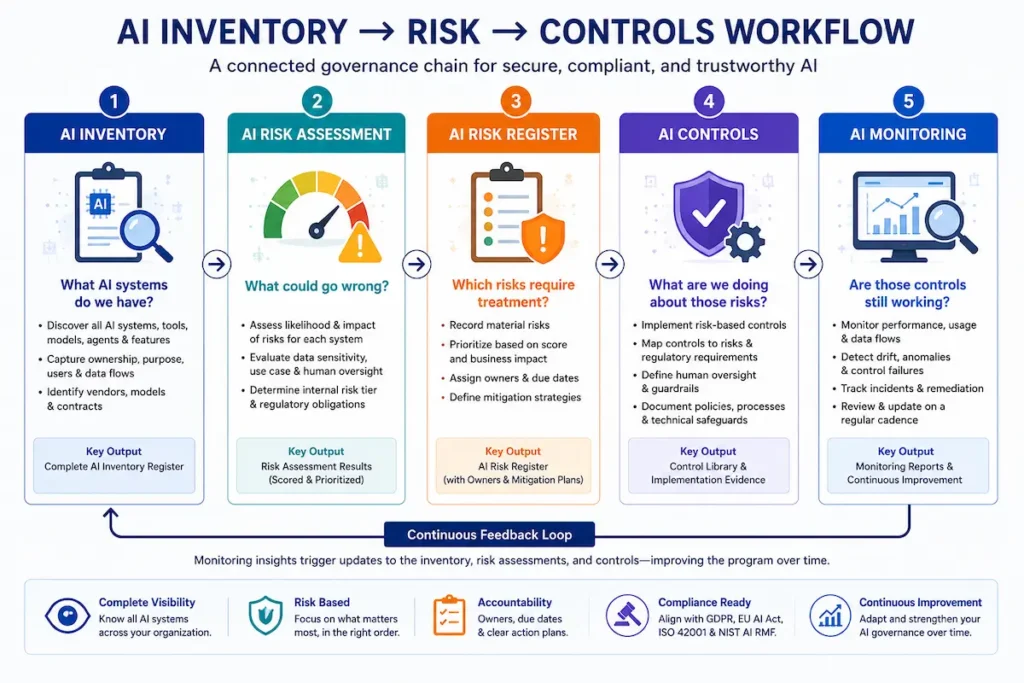
The inventory doesn’t operate in isolation — it’s the first link in a chain:
AI Inventory (what AI systems do we have?) → AI Risk Assessment (what could go wrong?) → AI Risk Register (which risks require treatment?) → AI Controls (what are we doing about those risks?) → AI Monitoring (are those controls still working?)
Each stage feeds the next. A system enters the inventory, gets risk-assessed using our AI Risk Assessment Checklist, any material findings move into a risk register with named mitigation owners, controls get implemented and mapped back to our Enterprise AI Security Checklist, and monitoring confirms those controls remain effective over time. Treating these as one connected chain — rather than five disconnected documents — is what separates a governance program from a folder of spreadsheets.
9 Ways to Discover Shadow AI
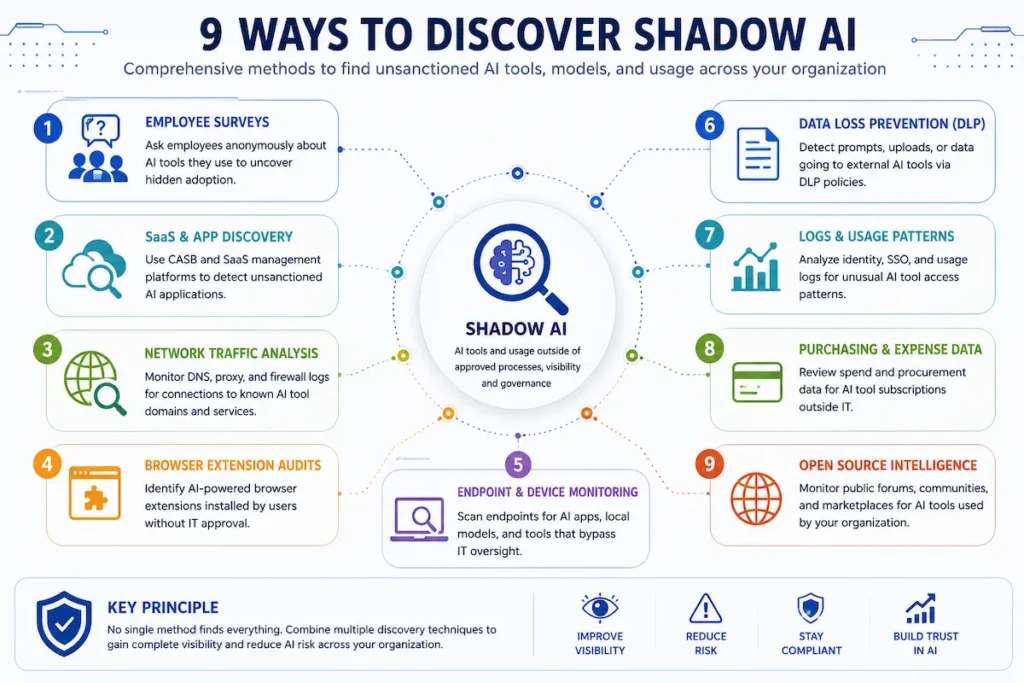
No single method surfaces everything. Run these in combination:
| Method | What It Surfaces | Effort | Blind Spot |
|---|---|---|---|
| Procurement / expense review | Directly purchased AI subscriptions | Low | Misses free tiers and embedded features |
| SSO / identity provider logs | Tools employees logged into via company SSO | Low | Misses tools accessed without SSO |
| OAuth grant review | Third-party apps connected to Workspace / Microsoft 365 | Low-Medium | Misses tools that don’t request OAuth access |
| Network / firewall log analysis | Traffic to known AI API endpoints | Medium | Requires security team; encrypted traffic limits visibility |
| Browser extension audit | AI extensions on managed devices | Medium | Misses unmanaged/personal devices |
| SaaS admin console review | AI functionality enabled by default in existing tools | Medium | Requires checking each platform’s settings individually |
| Embedded-feature / changelog review | AI features quietly added to tools you already pay for | Medium | Vendor changelogs are easy to miss |
| Contract / DPA review | AI clauses, subprocessors, model providers named in existing vendor contracts | Medium | Older contracts may predate AI-specific clauses |
| Anonymous amnesty survey | Tools employees use but haven’t disclosed | Low | Self-report bias; still won’t catch everything |
Risk Classification: Internal Tier vs. Regulatory Classification
These are two different things, and conflating them is a common — and consequential — mistake.
An internal risk tier is an organizational risk-management score you assign for prioritization. It is not the same as a system’s legal classification under the EU AI Act, and it does not by itself determine whether a GDPR Data Protection Impact Assessment is legally required.
The following is a TrusteraAI internal screening model, not a regulatory risk classification.
| Score Range | Internal Tier | Suggested Action |
|---|---|---|
| 1–5 | Low | Log and review annually |
| 6–11 | Medium | Log, assign an owner, review semi-annually |
| 12–15 | High | Full risk assessment required; review quarterly |
| 16–25 | Critical | Full risk assessment + legal review; review quarterly |
Use the internal tier — scored with the same Likelihood × Impact method as our AI Risk Assessment Checklist and AI Risk Assessment Calculator — as a screening signal, then separately and independently assess whether processing is likely to result in high risk under GDPR Article 35 and applicable supervisory authority guidance, and whether the system’s EU AI Act role and classification trigger specific legal obligations. These are related but distinct determinations.
The Two-Week Inventory Sweep Plan
Week 1 — Discover
| Day | Activity |
|---|---|
| 1 | Procurement / expense record review |
| 2 | Export SSO and OAuth logs |
| 3 | SaaS admin console + embedded-feature review across top tools by spend |
| 4 | Contract / DPA review for AI-related clauses |
| 5 | Launch the anonymous amnesty survey |
Week 2 — Validate & Govern
| Day | Activity |
|---|---|
| 6 | Consolidate findings into the template |
| 7 | Assign a named owner to each entry |
| 8 | Classify data types per entry (personal, special-category, confidential) |
| 9 | Score internal risk tier for each system |
| 10 | Assess each entry’s EU AI Act role and applicable classification |
| 11 | Flag personal-data entries for ROPA linkage; screen for DPIA review |
| 12 | Vendor / contract review for any entry lacking a DPA |
| 13 | Collect evidence documentation for each entry |
| 14 | Compliance/legal sign-off; schedule the first quarterly review |
How an AI Inventory Supports GDPR, EU AI Act, ISO 42001 & NIST AI RMF
| Framework | What the Inventory Supports |
|---|---|
| GDPR | Identifying processing activities that may need to be reflected in your Article 30 ROPA, and screening for whether an Article 35 DPIA is warranted — the inventory provides structured source information; it does not itself constitute a complete ROPA or DPIA |
| EU AI Act | Role identification (provider/deployer), applicable system classification, and lifecycle governance evidence |
| ISO/IEC 42001 | Documented information supporting the AI management system, including AI system impact assessment and governance records — see Clause 7.5 (documented information) and Clause 6.1.4/8.4 (AI system impact assessment) |
| NIST AI Risk Management Framework | Directly supports the Map function — documenting intended purpose, context, users, AI system components, third-party technologies, and impacts |
For the technical security controls that apply once a system is in the register, see our Enterprise AI Security Checklist; for the regulatory-inspection side of GDPR compliance, see our AEPD Inspection Guide.
AI Inventory Evidence: What Should You Keep?
Knowing you have a system isn’t the same as being able to prove how it’s governed. For every Medium-risk-or-above entry, the inventory should point to — not necessarily contain — the following evidence:
- Vendor contract and Data Processing Agreement (DPA)
- Vendor privacy and security documentation
- Model documentation (where available from the provider)
- Completed risk assessment
- DPIA (if triggered)
- ROPA entry (if personal data is involved)
- Approval record and date
- Security testing results
- Monitoring evidence / logs
- Incident history, if any
Structured this way, the inventory becomes an index to your evidence, not the evidence itself — exactly the structure an auditor or enterprise security questionnaire expects to see.
The TrusteraAI AI Inventory Maturity Model™
| Level | Name | Objective | Main Weakness | Next Step |
|---|---|---|---|---|
| 1 | Unknown | Discover what AI exists | No visibility at all | Run the two-week inventory sweep |
| 2 | Documented | Record known tools | Manual, inconsistently maintained | Assign named owners to every entry |
| 3 | Governed | Assign ownership and risk | Not yet connected to other registers | Link entries to ROPA and vendor review |
| 4 | Integrated | Connect to procurement and compliance | Still largely manual | Automate discovery for high-churn categories |
| 5 | Continuous | Maintain automatically | — | Sustain via quarterly audits and triggered updates |
Organizations without a dedicated AI governance function will often begin at Level 1 or 2. The two-week sweep plan above is designed to move you to a defensible Level 3 as a baseline.
Who Owns the Inventory? A RACI
| Activity | IT | Security | Legal / Privacy | Procurement | AI Governance Lead | Business Owner |
|---|---|---|---|---|---|---|
| Discovery | R | C | C | R | A | C |
| Registration | R | C | C | C | A | C |
| Risk scoring | C | R | C | — | A | C |
| DPIA / ROPA screening | — | C | R | — | C | C |
| Vendor / contract review | C | C | R | R | C | C |
| Approval | C | R | R | C | A | C |
| Ongoing monitoring | R | A | C | C | C | R |
(R = Responsible, A = Accountable, C = Consulted. Smaller teams without a dedicated AI Governance Lead can fold that column into the Business Owner role — the Business Owner then becomes Accountable in that scenario.)
Illustrative Example: Building an AI Inventory From Zero
Scenario: A 40-person SaaS company serving customers in the US, Spain, and the broader EU had never formally inventoried its AI usage. (The figures below are illustrative and not based on a specific TrusteraAI customer engagement.)
Before: 3 approved AI subscriptions on record. Everything else, unknown.
After a two-week sweep:
| Finding | Count |
|---|---|
| Total AI systems identified | 11 |
| Previously unknown (found via SSO/OAuth logs) | 2 |
| Previously unknown (employee-reported via survey) | 4 |
| Embedded AI features found in existing SaaS | 2 |
| Systems processing personal data, flagged for ROPA | 4 |
| Systems scoring High internal risk | 2 |
| Systems requiring formal vendor review | 3 |
| Systems flagged for DPIA screening | 1 |
Outcome: The completed inventory became the operational foundation for the company’s first formal AI governance policy, and gave their compliance lead a direct, evidence-backed answer for the first time when an enterprise prospect’s security questionnaire asked what AI systems process customer data.
When to Update the Inventory
Update the register immediately when:
- A new AI vendor enters procurement
- An existing SaaS vendor activates a new AI feature
- A model or model provider changes
- The training-on-input policy changes
- Data types processed by the system change
- The user population or use case changes
- Automated decision-making is introduced where it wasn’t before
- Data begins flowing to a new country
- A security incident involving the system occurs
- Vendor terms, privacy policy, or subprocessors change materially
- The system’s intended purpose or affected population changes materially
Beyond triggered updates, review Medium-risk-and-above systems quarterly and Low-risk systems annually.
Common Mistakes to Avoid
- Treating the inventory as a one-time project instead of a maintained register
- Only tracking internally built models and missing embedded AI features in existing SaaS
- Skipping the personal-data flag, disconnecting the inventory from GDPR obligations
- Treating the internal risk tier as equivalent to EU AI Act classification or a GDPR DPIA determination
- No named owner per entry, so findings sit undocumented and unactioned
Best Practices
- Start with the two-week sweep rather than waiting for a “complete” process before documenting anything
- Use at least three discovery methods in combination — no single method is sufficient
- Keep internal risk scoring and regulatory classification as clearly separate fields
- Flag personal-data entries immediately for ROPA screening, not as a later step
- Review Medium-risk-and-above systems quarterly
Key Takeaways
✅ An AI inventory is the discovery step every other AI governance control depends on.
✅ Embedded AI features in tools you already own are one of the most commonly overlooked categories — not just employee-adopted shadow AI.
✅ Internal risk tier and regulatory classification (EU AI Act, GDPR DPIA) are related but distinct — don’t conflate them.
✅ A structured inventory supports your GDPR Article 30 ROPA and Article 35 DPIA screening; it doesn’t replace either on its own.
✅ This inventory is the operational foundation for your broader AI Governance Checklist and AI Risk Assessment Checklist.
Frequently Asked Questions
What is an AI inventory template?
A structured register tracking every AI system an organization uses — tool name, owner, purpose, data handled, risk tier, and compliance status — forming the foundation for AI governance, security, and compliance.
Is an AI inventory required by law?
Not directly, in most jurisdictions — there isn’t a standalone legal mandate to maintain an “AI inventory” by that name. But it functions as the practical foundation for several requirements that often are mandatory, including GDPR’s Article 30 ROPA (where applicable) and evidence expected under frameworks like ISO/IEC 42001 or the EU AI Act’s documentation obligations for certain roles and risk categories.
Does an AI inventory satisfy GDPR Article 30 requirements?
An AI inventory that flags which systems process personal data can provide structured evidence and source information for your Article 30 Record of Processing Activities, but it does not by itself replace a complete ROPA, which requires additional information such as recipients and international transfer details.
Can an AI inventory replace a CMDB or ROPA?
No. It’s designed to complement them, not replace them. A CMDB tracks broader IT assets and a ROPA has specific GDPR-mandated fields neither the inventory nor a CMDB is built to capture — the inventory should link to both rather than duplicate or substitute for either.
What’s the difference between an AI inventory and an AI register?
The terms are often used interchangeably. Where a distinction is drawn, “AI inventory” typically refers to the discovery/cataloging process, while “AI register” refers to the maintained document itself — in practice, most organizations use one artifact for both.
How is this different from a vendor register or CMDB?
A vendor register and CMDB track broader categories — all vendors, all IT assets. An AI inventory is scoped specifically to AI systems and includes AI-specific fields like model provider and EU AI Act role that general asset registers don’t capture.
How long does it take to build a first-pass AI inventory?
A credible first-pass register can be built in two weeks by a single IT or compliance lead using the nine discovery methods above.
Does a High internal risk score automatically mean a DPIA is required?
No. The internal risk score is an organizational screening signal, not a legal determination. Whether a DPIA is legally required depends on a separate assessment against GDPR Article 35 criteria and applicable supervisory authority guidance.
Who should own the AI inventory process?
Typically the same AI governance owner responsible for the broader program, with IT and procurement providing discovery data and legal/privacy reviewing personal-data and DPIA/ROPA flags — see the RACI above for a fuller breakdown.