
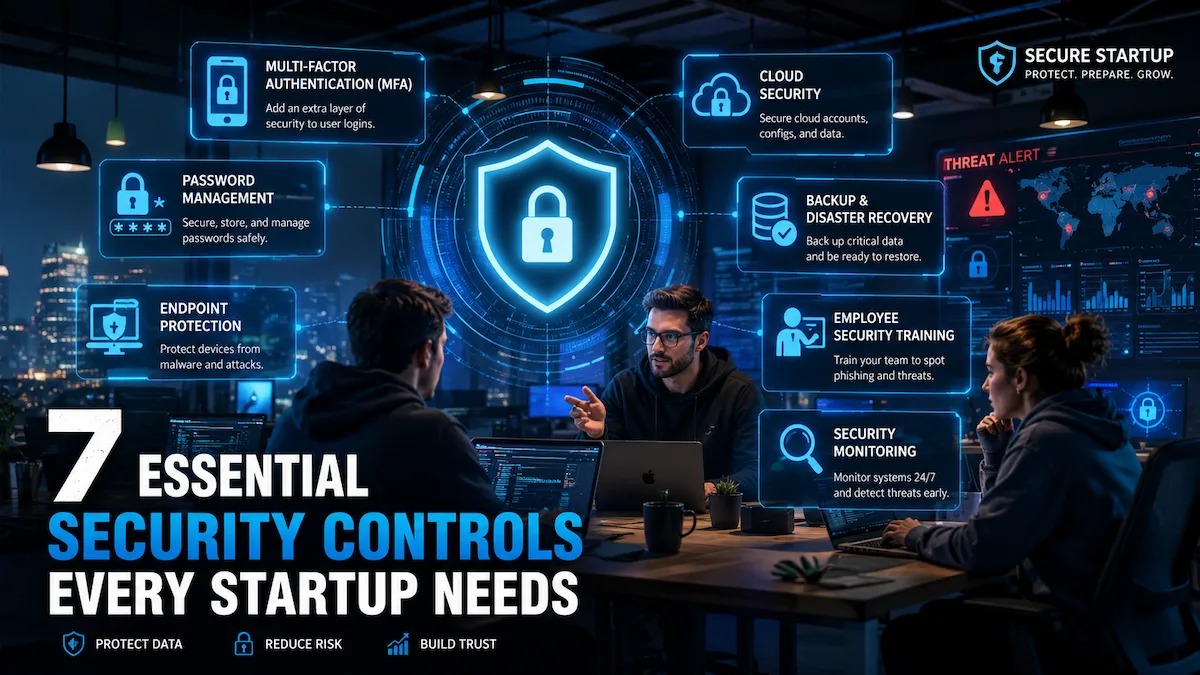
Most startups don’t think seriously about security until something goes wrong—a phishing attack drains a bank account, a misconfigured S3 bucket exposes customer data, or an enterprise prospect walks because you can’t answer their security questionnaire.
The problem isn’t that founders don’t care. It’s that security feels like an expensive, complicated problem that can wait until there’s more time, more money, and a dedicated hire. That thinking is exactly what attackers count on.
Building a lean security program for your startup isn’t about building a fortress. It’s about eliminating the obvious vulnerabilities that cause 80% of breaches without slowing your team down or burning your runway. This guide gives you a prioritized, practical framework to protect your startup — no CISO required.
In this guide: → What minimum viable security means (and why it’s founder-relevant) → The MVS Pyramid: a visual priority framework → Lean security by startup stage: Pre-Seed through Series A → 7 critical controls — with costs, tools, and implementation time → Security debt: the hidden cost of waiting → How security enables enterprise sales and closes deals faster → What you can safely delay (and what you can’t) → CIS Controls mapping for framework compliance → Full startup security checklist + tool comparison table → 10-question FAQ covering investor, compliance, and breach scenarios
What Is Minimum Viable Security for a Startup?
Minimum Viable Security for a Startup helps founders reduce risk with practical security controls instead of enterprise complexity.
Minimum viable security (MVS) is the smallest set of security controls that meaningfully reduces your startup’s risk exposure while remaining realistic for a small, resource-constrained team to implement and maintain.
Think of it like your MVP product strategy applied to security: identify the highest-impact risks, address them first, and build from there. You don’t need to be unhackable. You need to be meaningfully harder to breach than the average target.
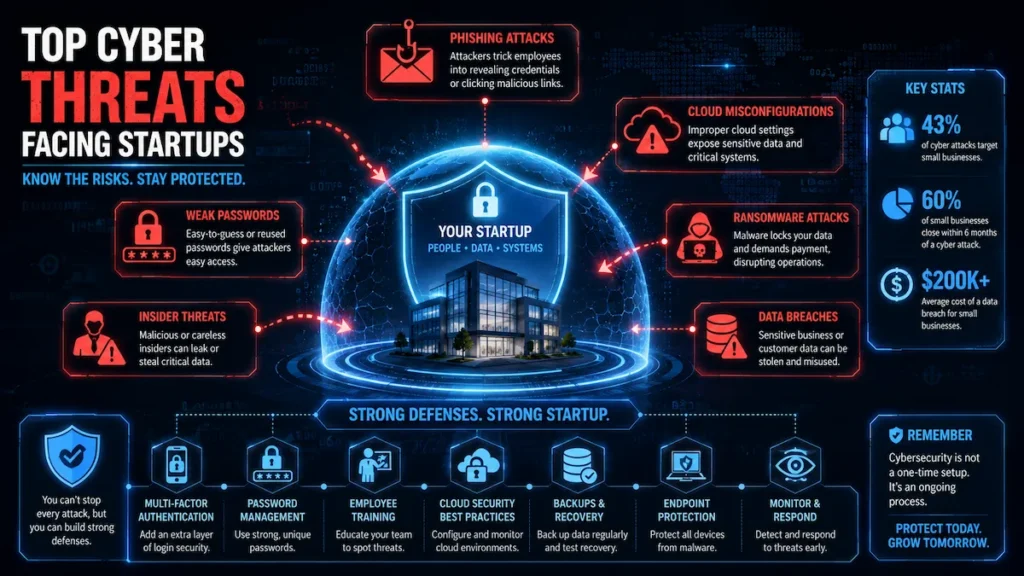
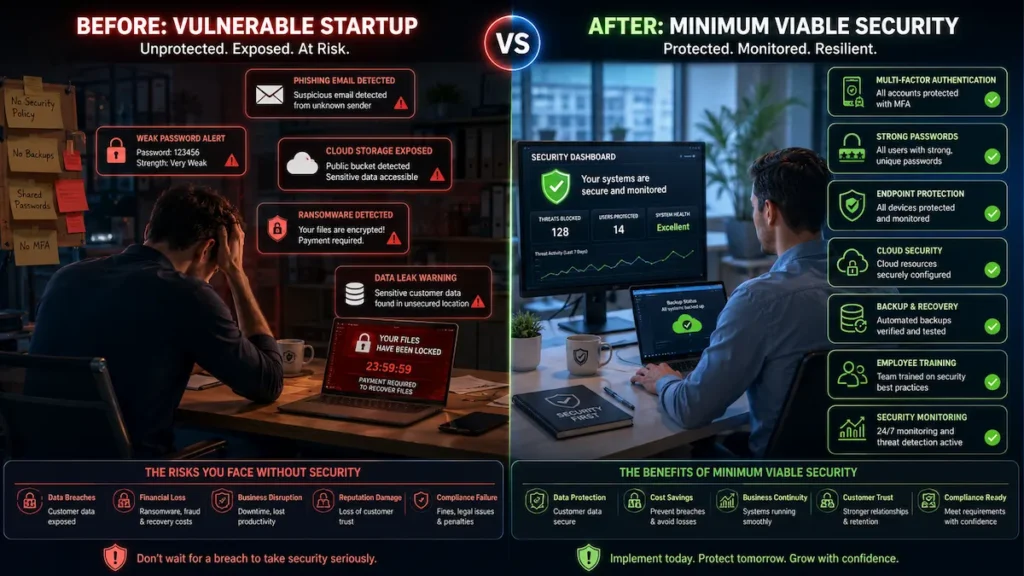
For most early-stage startups, that means protecting seven domains: identity and access, cloud infrastructure, endpoints, customer data, incident readiness, employee awareness, and third-party risk. These form the foundation of a lean security program at any funding stage.
“Early security investments rarely feel urgent — until they become urgent. A startup security baseline exists to make sure growth doesn’t become fragile. The founders who regret it are always the ones who waited.” — Common wisdom among fractional CISOs who work with early-stage companies
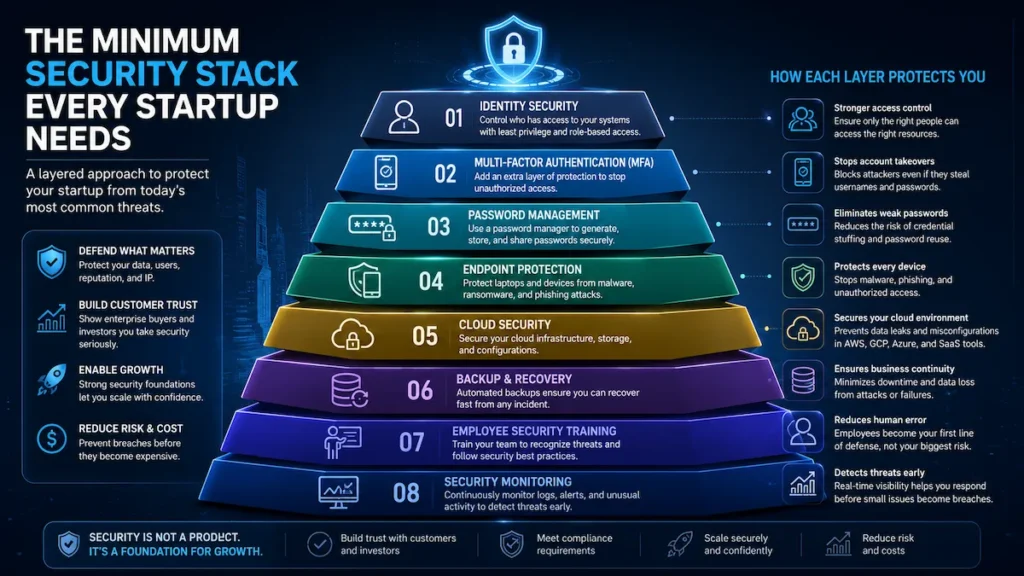
The MVS Pyramid: A Visual Framework
Before diving into controls, here’s how they stack by priority:
         ▲
        /  \
       / L3  \        Monitoring & Incident Response
      /--------\
     /    L2    \     Cloud Security + Endpoint Protection
    /-------------\
   /      L1       \  MFA + Password Management + Access Control
  /_________________\
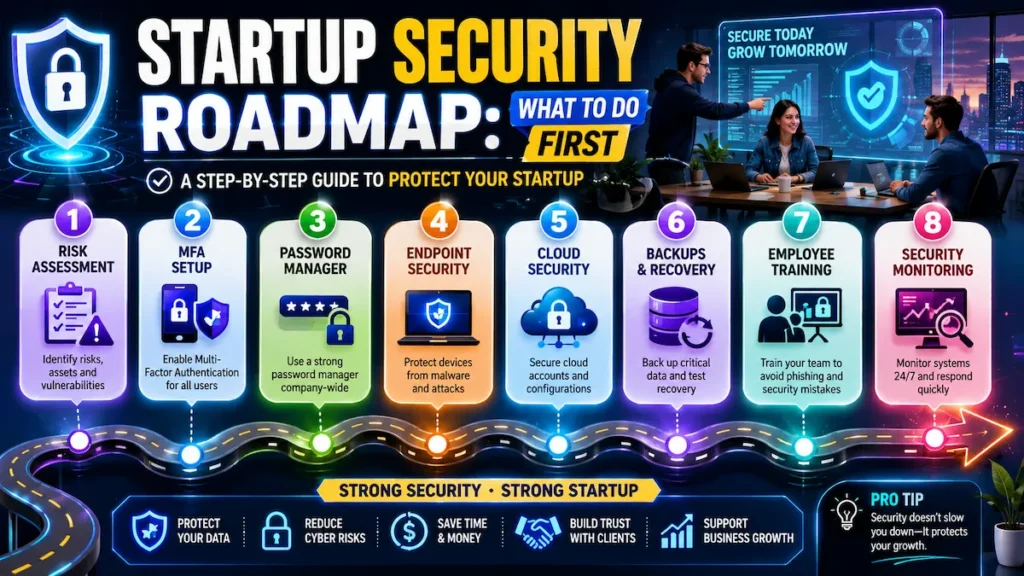
Level 1 (Do This Week): MFA, password manager, least-privilege access. Level 2 (Do This Month): Cloud hardening, endpoint security, logging. Level 3 (Do This Quarter): Incident response plan, monitoring, security awareness training
Your 30-Day Implementation Timeline
This roadmap converts Minimum Viable Security for a Startup into an achievable implementation plan.
Use this roadmap to go from zero to foundational startup cyber resilience in one month:
| Week | Focus | Key Actions |
|---|---|---|
| Week 1 | Identity & Passwords | Enable MFA on all accounts; deploy password manager team-wide; create admin vs. standard user roles |
| Week 2 | Access Control & Cloud | Set up SSO; restrict public cloud storage; enable cloud logging; remove stale account access |
| Week 3 | Endpoints & Data | Enable full-disk encryption; enforce auto-updates; activate EDR; verify backups are running and tested |
| Week 4 | Response & Awareness | Write a one-page IR plan, run security onboarding for the team, and document offboarding process |
Total estimated cost at pre-seed: $0–$150/month. Time investment: 10–15 hours across four weeks, primarily from a technical co-founder or senior developer.
Why Startups Are Prime Targets — And What’s Actually at Stake
Implementing Minimum Viable Security for a Startup early prevents security debt and supports sustainable growth.
Startups are attractive targets precisely because they move fast, hold valuable data, and often have almost no security controls in place.
A single breach can kill an early-stage company faster than a failed product launch:
- Customer data exposure — regulatory fines, lawsuits, mandatory notification
- Intellectual property theft — losing your competitive advantage
- Business email compromise — redirected wire transfers, hijacked vendor relationships
- Enterprise sales collapse — one failed security questionnaire kills a six-figure deal
- Investor confidence erosion—VCs conduct security due diligence, especially at Series A
According to IBM’s Cost of a Data Breach Report, the average breach cost for small businesses now exceeds $3.3 million. For most startups, that’s not recoverable.
Minimum Viable Security by Startup Stage
This Minimum Viable Security for a Startup framework prioritizes the controls that deliver the highest security impact first.
This is the section most competitor articles skip. Security needs vary significantly by team size and funding stage. Here’s a realistic, stage-appropriate roadmap for building startup cyber resilience from the ground up:
Pre-Seed (1–10 Employees)
- MFA on all accounts (non-negotiable, free)
- Password manager deployed team-wide
- Full-disk encryption on all laptops
- Automated, encrypted backups
- Basic cloud security settings reviewed
Estimated monthly cost: $0–$100
Seed Stage (10–25 Employees)
Everything above, plus:
- Single Sign-On (SSO) for centralized access management
- Endpoint detection and response (EDR) tool deployed
- Cloud logging and monitoring enabled
- Employee security onboarding added to HR process
- Incident response plan documented (even one page)
Estimated monthly cost: $200–$600
Series A and Beyond (25+ Employees)
Everything above, plus:
- SOC 2 Type II preparation begins
- Vendor security risk assessments implemented
- Security awareness training platform deployed
- Penetration test scheduled annually
- Enterprise security questionnaire process documented
Estimated monthly cost: $1,000–$5,000+
If you’re navigating security on a tight budget, see our guide to AI security tools on a startup budget for cost-effective options at every stage.
Control 1: Enforce Multi-Factor Authentication Everywhere
Multi-factor authentication strengthens minimum viable security for a startup by reducing account takeover risk.
If you implement nothing else from this guide, implement MFA. It’s the single highest-impact security control available to a startup, and it’s almost free.
Credential theft drives the majority of breaches. Weak or reused passwords — even complex ones — can be purchased on the dark web for dollars. MFA eliminates most of that risk.
Where to enforce MFA immediately:
- Email (Google Workspace, Microsoft 365)
- Code repositories (GitHub, GitLab, Bitbucket)
- Cloud platforms (AWS, GCP, Azure)
- Business banking and financial accounts
- Any admin panel containing customer data
Implementation note: Use an authenticator app (Google Authenticator, Authy, or Microsoft Authenticator) rather than SMS-based MFA. SMS codes are vulnerable to SIM-swapping. For high-privilege accounts, consider hardware security keys (YubiKey, ~$25–$50 each).
Implementation time: 1–2 hours across a 10-person team. Cost: Free on most platforms.
Control 2: Implement Identity and Access Management (IAM) With Least Privilege
Identity protection is one of the highest-return investments within minimum viable security for a startup.
The principle of least privilege means every team member, contractor, and third-party integration gets access only to what they actually need — no more. This limits the blast radius when credentials are compromised.
Core IAM practices for early-stage startups:
- Deploy SSO: Platforms like Okta, Google Workspace, or JumpCloud let you manage access centrally. When an employee leaves, you deactivate one account instead of hunting through 30 SaaS tools.
- Create role-based access controls (RBAC): Define access tiers — admin, developer, read-only — and assign based on role, not convenience.
- Audit access quarterly: People accumulate permissions over time. Schedule a review to remove stale access.
- Offboarding checklist: Revoke access within 24 hours of departure. This should be documented and auditable.
Common founder mistake: Giving everyone admin access to everything “to move fast.” When one person’s credentials are phished, your entire infrastructure is exposed.
For teams without an IT department, our guide on cybersecurity for startups with no IT team covers how to manage IAM without dedicated staff.
Control 3: Secure Your Cloud Infrastructure
Cloud controls ensure minimum viable security for a startup extends beyond endpoint protection.
Most startups live in the cloud. But cloud security is a shared responsibility model—the provider secures the underlying infrastructure; you’re responsible for everything you build on top of it.
The most common cloud security failures at startups:
- Publicly exposed S3 buckets or storage containers containing customer data
- Overly permissive IAM roles granting excessive access
- Default security configurations left unchanged (open ports, public-facing databases)
- No logging enabled — leaving you blind during an incident
Minimum viable cloud security actions:
- Enable cloud-native security tools: AWS Security Hub, Google Security Command Center, or Azure Security Center. These tools cost little and identify misconfigurations automatically.
- Never store credentials in code. Use secret managers—AWS Secrets Manager, HashiCorp Vault, or environment variables with proper access controls.
- Enable logging: AWS CloudTrail, GCP Audit Logs, or Azure Monitor. You need an audit trail.
- Restrict public access to storage by default.
- Use infrastructure-as-code (IaC) scanning tools like Checkov or tfsec to catch misconfigurations before they hit production.
AI-powered monitoring tools can also detect anomalies in your cloud environment in real time. See our breakdown of AI network security monitoring for small teams to understand your options.
Control 4: Protect Endpoints — Every Laptop Is a Risk
Your endpoints—laptops, phones, and tablets—are where most attacks begin. A phishing email, a drive-by malware download, or an unpatched operating system can give an attacker a foothold into your entire environment.
Minimum viable endpoint security:
- Password manager: 1Password, Bitwarden, or Dashlane. Team plans start at a few dollars per user per month. This eliminates reused passwords across your organization.
- Full-disk encryption: FileVault (macOS) or BitLocker (Windows). Built-in and free.
- Automatic OS and software updates: Enforce these. Unpatched systems are the most exploited attack vector after phishing.
- EDR tool: SentinelOne, CrowdStrike Falcon Go, or Microsoft Defender for Business provides meaningful protection without enterprise overhead.
- MDM for device management: Tools like Jamf (Mac) or Microsoft Intune let you enforce policies and remotely wipe devices.
For teams evaluating no-cost options, our roundup of free AI cybersecurity tools for startups includes several endpoint tools worth considering.
Control 5: Protect Customer Data — Encryption, Backups, and Retention
Backup readiness strengthens minimum viable security for a startup during operational disruptions.
If you handle customer data — and almost every startup does — protecting it is both a legal and ethical obligation.
Core data protection practices:
- Encrypt data at rest and in transit. Use TLS 1.2 or higher for all web traffic. Enable encryption at rest on databases and storage. Most cloud platforms do this by default if configured correctly.
- Define a data retention policy. Don’t keep data longer than necessary. Less data held means smaller breach exposure.
- Run automated, encrypted backups. Test your restoration process regularly. Ransomware is catastrophic if you have no usable backup.
- Classify your data. Know the difference between public information, internal-only data, and sensitive customer or financial data.
Regarding compliance: if you have customers in the EU or California, GDPR and CCPA create legal obligations around data access requests, deletion, and breach notification timelines. Consulting a privacy lawyer early is cheaper than a regulatory fine later.
Control 6: Create a Basic Incident Response Plan
Incident preparation makes minimum viable security for a startup operational instead of theoretical.
Most startups have no documented incident response plan. When a breach happens — and statistically, it will — the first 24 hours are the most critical. Decisions made in panic, without a plan, dramatically worsen outcomes.
Your minimum viable IR plan needs to answer six questions:
- How do we detect a security incident?
- Who leads the response?
- Who is notified internally? (CEO, investors, board)
- Who are our external contacts? (Legal counsel, PR, incident response firm)
- What are our regulatory notification obligations? (GDPR: 72 hours; US state laws vary)
- How do we contain and recover?
Document this. Store it somewhere accessible offline. Review it annually.
For a step-by-step template, see our complete guide to building a startup cybersecurity checklist for 2026.
Control 7: Train Your Team on Security Awareness
Employee education reinforces minimum viable security for a startup across everyday activities.
Technical controls stop technical attacks. Social engineering—phishing emails, vishing calls, fake invoices—targets people. Your team is your strongest first line of defense or your biggest vulnerability.
Minimum viable security awareness:
- Run a security onboarding session for every new hire: phishing identification, password hygiene, and incident reporting.
- Conduct at least one phishing simulation per year. Tools like KnowBe4, Proofpoint, or the open-source GoPhish let you test your team without being punitive.
- Create a low-friction way to report suspicious emails.
- Brief the team when major threats emerge relevant to your industry.
Security awareness doesn’t need to be expensive. The goal is a team that pauses before clicking.
Security Debt: The Startup Mistake That Becomes Expensive Later
Reducing security debt is one of the long-term benefits of minimum viable security for a startup.
Security debt works exactly like technical debt — deferred fixes that compound into larger, more expensive problems.
When a startup delays implementing MFA, proper IAM, logging, or a basic IR plan, it doesn’t eliminate those costs. It defers and multiplies them:
- Delayed MFA → one phishing attack compromises your entire Google Workspace
- No IAM documentation → SOC 2 audit takes 3x longer because you’re reconstructing history
- No logging → breach investigation becomes impossible; you can’t prove what was accessed
- No offboarding process → former employees retain access to production systems for months
The cost of retrofitting a foundational security baseline at Series A — when investors are watching, enterprise customers are demanding SOC 2, and your engineering team is stretched — is dramatically higher than building these habits at pre-seed.
Build the right habits now. The tools are cheap. The discipline is free.
How Minimum Viable Security Helps Close Enterprise Deals
Enterprise buyers increasingly evaluate minimum viable security for a startup during procurement.
A strong startup security posture is no longer just a cost center — it’s a revenue enabler. Enterprise buyers now treat security as a procurement requirement, not a nice-to-have.
Here’s what happens in a typical enterprise sales cycle when a startup has MVS in place:
- Vendor security questionnaires (VSQs) ask about MFA, encryption, access controls, incident response, and backup procedures. A startup with MVS implemented can answer these in hours, not weeks.
- Procurement reviews often include a security addendum to the contract. Documented controls mean faster legal review.
- Customer trust conversations shift from “Do you take security seriously?” to “Tell us about your roadmap to SOC 2.” That’s a much better conversation.
- Sales cycle acceleration: Enterprise deals that typically stall for 30–60 days on security review can close faster when your security posture is already documented.
Founders who invest in foundational startup security early often find it pays back in shortened sales cycles before it ever prevents a breach.
For startups approaching SOC 2, our guide to the best SOC 2 compliance tools for AI startups covers platforms that can accelerate your audit readiness.
Mapping Minimum Viable Security to CIS Controls
This roadmap converts Minimum Viable Security for a Startup into an achievable implementation plan.
The CIS Critical Security Controls (published by the Center for Internet Security) are the most widely recognized prioritized security framework for organizations of all sizes. Mapping your startup security controls to CIS adds credibility, simplifies future audits, and helps you answer “What framework do you follow?” in enterprise sales conversations.
| MVS Control | CIS Control | CIS Priority |
|---|---|---|
| Asset inventory / device management | CIS Control 1: Inventory of Enterprise Assets | IG1 |
| IAM + least privilege | CIS Control 5: Account Management | IG1 |
| MFA enforcement | CIS Control 6: Access Control Management | IG1 |
| Vulnerability / patch management | CIS Control 7: Continuous Vulnerability Management | IG1 |
| Data protection + encryption | CIS Control 3: Data Protection | IG1 |
| Cloud security hardening | CIS Control 4: Secure Configuration | IG1 |
| Security awareness training | CIS Control 14: Security Awareness | IG1 |
| Incident response plan | CIS Control 17: Incident Response Management | IG2 |
| Logging and monitoring | CIS Control 8: Audit Log Management | IG2 |
IG1 (Implementation Group 1) is explicitly designed for small organizations with limited security resources — exactly where most startups sit. Every control in your foundational security program maps to CIS IG1 or IG2, making this framework the natural complement to your startup risk management approach.
Common Startup Breach Scenarios (And How MVS Prevents Them)
A prioritization model ensures minimum viable security for a startup stays aligned with business goals.
Understanding real attack patterns makes the controls above more concrete:
Scenario 1: The Phishing Attack That Wiped a Bank Account A finance team member received a convincing email appearing to be from the CEO requesting a wire transfer. No MFA on email. No security training. $180,000 gone. MVS Prevention: MFA on email + basic security awareness training stops this cold.
Scenario 2: The Exposed Database An engineer misconfigured an AWS RDS instance during a late-night deploy. Customer PII was publicly accessible for 11 days before a security researcher reported it. MVS Prevention: Cloud security posture management tool flags the misconfiguration within minutes. Logging captures who made the change and when.
Scenario 3: The Disgruntled Former Employee A developer who resigned retained admin access to GitHub and production AWS for 60 days after departure—no offboarding checklist existed. MVS Prevention: IAM with a documented offboarding checklist and SSO centralization eliminates this risk.
Scenario 4: The Ransomware Attack An unpatched Windows laptop running outdated software was infected via a malicious email attachment. Ransomware encrypted the startup’s file server. No backups. MVS Prevention: Endpoint security + automatic updates + encrypted backups mean this attack fails to cause meaningful damage.
What Can Wait? Security Controls Early Startups Can Deprioritize
Most startup security guides tell you what to do. Few tell you what you don’t need yet. That prioritization is just as valuable — it keeps lean teams from burning time on enterprise-grade controls before they’re necessary.
You can safely delay these until Series A or significant customer scale:
| Control | Why It Can Wait | When to Add It |
|---|---|---|
| SIEM (Security Information & Event Management) | Complex, expensive, requires dedicated analysis | 50+ employees or post-SOC 2 |
| Dedicated Security Operations Center (SOC) | Overkill for teams under 50; MSSP can bridge | Series B+ or regulated industry |
| Continuous penetration testing | An annual pen test sufficient at early stage | After SOC 2 Type II |
| Bug bounty program | Requires mature vulnerability management first | After internal security process is stable |
| Advanced red team exercises | No value without foundational controls in place | Series B+ with dedicated security staff |
| Data Loss Prevention (DLP) | High false-positive rate on small teams; disruptive | When handling regulated data at scale |
| Zero Trust network architecture | High implementation complexity; designed for enterprise | Series A+ with dedicated engineering |
The priority filter: If a control doesn’t prevent a realistic attack on your current infrastructure or doesn’t satisfy an enterprise questionnaire you’re actively facing, it can wait. Startup attack surface reduction starts with the basics—not the advanced.
For AI-powered detection that scales with small teams, our guide to machine learning intrusion detection for startups covers when and how to layer in smarter monitoring without enterprise overhead.
Minimum Viable Security Checklist
Identity & Access
- MFA enabled on all accounts (email, cloud, code, finance)
- SSO deployed for SaaS tool management
- Least privilege access enforced across roles
- Offboarding checklist documented and tested
- Access reviewed and pruned quarterly
Cloud Security
- Cloud-native security tool enabled (AWS Security Hub / GCP SCC / Azure SC)
- No credentials stored in code or repositories
- Logging and monitoring enabled
- Public storage access restricted by default
- IaC scanning in CI/CD pipeline
Endpoint Security
- Password manager deployed team-wide
- Full-disk encryption enabled on all devices
- Automatic OS and software updates enforced
- EDR tool deployed
Data Protection
- TLS 1.2+ on all web traffic
- Encryption at rest on databases and storage
- Data retention policy documented
- Automated, tested backups running
- Basic data classification defined
Incident Response
- IR plan documented (who, what, when, who to call)
- Regulatory notification obligations identified
- IR plan stored offline
- Plan reviewed annually
Security Awareness
- Security onboarding for all new hires
- Annual phishing simulation conducted
- Suspicious activity reporting process defined
Security Tools Comparison: Startup-Friendly Options
| Category | Budget Option | Mid-Range Option | Notes |
|---|---|---|---|
| Password Manager | Bitwarden Teams ($3/user/mo) | 1Password Teams ($8/user/mo) | Both excellent; 1Password has better UX |
| MFA | Google Authenticator (free) | Duo Security (~$3/user/mo) | Duo adds centralized management |
| SSO / IAM | Google Workspace (SSO included) | Okta (~$2/user/mo) | Google fine pre-Series A; Okta for scale |
| Endpoint Security | Windows Defender / XProtect (free) | SentinelOne / CrowdStrike Falcon Go | Native tools adequate at early stage |
| Cloud Security | Native tools (free tier) | Wiz / Orca Security | Start native and expand at Series A |
| Security Awareness | GoPhish (free, self-hosted) | KnowBe4 / Proofpoint | GoPhish sufficient for small teams |
| MDM | Basic MDM in Google Workspace | Jamf (Mac) / Intune (Win) | MDM becomes critical at 15+ devices |
To explore AI-powered options across these categories, our guide on how to secure a startup with AI tools covers where AI adds the most value for lean security teams.
Pros, Cons, and Trade-offs of Common Startup Security Approaches
| Approach | Pros | Cons |
|---|---|---|
| Do nothing | No upfront cost or time | Catastrophic breach risk; kills enterprise deals; violates regulations |
| DIY minimum viable security | Low cost; fast; builds founder knowledge | Requires focused time; easy to misconfigure |
| Fractional CISO | Expert guidance; scalable | $5K–$15K/month; requires vendor evaluation |
| Early SOC 2 | Unlocks enterprise sales; signals maturity | 3–12 months; $30K–$100K+ year one |
| Cyber insurance only | Covers financial losses post-breach | Doesn’t prevent breaches; doesn’t satisfy VSQs; requires minimum controls |
Featured Snippet: Quick Definition
What is minimum viable security for a startup? Minimum viable security (MVS) for a startup is the essential set of cybersecurity controls — including MFA, IAM, cloud security hardening, endpoint protection, data encryption, incident response planning, and security awareness training — that meaningfully reduces breach risk without requiring a dedicated security team or significant budget. It prioritizes highest-impact controls first and builds a foundation for future compliance and security maturity.
FAQ
Q: What’s the single most important security control for a startup?
Multi-factor authentication. No other control eliminates as much risk per dollar spent. Enforce MFA across email, cloud infrastructure, and code repositories before doing anything else.
Q: How much should a startup spend on cybersecurity?
At pre-seed, most MVS controls cost $0–$500/month for a 10–15-person team. A reasonable benchmark for Series A and beyond is 5–8% of your IT budget allocated to security.
Q: Can a startup pass a security review without SOC 2?
Yes. Most enterprise procurement teams accept a completed VSQ (vendor security questionnaire), evidence of MFA and encryption, and a documented incident response plan. SOC 2 becomes necessary when enterprise deals stall specifically because of its absence—usually at 25+ employees or $1M+ ACV deals.
Q: What security controls do VCs expect?
At seed, most VCs don’t conduct deep security due diligence. At Series A and beyond, expect questions about MFA, data encryption, employee security training, and whether a SOC 2 audit is planned. A documented security program signals operational maturity.
Q: How long does it take to implement minimum viable security?
Level 1 controls (MFA, password manager, basic access controls) can be implemented in a single day. Full MVS across all seven domains — including incident response documentation and cloud hardening — typically takes 2–4 weeks for a small team working part-time on it.
Q: What are the most common startup security mistakes?
In order of frequency: no MFA, admin access given to everyone, no offboarding process, secrets stored in code, no logging enabled, and no incident response plan. All of these are cheap and fast to fix.
Q: Do we need SOC 2 as an early-stage startup?
Not immediately. Begin SOC 2 preparation when you’re actively losing enterprise deals because of its absence or when your team reaches 25+ employees. The process takes 6–12 months and costs $30K–$100K+ in year one. Our guide to SOC 2 compliance tools for AI startups can help when you’re ready.
Q: What should we do in the first 24 hours after a breach?
Contain first: revoke compromised credentials and isolate affected systems. Notify legal counsel immediately to understand notification obligations. Document everything in real time. Don’t disclose publicly until you understand the scope. This process should be pre-written in your IR plan — not improvised during a crisis.
Q: Is cyber insurance a substitute for security controls?
No. Cyber insurance covers financial losses after a breach; it doesn’t prevent breaches or satisfy enterprise security questionnaires. Most insurers also require minimum controls (MFA at minimum) to issue a policy. Insurance is a backstop, not a strategy.
Q: How does security help close enterprise deals faster?
Enterprise buyers run vendor security questionnaires as a standard procurement step. A startup with documented MVS controls can complete these in hours rather than weeks, reducing deal friction significantly. Founders who treat security as a sales asset — not just a risk management tool — consistently report shorter enterprise sales cycles.
Conclusion
Minimum Viable Security for a Startup is not about perfection—it is about protecting growth with the right controls first.
A solid startup security baseline isn’t about perfection. It’s about making your company meaningfully harder to breach than the next one—and making sure security debt doesn’t become a crisis when you’re trying to close your Series A or your first enterprise customer.
The seven controls in this guide address the vast majority of real-world threats facing early-stage companies. Most cost almost nothing to implement. The biggest investment is time and operational discipline.
The MVS Pyramid gives you a clear starting point: deploy MFA and a password manager this week. Harden your cloud environment and endpoints this month. Document your incident response plan this quarter. Build security awareness into your hiring and onboarding process from day one.
That documentation pays dividends the first time an enterprise prospect sends you a security questionnaire. That discipline prevents the breach that might otherwise kill the company.
Security done right isn’t a tax on building. It’s a competitive advantage.