
Most startup founders think they’re too small to be hacked.
That belief is exactly why attackers target them.
You don’t need to be Amazon to have data worth stealing. Customer emails, payment records, proprietary code—any of it qualifies. Attackers know startups move fast and secure slowly. That gap is their business model.
Startup cybersecurity is not optional—it’s survival infrastructure.
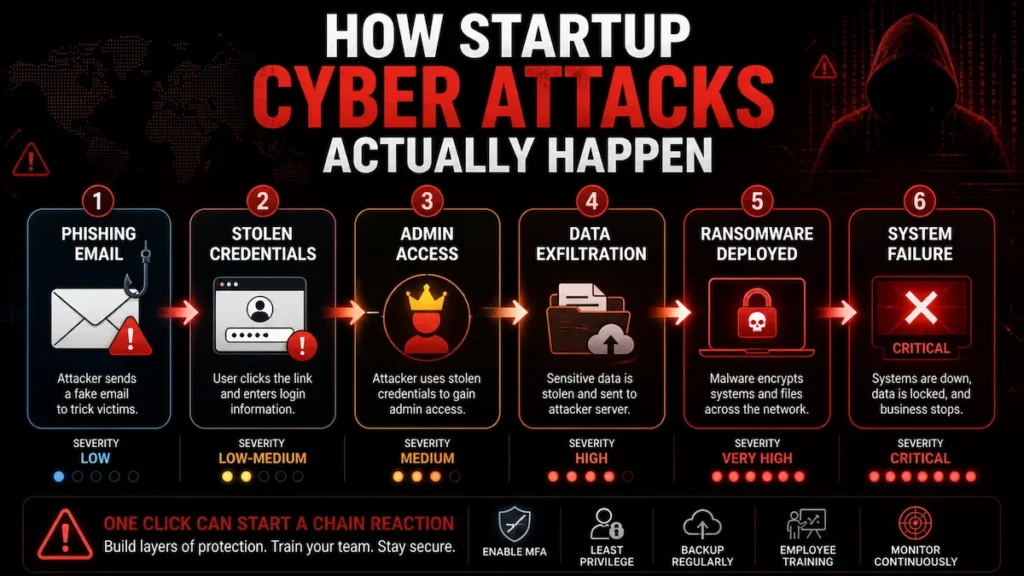
This guide gives you the Founder Security Operating System (FSOS): a seven-layer, decision-first framework built for founders operating under real constraints—limited budget, no dedicated security team, and a product that cannot stop to breathe.
This framework is based on common breach patterns observed across early-stage SaaS and fintech startups—the vulnerabilities that actually get exploited, in the order they actually get exploited.
What Cybersecurity Does a Startup Need to Stay Secure?
This section explains what cybersecurity does a startup need to stay secure, scale safely, and avoid the most common early-stage attacks.
Direct answer: A startup needs cybersecurity across seven core areas: identity and access management (MFA), endpoint protection, network security, data encryption, backup and disaster recovery, employee training, and continuous monitoring. At minimum, founders should enforce MFA on all accounts, restrict access using least-privilege principles, and maintain tested backups to prevent the most common and most damaging attacks.
The sections below give you the complete framework—tools, costs, checklist, and stage-by-stage decision guide—so you can build the right stack for where your startup is right now.
If you do nothing else after reading this, do these three things first:
- Enable MFA on every account your company uses—today, not next sprint
- Audit admin access and revoke everything that isn’t role-necessary
- Set up automated off-site backups and run a restoration test this week
Everything else builds on those three. If they’re not in place, a $3,000/month security stack is theater.
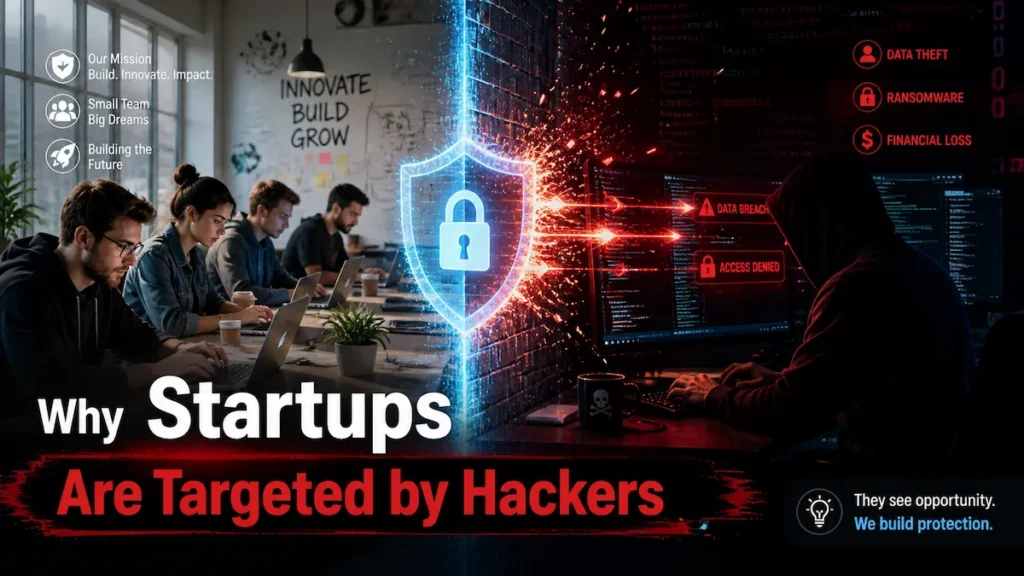
Why Startups Are Prime Targets for Cyber Attacks
Understanding what cybersecurity does a startup need becomes critical here because attackers specifically target startups with weak and incomplete defenses.
Cybercriminals don’t just target enterprises. They actively hunt startups—because most have valuable data and minimal defenses.
According to IBM’s Cost of a Data Breach Report:
- 43% of cyberattacks target small businesses
- The average breach costs a small company over $200,000
- 60% of small businesses close within 6 months of a major incident
Startups in SaaS, fintech, healthcare, and e-commerce are especially exposed. Fast growth means your security posture is routinely 6–18 months behind your infrastructure curve. That lag is exactly what attackers map and exploit.
One breach can destroy customer trust, trigger regulatory fines (GDPR, CCPA, HIPAA), damage investor confidence, and expose founders to personal liability.
Understanding what cybersecurity does a startup need isn’t a peripheral question—for most startups, it’s an existential one.
In practice, most startups implement only 2–3 of the critical security layers correctly in their first year. The goal of this guide is to change that—with a prioritized system, not an overwhelming checklist.
Your Startup Cybersecurity Risk Score (SCRS)
Before deciding what cybersecurity does a startup need, founders should first evaluate their current exposure using a structured risk scoring system like SCRS.
Before building anything, know where you stand. Score yourself honestly—add points for each gap.
Control Area—Fully Implemented / Partial / Not in Place:
- MFA on all accounts—0 / +10 / +20
- Least-privilege access enforced—0 / +10 / +20
- Endpoint protection on all devices—0 / +8 / +15
- Tested backups with off-site storage—0 / +10 / +20
- VPN for all remote access—0 / +5 / +10
- Employee phishing training (last 90 days)—0 / +5 / +10
- Vulnerability scanning running—0 / +5 / +10
- Incident response plan documented—0 / +5 / +10
What your score means:
- 0–15: Strong foundation. Focus on operationalizing and expanding monitoring.
- 16–40: Moderate exposure. Prioritize MFA, access controls, and backups immediately.
- 41–70: High risk. You have exploitable gaps across multiple critical layers.
- 71–115: Critical. One targeted attack could be company-ending. Address this week.
Run this diagnostic quarterly. If your score rises between reviews, something broke—find it before an attacker does.
The 7-Layer Founder Security Operating System (FSOS)
The FSOS framework breaks down what cybersecurity does a startup need into seven practical layers designed specifically for early-stage companies.
Startup cybersecurity fails not because founders are careless—it fails because defenses are built randomly, not systematically. A great firewall with no access controls. Endpoint protection with no backups. Tools without policies.
The Founder Security Operating System (FSOS) fixes that.
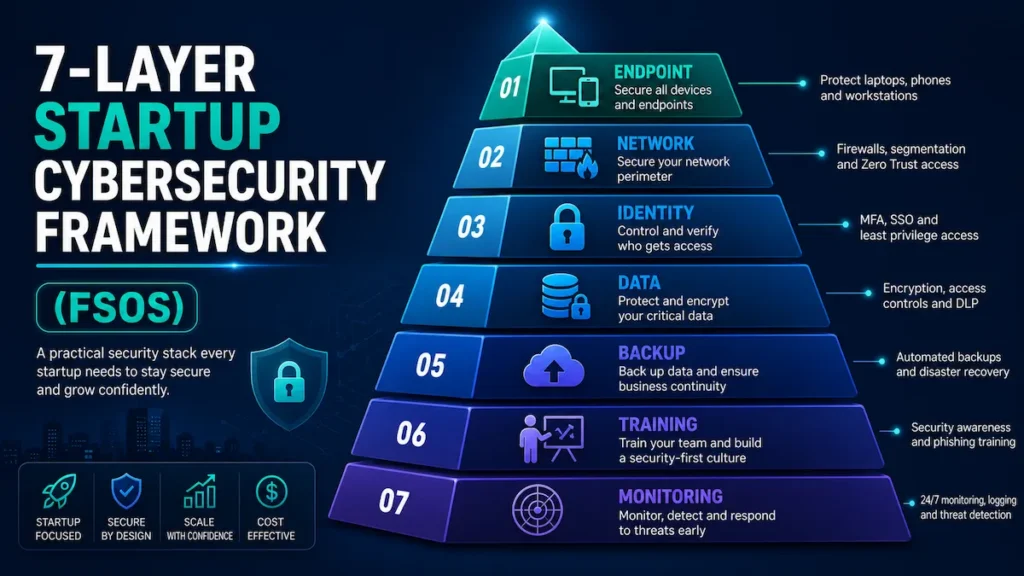
Seven layers, ordered by the actual sequence in which startup defenses fail in the real world. Each layer is designed to catch what the one above it missed. Skip a layer and you create a gap attackers move through without friction.
The Startup Security Failure Cascade—how breaches actually spread:
Phishing email lands → credentials stolen (no MFA) → admin access gained (no least privilege) → data exfiltrated (no monitoring) → ransomware deployed (no tested backup) → company cannot recover.
The FSOS breaks this chain at every single link.
Layer 1: Endpoint Security—Where Most Startup Breaches Begin
When analyzing what cybersecurity does a startup need, endpoint security is usually the first and most critical layer because most breaches begin at the device level.
What it covers: Endpoint detection and response (EDR), device encryption, remote wipe capability, and mobile device management (MDM).
The hard rule: If a device isn’t enrolled in MDM, it doesn’t access production systems. Not for contractors. Not temporarily. That’s the policy—and it’s non-negotiable.
Common scenario: A developer’s personal laptop—used daily to SSH into production—is compromised through a malicious browser extension. No MDM means no remote wipe. No EDR means no detection. The attacker has undetected access for nearly two weeks before a client notices suspicious activity in their account.
What NOT to do: Don’t allow personal devices to access production systems without MDM enrollment, full-disk encryption, and remote wipe enabled. “Trust the employee” is not a security policy—it’s an unquantified liability.
→ Learn how AI endpoint security for startups can protect developer devices without slowing your team down—including MDM configuration, EDR selection, and remote wipe setup for lean teams.
Action: Deploy EDR on every device with production access. Enforce full-disk encryption. Make MDM enrollment a condition of access—not a request.
Layer 2: Network Security—Your Firewall Isn’t Your Problem
A key part of what cybersecurity does a startup need is network security, which prevents attackers from moving freely once they gain initial access.
A well-configured firewall protecting a flat, unsegmented network is a front door with a good lock and no interior walls. An attacker who gets inside—through a compromised device, a phished employee, or a misconfigured integration—can reach everything without resistance.
What it covers: Business-grade firewall, VPN for remote workers, network segmentation, DNS filtering, and intrusion detection.
The hard rule: VPN is non-negotiable for remote workers. “We use HTTPS” is not a substitute for encrypted internal traffic tunneling. If your team works remotely without a VPN, your network perimeter is every coffee shop and apartment building they work from.
Common scenario: A startup using shared co-working space Wi-Fi has developer credentials intercepted via a man-in-the-middle attack. Months of customer data exfiltrated. The attacker is never identified. The regulatory notification costs more than the controls that would have prevented the entire incident.
→ See how AI network security monitoring for small teams gives distributed startups real-time visibility into network threats without requiring a dedicated security analyst on staff.
Action: Deploy a business-grade firewall. Enforce VPN for all remote access without exception. Segment your network by functional zone so a single compromised endpoint cannot cascade into production systems.
Layer 3: Identity and Access Management—The Layer That Stops 99% of Attacks
One of the most important answers to what cybersecurity does a startup need is strong identity and access management, especially MFA and least-privilege controls.
Most startup breaches aren’t technically sophisticated. They’re an identity problem wearing a cybersecurity costume. Stolen credentials, over-privileged accounts, and missing MFA are the root cause of the overwhelming majority of incidents at the startup stage.
What it covers: Multi-factor authentication (MFA), single sign-on (SSO), role-based access control (RBAC), and privileged access management (PAM).
The hard rule: Access permissions created during the “move fast” founding phase must be audited as the company scales. Every new hire should not inherit founding-team admin access by default. This happens constantly—and it’s how 80,000-record breaches start with a single phished customer service account.
The forced tradeoff: If you’re choosing between IAM controls and endpoint tools this month—choose IAM. A compromised device with limited access causes a containable incident. A compromised admin credential with full access causes an existential one. Blast radius always matters more than entry point.
According to CISA’s identity security guidance, MFA alone blocks over 99% of automated credential attacks—making it the single highest-ROI security control available at any budget level.
Action: Enforce MFA on everything. Apply least privilege without exception—people get access only to what their current role requires. Audit access quarterly with an assigned owner for that review.
✅ Quick win: At this point, you’ve addressed the root cause of 80% of real-world startup breaches. Layers 4–7 build the defense depth that makes your startup resilient—not just protected.
📥 Need a fast-action checklist to fix access issues first? [Download the FSOS Checklist (7 Layers + 90-Day Plan)] (Insert CTA button)
Layer 4: Data Encryption—What Makes a Breach Survivable
Understanding what cybersecurity does a startup need also includes data encryption, which protects sensitive information even if a breach occurs.
Encryption doesn’t prevent attacks. It determines whether a breach becomes a catastrophe or a contained incident. Properly encrypted stolen data is operationally worthless to an attacker—the difference between a manageable regulatory fine and a class action lawsuit.
What it covers: Encryption at rest, encryption in transit, database-level encryption, and secrets management.
The hard rule: Never store API keys, database credentials, or secrets in code repositories—ever. Not in private repos. Not “temporarily.” Not in a commented-out line. Credentials committed to GitHub—sometimes years before the breach—are a documented, repeating pattern, not an edge case.
Common scenario: Patient records stored in an unencrypted cloud storage bucket with public access enabled—a misconfigured default from initial setup that was never audited. A security researcher discovers it during a routine scan. Six-figure regulatory fine. Weeks of patient notifications. Reputational damage in a market built entirely on trust.
Action: Enable encryption at rest for all databases and object storage. Enforce TLS/HTTPS for all data in transit. Use bcrypt or Argon2 for password hashing. Deploy a secrets manager for all credentials and API keys. Audit your cloud storage bucket permissions this week—not this quarter.
Layer 5: Backup and Disaster Recovery—The Only Control That Defeats Ransomware
Ransomware finds one opening and encrypts everything it can reach. Your backup is the only control that turns a ransomware attack into a recovery event instead of a shutdown event.
An untested backup is not a backup. It’s a false sense of security waiting to fail under maximum pressure—which is always the worst possible moment to discover it.
What it covers: Automated daily backups, off-site and cross-account cloud storage, recovery time objectives (RTO), and tested restoration procedures.
The hard rule: Follow the 3-2-1 rule—3 copies of data, 2 different storage types, 1 off-site location outside your primary cloud account. A ransomware attack that reaches your AWS environment can encrypt a backup stored in the same account. Separation is the entire point.
The forced tradeoff: If choosing between backup infrastructure and monitoring tools this month—choose backup. Monitoring tells you an attack is happening. A tested backup is what lets you survive it.
According to Veeam’s 2024 Data Protection Report, 75% of organizations experienced at least one ransomware attack last year—and 25% couldn’t recover their data even after paying the ransom.
Action: Automate daily backups. Store one copy outside your primary cloud account entirely. Test full restoration quarterly—not the backup job completion, the actual restoration from zero. Document your RTO target and verify your backup meets it. If you can’t restore in under 4 hours, your recovery plan isn’t operational.
Layer 6: Employee Training—The Only Control That Fixes the Root Cause
Human error drives over 80% of successful breaches. No tool prevents a convincing phishing email from landing. Training is not supplementary content—it’s a primary security control, and it’s the one most startups genuinely underinvest in.
We’ve seen teams delay phishing training for months due to operational friction—and regret it after a wire fraud incident that a single 30-minute awareness session would have prevented.
What it covers: Phishing simulation testing, password hygiene, social engineering recognition, and incident reporting culture.
The hard rule: Run phishing simulations before formal training to capture an honest baseline—not a post-training vanity metric. Build an explicit no-blame reporting culture. Late-reported incidents cost exponentially more to contain than false alarms cost to investigate.
Common scenario: A fintech CFO receives a spoofed email appearing to come from the CEO requesting an urgent wire transfer. No verification protocol. No training covering this attack pattern. $47,000 lost before detection. Never recovered.
The NIST Cybersecurity Framework classifies workforce education as a continuous operational control—not a one-time onboarding checkbox. Structure it accordingly.
Action: Monthly phishing simulations. Quarterly security awareness training for all employees. A one-page incident reporting procedure that makes reporting feel like good citizenship—not an admission of failure.
Layer 7: Continuous Monitoring—What Catches Everything Else
Every other FSOS layer is a prevention control. This is your detection layer—and it determines whether an attack that slips through becomes a 48-hour contained incident or a 194-day silent breach.
The average time to detect a cyberattack is 194 days. In that window, an attacker has mapped your infrastructure, established persistence, exfiltrated your most valuable data, and likely created backdoor access for future use—while your team shipped two product releases and onboarded four new employees.
What it covers: Vulnerability scanning, intrusion detection (IDS), log aggregation and monitoring, and SIEM for threat correlation.
The hard rule: Logs nobody reads are not security—they’re storage costs. Configure alerts for high-signal anomalies: abnormal login patterns, off-hours admin access, bulk data exports, and new external connections from internal systems.
Common scenario: A startup running weekly automated vulnerability scans identifies an unpatched API gateway dependency — the exact vulnerability being actively exploited against three direct competitors that month. Patched in 48 hours. Those competitors didn’t detect it until breach notification letters were already in legal review.
→ Explore how machine learning intrusion detection for startups makes continuous threat detection accessible without an enterprise budget or a dedicated SOC team.
→ See the AI-powered threat detection tools that give early-stage startups real-time attack visibility—including behavioral anomaly detection and automated response capabilities.
Action: Run automated vulnerability scans weekly. Enable cloud-native detection tools in your infrastructure—AWS GuardDuty, Google Security Command Center, or Azure Defender for Cloud. Configure alerts for meaningful anomaly signals, not notification noise that trains your team to ignore alerts.
✅ You’ve now covered all 7 layers of the Founder Security Operating System. Most startups that implement even 5 of these layers correctly reduce their breach risk by over 80%. The checklist below shows you exactly how to execute each one.
What Cybersecurity Tools Does a Startup Need?
To understand what cybersecurity does a startup need, founders must prioritize essential tools only after establishing strong security processes and controls. The right tool in an undisciplined environment creates false confidence. Get your policies, access controls, and procedures in place first. Then deploy tooling to enforce and extend them.
Identity & Access: Team-wide password manager (mandatory enrollment, not optional), MFA authenticator app, SSO platform for centralized SaaS access management and instant offboarding.
Endpoint Protection: EDR with behavioral detection—not legacy signature-based antivirus, MDM with remote wipe capability, full-disk encryption on every device. It ships with every modern OS. There is no excuse not to have it enabled.
Network Security: Business-grade firewall, enforced VPN for all remote access, DNS filtering to block malicious domains at the resolution layer before a connection is ever established.
Data Security: Cloud encryption properly configured in your infrastructure settings—never assumed, dedicated secrets manager for all credentials and API keys, database encryption at rest verified and audited.
Monitoring & Detection: Weekly vulnerability scanner, SIEM for log aggregation and anomaly alerting, cloud-native intrusion detection appropriate to your infrastructure stack.
Backup & Recovery: Automated daily backups with cross-account off-site storage, documented restoration runbooks, quarterly tested restoration with a defined and verified RTO.
Training: Phishing simulation platform, quarterly security awareness training modules, one-page incident reporting procedure distributed to every employee.
Realistic monthly cost: $500–$2,000 for a 10–50 person startup—less than one week of a mid-level engineer’s fully-loaded salary to protect everything your company has built.
→ Read the full guide on how to secure a startup with AI tools—covering which AI-powered security tools deliver the most protection per dollar for early-stage teams without dedicated security staff.
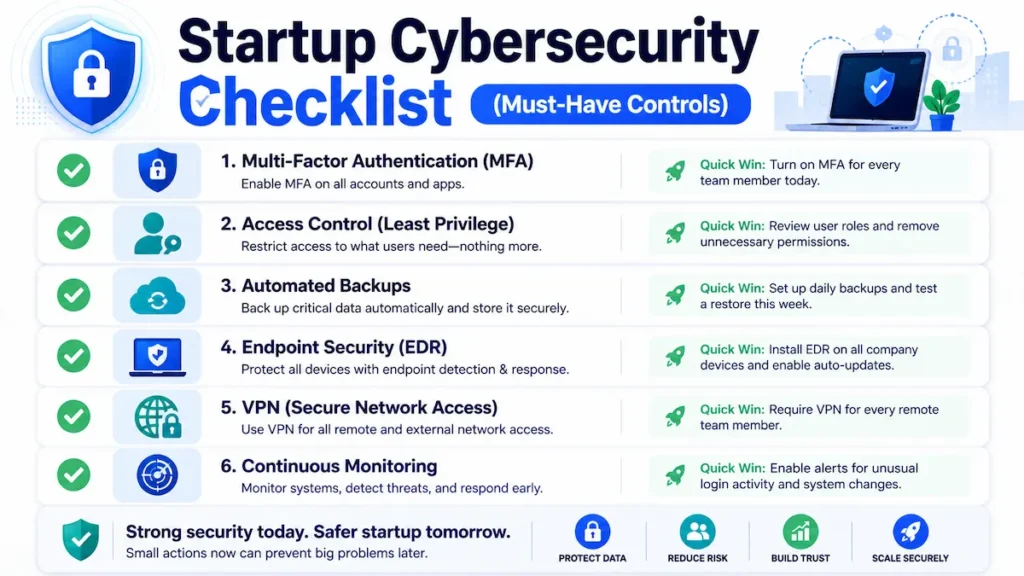
Startup Cybersecurity Checklist: FSOS 90-Day Execution Roadmap
This roadmap shows what cybersecurity does a startup need in practical stages so founders can implement security without overwhelming their operations.
Week 1–2—The Non-Negotiables:
- Enforce MFA on every account across the entire company without exception
- Run a full access audit; revoke all permissions that violate least privilege
- Enable full-disk encryption on all company and enrolled personal devices
- Deploy EDR endpoint protection on every device with production access
- Set up automated backups with off-site storage and complete a test restoration before moving to Week 3
Week 3–4—Infrastructure Hardening:
- Deploy VPN and enforce it for all remote access without exception
- Configure firewall rules and segment your network by functional zone
- Enable encryption at rest and in transit across all data stores
- Audit all third-party integrations and revoke unnecessary API permissions
- Enable DNS filtering
Month 2—Detection and Human Layer:
- Run a baseline phishing simulation across your full team before formal training
- Deploy vulnerability scanner; remediate all critical and high findings within 30 days
- Set up log aggregation and configure high-signal anomaly alerts
- Write and distribute a one-page incident response procedure in plain language
Month 3—Operationalize and Own It:
- Run formal security awareness training for all employees
- Re-run your SCRS diagnostic and compare against your baseline score
- Conduct a full access permissions audit; make this a standing quarterly ritual
- Schedule quarterly security reviews with a named owner and a calendar commitment
Stage-Based Priority Matrix: What to Build at Each Startup Stage
The stage-based approach clarifies what cybersecurity does a startup need depending on funding level, team size, and infrastructure complexity.
What cybersecurity does a startup need is a different answer at pre-revenue versus post-Series A. Trying to build an enterprise security architecture when you’re bootstrapped wastes budget and creates false confidence.
Pre-revenue / under $500K ARR: Focus only on MFA everywhere, endpoint encryption, and tested backups. Skip SIEM, MSSP, and compliance frameworks entirely until you have product-market fit and a budget to match. Every hour spent on enterprise security tooling at this stage is an hour not spent on product.
$500K–$3M ARR, no dedicated CTO: Add VPN, vulnerability scanning, least-privilege access enforcement, and DNS filtering. If you’re handling PII or payment data, bring in a fractional CISO for 5–10 strategic hours per month. Don’t build your own SIEM—the operational burden will outstrip your team’s bandwidth within 60 days.
Running on AWS / GCP / Azure: Enable cloud-native security tooling before anything else. GuardDuty, Security Command Center, and Azure Defender are purpose-built for your infrastructure and detect the most common cloud attack patterns out of the box at the highest ROI per dollar of any option available.
→ See how AI cloud security solutions for startups extend cloud-native controls with AI-powered threat detection, misconfiguration alerts, and compliance monitoring—built specifically for AWS, GCP, and Azure environments.
Handling PII, health data, or payments: Compliance controls are not optional and are not a substitute for operational security. Layer HIPAA, PCI-DSS, or GDPR requirements on top of your FSOS base. Treat SOC 2 readiness as a revenue enabler for enterprise sales—not a bureaucratic burden.
Fully distributed or remote-first team: Zero trust architecture is your direction—every access request verified regardless of network location, no implicit trust based on device, location, or seniority.
→ Get the complete playbook on zero trust security tools for startups—including how to implement zero trust principles incrementally without disrupting your team or requiring enterprise infrastructure.
The forced tradeoff when budget is genuinely tight: Prioritize in this exact order—(1) MFA and access controls, (2) tested backups, (3) endpoint protection, (4) network security, (5) monitoring and training. Cut from the bottom up. Never from the top down. Cutting IAM to save money is how containable incidents become company-ending ones.
DIY vs MSSP vs Fractional CISO: Strategic Decision Guide
Choosing the right model depends on what cybersecurity does a startup need at its current scale and risk exposure.
DIY Security—Best for: Technical founders, pre-revenue startups, low-risk products with no PII or payment data. Monthly cost: $200–$800 (tools only). Honest limit: Works competently up to around 30 employees. After that, the operational complexity of managing growing infrastructure, access controls, and an evolving threat landscape requires dedicated expertise—or you start cutting corners you cannot afford to cut. 24/7 monitoring: No. Scales past 30 employees: No.
MSSP (Managed Security Service Provider)—Best for: Regulated data environments, teams with zero internal security expertise, post-Series A companies requiring 24/7 coverage. Monthly cost: $1,500–$5,000+. Honest limit: Expensive for early-stage budgets and often over-engineered for pre-product-market-fit environments. 24/7 monitoring: Yes. Scales: Yes.
Fractional CISO—Best for: $1M–$10M ARR startups that need senior strategic direction without a full-time hire. Monthly cost: $1,000–$3,000. Honest case: Ten strategic hours per month—covering security roadmap, vendor selection, compliance posture, and incident response planning—consistently outperforms adding another tool subscription at this stage. It’s the most underutilized security option available to growth-stage startups. 24/7 monitoring: No—strategy and direction only. Scales: Yes.
Common Cybersecurity Mistakes That Kill Startups
Most failures happen when founders misunderstand what cybersecurity does a startup need and either overbuild or ignore critical basics.
“We’ll fix security after launch.” You won’t. “After launch” becomes “after Series A” becomes “after we hire a CTO.” The breach doesn’t wait for a convenient quarter. Security debt compounds faster than technical debt and carries worse consequences than either.
One tool, one layer, one prayer. Great endpoint protection doesn’t protect an unencrypted database. An enterprise firewall doesn’t stop a CFO who just wired $47,000 to a fraudulent account. The FSOS layers are interdependent — remove one and the failure cascade runs to completion.
Admin access for everyone. “Everyone here is trusted” is not a security model. Trusted employees get their credentials stolen. Least privilege isn’t about distrust—it’s about limiting blast radius when something inevitable happens to a trusted person.
The untested backup. Run a full restoration test this quarter—from zero. If you can’t complete it in under 4 hours, you don’t have a recovery plan that will survive a real incident under real pressure.
Third-party blindness. Every SaaS integration, API connection, and contractor with production access is an extension of your attack surface. Per NIST’s supply chain risk framework, their breach becomes your breach through your integration. Audit annually. Revoke everything you’re no longer actively using.
No incident response plan. Startups that contain breaches quickly had one thing in common: they knew exactly what to do in the first 30 minutes—before panic set in. One page. Named decision-maker. Notification list. That document is worth more than most monthly tool subscriptions.
Expert Insight: What Most Cybersecurity Guides Get Wrong
Most startup security advice is enterprise content with a startup label. It recommends architectures requiring dedicated security teams and 6-month implementation timelines. Founders read it, feel overwhelmed, and implement nothing. That guide—however comprehensive—made your startup less secure by creating paralysis.
Compliance is not security. SOC 2 certification means an auditor reviewed your documented controls at a point in time. It does not mean those controls are working, current, or sufficient. Certifications open enterprise sales doors. The security underneath them is a separate and ongoing responsibility—and too many startups stop thinking about security the moment the audit report arrives.
Tools don’t replace discipline. A startup with basic tools, enforced MFA, tested backups, and trained employees is dramatically more secure than a startup with a $5,000/month security stack nobody configured correctly and no one actively monitors.
Zero trust is a direction, not a starting point. Implementing zero trust principles badly is measurably worse than implementing FSOS fundamentals well. Start with the foundation. Move toward zero trust architecture as your team and infrastructure scale into it. Directional correctness matters more than architectural purity at the early stage.
What actually works in real startup environments: A small number of controls, applied consistently, owned explicitly, and audited on a defined schedule. The startups that don’t make breach notification headlines aren’t running the most sophisticated stacks. They’re running fundamentals, flawlessly, as an operational habit.
Frequently Asked Questions
What cybersecurity does a startup need at the very beginning?
At the earliest stage, what cybersecurity does a startup need is simple but critical: multi-factor authentication (MFA), secure backups, and endpoint protection. These three controls eliminate the most common attack paths without requiring a large budget or security team.
How much should a startup spend on cybersecurity?
The level of protection depends on risk, but in general, what cybersecurity does a startup need includes identity security, data protection, and monitoring tools scaled to its size. Most startups can stay protected with a focused 7-layer system instead of enterprise-level complexity.
Do startups need a dedicated security team?
No, startups do not need enterprise-heavy systems. However, what cybersecurity does a startup need is a structured approach that prioritizes access control, backups, and device security. Without these basics, even small startups become easy targets for attackers.
What’s the most common cause of startup data breaches?
Stolen credentials combined with missing MFA is the most common entry point. Over 80% of breaches involve a human element—phishing, social engineering, or password reuse. This is why IAM (Layer 3) and employee training (Layer 6) deliver disproportionate security ROI relative to their cost and implementation effort.
Is cybersecurity compliance the same as being secure?
No—and conflating the two is one of the most dangerous mistakes a startup can make. SOC 2, ISO 27001, and HIPAA certifications document that controls existed and were audited at a point in time. Real security is operational and continuous. Certifications open enterprise sales doors. The FSOS keeps your company actually secure between those audit dates.
What cybersecurity tools does a startup actually need?
Priority order: password manager with enforced MFA, EDR endpoint protection, VPN, automated backup solution with tested restoration, and a vulnerability scanner. These five tool categories address the highest-frequency, highest-impact attack vectors at the startup stage. Everything else scales on top of this foundation.
What is the Founder Security Operating System (FSOS)?
The FSOS is a seven-layer startup cybersecurity framework designed specifically for resource-constrained startup environments. It prioritizes controls by the actual sequence in which startup defenses fail—endpoint, network, identity, data, backup, training, and monitoring—with stage-based guidance so founders know exactly what to build at each growth phase, and what to defer until they’re operationally ready for it.
How do I decide what cybersecurity my startup should implement first?
To decide what cybersecurity does a startup need, founders should start with risk assessment and focus on the highest-impact controls first. Identity protection (MFA), backups, and endpoint security should always come before advanced tools or monitoring systems.
Final Verdict: What Cybersecurity Does a Startup Need?
The final takeaway is simple—what cybersecurity does a startup need is not complexity, but a structured system that reduces failure points across all seven layers.
You don’t need to be perfect. You need to make the failure cascade impossible to complete.
The FSOS at a glance:
- Layer 1—Endpoint Protection: Stops device compromise and malware entry. Implementation time: 1–2 days.
- Layer 2—Network Security: Stops lateral movement and traffic interception. Implementation time: 3–5 days.
- Layer 3—Identity & Access Management: Stops credential theft and over-privileged access. Implementation time: 1 day.
- Layer 4—Data Encryption: Stops data exposure and compliance violations. Implementation time: 2–3 days.
- Layer 5—Backup & Disaster Recovery: Stops ransomware from being a company-ending event. Implementation time: 1–2 days.
- Layer 6—Employee Training: Stops phishing, social engineering, and wire fraud. Ongoing.
- Layer 7—Continuous Monitoring: Stops silent intrusion and undetected exfiltration. Implementation time: 3–5 days.
Total implementation time for a 10–20 person cloud-native startup: 3–4 weeks of focused execution.
Run your SCRS. Know your number. Start at Layer 1.
Security is not a product you buy once. It’s an operational discipline you build deliberately, improve continuously, and take seriously before—not after—the incident that makes it unavoidable.
The startups that don’t make breach notification headlines aren’t lucky. They made a deliberate decision before the attack found them.
Make that decision today.