

A practical, tested cybersecurity stack that protects early-stage startups without enterprise tools or a security team.
This guide breaks down exactly what to install, in what order, and how to stay under $100/month without sacrificing real protection.
How This Stack Was Evaluated
AI security tools on a startup budget are no longer optional—they’re the fastest way to reduce real breach risk early.
Before diving in, here’s what shaped every recommendation in this guide:
- Deployment context: Tools were evaluated based on real SMB and startup deployment scenarios — not enterprise lab environments
- Team size: Optimized for 3–50 person teams with no dedicated security staff
- Budget constraint: Hard ceiling of $100/month for the full stack; free tiers prioritized where genuinely effective
- Startup program eligibility: Only tools with accessible pricing, free tiers, or documented startup programs were included
- Attack vector focus: Recommendations are weighted toward the actual threats startups face—phishing, IAM misconfiguration, endpoint compromise, and vulnerable code—not theoretical advanced threats
- Operational reality: Tools requiring more than 4 hours/month to maintain without security expertise were deprioritized
This isn’t a vendor list. It’s an opinionated, sequenced security blueprint built for founders who need real protection with limited time and budget. AI security tools on a startup budget help founders protect cloud, code, and devices without hiring a full security team.
Why Startups Are Easy Targets (And What a Lean Security Stack Actually Fixes)
AI security tools on a startup budget directly address the most common startup attack paths like phishing and IAM misconfigurations.
Most founders believe hackers go after the big names. They don’t.
Startups are the preferred target. No dedicated security team. No enterprise firewall. No compliance budget. You’re running lean—and attackers know exactly what that means.
Here’s what the data says: 43% of cyberattacks target small businesses, according to Verizon’s 2024 Data Breach Investigations Report. The average cost of a breach for a company under 500 employees is $3.31 million. That’s enough to kill a Series A startup before the wire even clears.
The threat scenarios are real—and they happen constantly:
A SaaS startup loses customer PII through a misconfigured S3 bucket. The breach goes undetected for 11 weeks. A fintech seed-stage company gets hit with ransomware on a Friday night. No backups. Gone. A founder clicks a spear-phishing email impersonating a VC. Login credentials compromised. Fundraising data stolen.
These aren’t edge cases. They’re the standard attack playbook used against companies exactly like yours.
The good news? Building an effective early-stage cybersecurity setup has never been more achievable. AI automation has democratized protection that used to require a dedicated six-figure budget. What once cost enterprise money now costs less than your Figma subscription.
Every week you delay is a week you’re fully exposed. If you want a broader framework for where to start, this complete guide to securing a startup with AI tools walks through the full process from day one.
Startup Threat Priority Map (Fix These in Order)
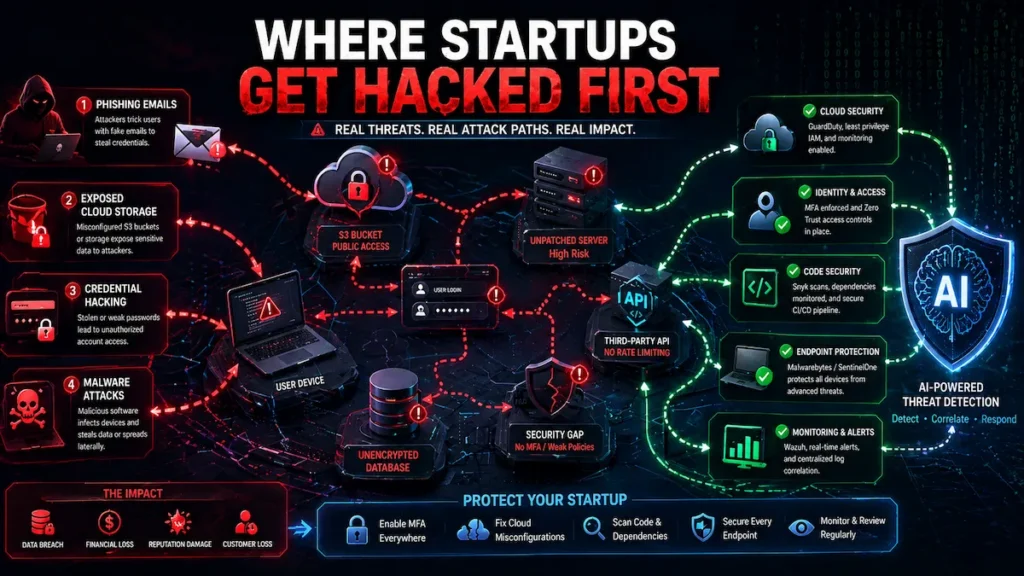
Not all threats are equal. Most startups waste budget protecting against low-probability risks while leaving their highest-probability vulnerabilities wide open. AI security tools on a startup budget should always be aligned with real threat priority, not hypothetical risks.
Here’s how to prioritize:
🔴 Critical—Fix These First
AI security tools on a startup budget work best after fixing IAM, MFA, and exposed storage issues.
- IAM misconfiguration (overly permissive roles, unused access keys, no MFA on root accounts)
- Phishing attacks targeting employee credentials
- Exposed cloud storage (public S3 buckets, unprotected databases)
These three vectors are responsible for the overwhelming majority of startup breaches. They’re also the cheapest to fix. None of them require paid tools.
🟠 High—Address Within 30 Days
AI security tools on a startup budget become essential when protecting endpoints and code vulnerabilities.
- Endpoint compromise on developer and team devices
- Vulnerable open-source dependencies inside your codebase
- Lack of identity-based access control (VPN-only or no access control)
These require modest tooling investment but are entirely solvable within a $75/month budget.
🟡 Medium—Address Within 90 Days
AI security tools on a startup budget help reduce alert noise through smarter monitoring.
- Log monitoring gaps (no centralized visibility into system behavior)
- Alert fatigue from unconfigured detection tools
- Absence of code scanning in CI/CD pipeline
🟢 Low—Address When Budget Allows
- Dark web monitoring for leaked credentials
- Advanced threat intelligence feeds
- Penetration testing subscriptions
Use this map as your investment sequencing guide. If you haven’t solved Critical-tier risks, don’t spend budget on Medium or Low-tier tools.
What Most Startups Get Wrong When Building a Security Stack
AI security tools on a startup budget fail without proper ownership and configuration discipline.
Most founder-led security stacks fail—not because the tools are bad, but because of three predictable mistakes made before a single tool is configured.
Mistake 1: Buying tools before fixing fundamentals. Startups install SentinelOne on every laptop while leaving their AWS root account without MFA and production S3 buckets publicly accessible. The tool budget is spent. The highest-probability attack vectors remain wide open. Always solve IAM, MFA, and cloud storage exposure first—they’re free to fix and eliminate more risk than most paid tools.
Mistake 2: Installing tools nobody owns. A security tool without a named owner is security theater. GuardDuty alerts pile up unreviewed. Snyk warnings get suppressed because they slow down deploys. Wazuh dashboards go unchecked for weeks. The tool is running. The protection is not. Assign explicit ownership before deployment—not after.
Mistake 3: Confusing coverage with configuration. Activating a tool is not the same as configuring it properly. Default installs produce alert volumes that teams mute within a week. Proper threshold tuning, alert routing, and weekly review schedules are what make tools actually work. Budget time for configuration, not just subscription cost.
These three mistakes are more dangerous than not having tools at all—because they create the false confidence that you’re protected when you aren’t.
What “AI Security Tools on a Startup Budget” Actually Means (Reality Check)
Let’s set expectations clearly.
“AI security” doesn’t mean a magic black box that stops every threat. It means software that uses machine learning to detect behavioral patterns, flag anomalies, and automate responses faster than any human team can.
And “startup budget” doesn’t mean free. It means efficient—no bloat, no shelfware, no 12-month enterprise contracts for tools you’ll misconfigure and ignore.
Free vs. Paid vs. Open-Source—The Honest Breakdown:
Free tools exist and some are genuinely useful. Wazuh, Snyk’s free tier, and Cloudflare Zero Trust are real products—not stripped demos. But free typically means limited coverage, no SLA, and manual configuration that burns engineering hours. Engineering hours carry real opportunity cost.
Paid tools with startup programs are the sweet spot. CrowdStrike, Lacework, SentinelOne—most offer startup tiers, YC discounts, or pilot programs. You can access serious protection for $20–$80/month if you know where to apply.
Open-source tools require in-house expertise. If you have a DevOps engineer willing to own the configuration, great. If not, a half-configured security tool is measurably worse than no tool at all—it creates false confidence while leaving real gaps.
Hidden costs to account for before committing:
- Integration time (expect 20–40 engineering hours upfront for complex tools)
- Alert fatigue from misconfigured thresholds—ignored alerts lead directly to missed breaches
- Data egress fees on cloud security platforms
- Per-seat pricing that balloons as you hire
In practice: A realistic founder-led security stack for a 10-person team runs $50–$150/month. Anything below that requires significant engineering investment. Anything above $300/month needs strong justification unless you’re processing payments or handling protected health data.
Types of AI Security Tools for Startups (And What Each Layer Actually Does)
AI security tools on a startup budget cover multiple layers including cloud, endpoint, and code security.
Threat Detection Tools for Startups on a Budget
AI security tools on a startup budget improve visibility through log analysis and anomaly detection.
Threat detection tools monitor your infrastructure in real time, using AI models trained on millions of historical attack patterns to surface what a human analyst would miss.
For startups, the most effective affordable options focus on log analysis and network behavior anomaly detection. Tools like Wazuh (open-source, free) and Elastic Security (free tier available) ingest system logs, run behavioral correlation rules, and flag actual threats rather than routine noise.
Machine learning-based intrusion detection has matured significantly. What used to require a full enterprise SIEM deployment now runs on a $15/month VPS with open-source tooling.
Why it matters: According to IBM’s Cost of a Data Breach Report, the average time to identify a breach remains well over 100 days. AI-driven detection can significantly reduce that window—though the actual improvement depends heavily on your configuration maturity and whether someone is actively reviewing alerts.
Budget fit: $0–$30/month depending on data volume.
What most guides miss: Free self-hosted options work well if someone owns the configuration long-term. If nobody does, a managed alternative is worth the extra cost.
Endpoint Protection Tools for Startup Security on a Budget
AI security tools on a startup budget protect developer devices from malware and credential theft.
Every laptop, developer machine, and cloud server is an endpoint. Each one is a potential entry point. Endpoint protection AI watches for malware, suspicious process behavior, and unusual file system activity—without requiring human intervention for every event.
The standout affordable options are SentinelOne Singularity Core (startup pricing available) and Malwarebytes for Teams (~$4/seat/month). Both use behavioral AI rather than signature databases, which means they can catch threats that traditional antivirus misses entirely.
For a deeper breakdown of how these tools work in practice, this full guide to AI endpoint security for startups covers configuration, common mistakes, and what to prioritize first.
Why it matters: Developer laptops are among the most common breach entry points for early-stage startups. A compromised machine with active AWS credentials can expose your entire cloud environment in minutes.
Budget fit: $4–$15/seat/month.
Operational limitation: Default installs without threshold tuning generate noise that teams start ignoring. Spend an hour on initial configuration—it’s worth it.
Cloud Security Tools for Startups on a Budget
AI security tools on a startup budget help detect misconfigurations and suspicious cloud activity.
If you’re on AWS, GCP, or Azure, you already have access to baseline AI security tools at no additional cost—AWS GuardDuty, Azure Defender free tier, GCP Security Command Center. The problem isn’t access. It’s that most startups never turn them on.
Beyond native tools, platforms like Lacework and Orca Security offer startup programs with meaningful discounts. They use AI to continuously map your cloud environment, detect misconfigurations, and flag anomalous API behavior before it escalates.
AI cloud security solutions built for startups have become significantly more accessible in 2026, particularly for companies on AWS or GCP with active startup credit programs.
Why it matters: Gartner has widely reported that misconfiguration is among the leading causes of cloud security incidents—not sophisticated external hacking. IAM errors, public storage buckets, and overly permissive roles are the actual threat vectors most startups face.
Budget fit: $0 (native tools) to $50–$100/month for dedicated platforms.
Important nuance: Native cloud tools are free and genuinely effective. Activate them before spending anything on third-party platforms.
Monitoring & Alerting Tools for Early-Stage Cybersecurity
You need to know when something goes wrong—and that alert needs to be actionable, not just noise that gets muted after a week.
Grafana + Prometheus (open-source) with anomaly detection plugins provide powerful custom dashboards at zero cost. PagerDuty free tier handles on-call routing cleanly. Datadog Security Monitoring is expensive at list price, but startup credits exist through the Datadog for Startups program.
For teams wanting centralized visibility, this AI network security monitoring guide for small teams provides a practical framework for reducing alert volume while maintaining genuine coverage.
Why it matters: Rule-based alerting generates hundreds of alerts per day. ML-based alerting surfaces the handful that actually require action.
Budget fit: $0–$40/month.
In practice: Assign a named human owner to review alerts on a fixed schedule. Unreviewed alerts are operationally equivalent to no alerts at all.
Best AI Security Tools for Startups Under $100 (2026 Rankings)
AI security tools on a startup budget make enterprise-level protection accessible at low cost.
Quick Comparison Table
| Tool | Category | Monthly Cost | Setup Difficulty | Best For |
|---|---|---|---|---|
| Wazuh | SIEM / Threat Detection | Free + ~$15 VPS | Medium | Startups with DevOps capacity |
| SentinelOne Core | Endpoint Protection | ~$6–$10/seat | Low | Any startup with 5+ devices |
| Snyk | Code & Dependency Security | Free / $25+ | Very Low | Every SaaS startup shipping code |
| AWS GuardDuty | Cloud Threat Detection | ~$10–$30 | Very Low | AWS-based startups |
| Cloudflare Zero Trust | Identity & Access | Free (≤50 users) | Low | Remote teams replacing VPN |
| Malwarebytes Teams | Endpoint Protection | ~$4/seat | Very Low | Non-technical teams |
| Lacework | Cloud Security Posture | Startup program | Medium | Cloud-native startups |
1. Wazuh Open-source SIEM with built-in threat detection, file integrity monitoring, and compliance dashboards. Who it’s for: Startups with a DevOps engineer willing to own configuration and maintenance. Budget fit: Free. Hosting costs ~$10–$20/month on a small VPS. Why it works: Active ML-based rule engine. Large open-source community. Native integrations with AWS, Azure, and GCP.
2. SentinelOne Singularity Core Behavioral AI endpoint protection that catches ransomware and zero-day attacks without relying on signature databases. Who it’s for: Any startup with 5+ devices across the team. Budget fit: Startup programs available. Negotiate around $6–$10/seat/month. Why it works: Autonomous threat response—it can terminate a malicious process before the alert reaches your inbox.
3. Snyk AI-powered vulnerability scanning for code, containers, open-source dependencies, and infrastructure-as-code. Who it’s for: Every startup shipping software. Non-negotiable if you’re building SaaS. Budget fit: Free tier is genuinely production-ready for small teams. Paid plans start at $25/month. Why it works: Catches critical security bugs before they deploy. Developer-native—runs inside your existing CI/CD pipeline without a separate dashboard.
4. AWS GuardDuty AI-powered threat detection built natively into AWS. Continuously analyzes CloudTrail logs, VPC flow data, and DNS queries. Who it’s for: Any startup running infrastructure on AWS. Budget fit: ~$10–$30/month depending on data volume. First 30 days free, zero setup required. Why it works: No agent to deploy. Fully native. Detects compromised IAM credentials, crypto mining activity, and data exfiltration patterns automatically.
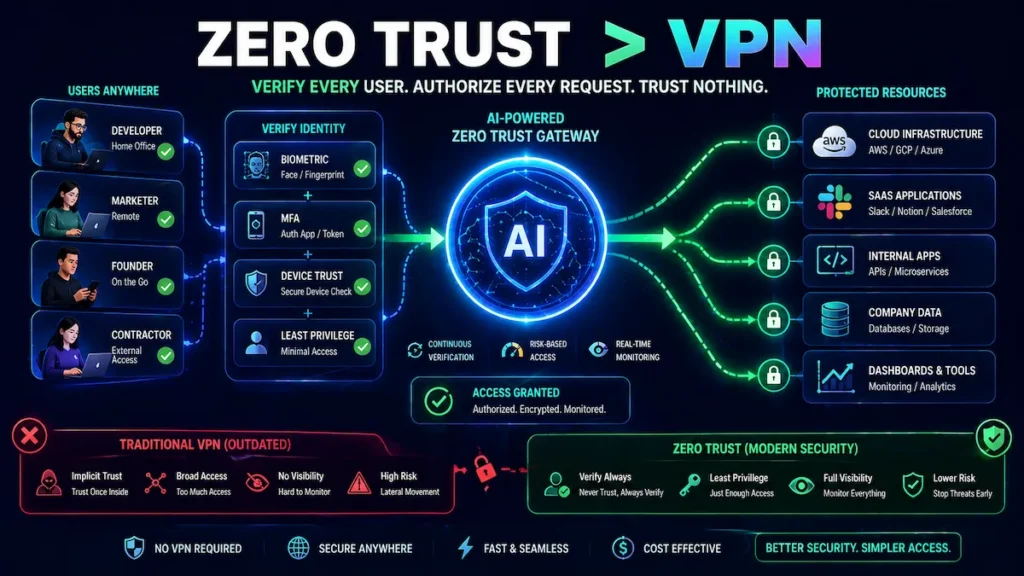
5. Cloudflare Zero Trust (Free Tier) Identity-based access control that replaces your VPN. Includes AI-powered bot detection and DDoS mitigation at the network edge. Who it’s for: Any startup with remote employees accessing internal tools or infrastructure. Budget fit: Free for up to 50 users. Why it works: Eliminates the “VPN is the perimeter” problem that underlies most startup access control failures. This zero trust security setup guide for startups in 2026 covers every configuration step in detail.
6. Malwarebytes for Teams Simple, effective AI endpoint protection with minimal operational overhead. Who it’s for: Non-technical teams who need company-wide protection without a security engineer managing it. Budget fit: ~$4/seat/month. Scales cleanly as you grow. Why it works: Low overhead. Genuine behavioral detection. No security expertise required to deploy or maintain.
7. Lacework (Startup Program) Cloud security posture management combined with AI-driven behavioral threat analysis across your entire cloud environment. Who it’s for: Cloud-native startups with meaningful AWS, GCP, or Azure workloads. Budget fit: Apply directly to their startup program. Discounts are significant for qualifying companies. Why it works: Automatically maps your entire cloud attack surface and detects anomalous behavior without manual rule configuration.
Why Startups Still Get Hacked Even After Installing Security Tools
AI security tools on a startup budget fail when alerts are ignored or coverage is incomplete.
This is the section most security articles skip—because it’s uncomfortable. But it’s the most important one.
Tools don’t protect you. Properly configured, actively monitored, correctly owned tools protect you. There’s a significant difference.
Here’s how breaches happen after a security stack is in place:
GuardDuty alerts ignored, then breach confirmed. A startup enables GuardDuty in week one. Alerts start flowing. Nobody is assigned to review them. Eleven weeks later, a compromised IAM key—flagged by GuardDuty on day three—has been used to exfiltrate customer data. The tool worked. The process didn’t.
Snyk warnings suppressed to meet a shipping deadline. A team configures Snyk to block PRs with critical vulnerabilities. Two weeks later, a developer suppresses a high-severity warning to hit a sprint deadline. The vulnerability ships. Three months later it’s exploited. The tool worked. The culture didn’t.
MFA enabled, but recovery email compromised first. A startup enforces MFA on Google Workspace. A developer’s personal Gmail—used as the recovery address for their work account—gets phished. Attacker resets the work account. MFA bypassed entirely. The tool worked. The implementation had a gap.
Endpoint tool installed but not enforced on contractors. A company deploys SentinelOne on all full-time employee devices. Three contractors are exempt because they use personal machines. An attacker compromises a contractor’s laptop. Uses it to access shared Notion workspace, internal Slack, and staging environment credentials. The tool worked on the devices it covered.
The pattern is always the same: partial configuration, no ownership, or gaps in coverage create the breach—not tool failure.
This is why the “Founder Quick-Start Stack” section below is sequenced the way it is. Ownership and configuration discipline matter more than which tools you buy.
Recommended Starter Stack (If You’re Overwhelmed, Start Here)
AI security tools on a startup budget can be implemented quickly using a focused five-tool stack.
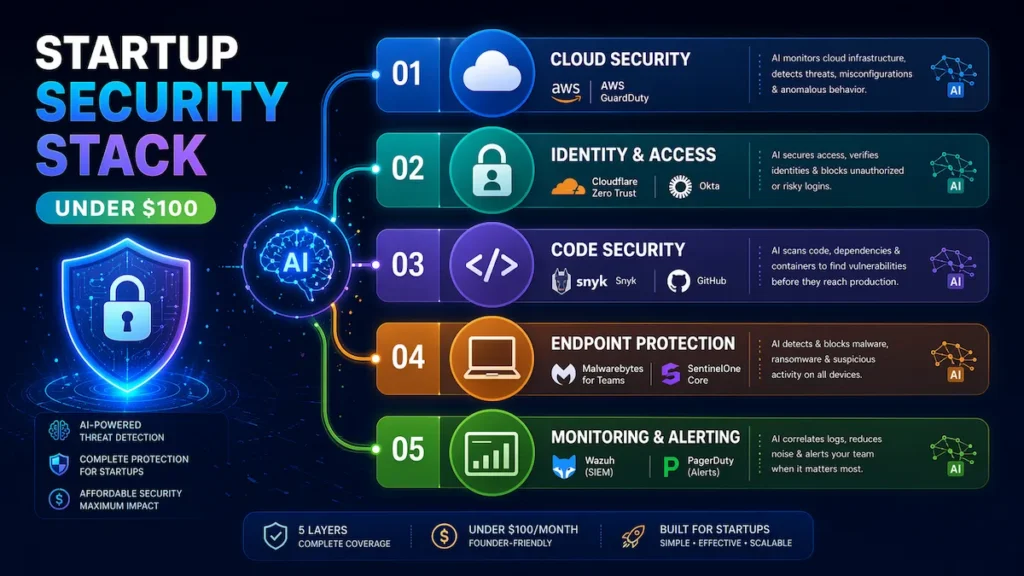
Don’t overthink it. If you’re not sure where to begin, implement these five tools in this order:
| Priority | Tool | Why First |
|---|---|---|
| 1 | AWS GuardDuty | Activates in 10 minutes. Zero maintenance. Covers your biggest cloud risk immediately. |
| 2 | Cloudflare Zero Trust | Free. Replaces VPN. Stops credential-based access attacks. |
| 3 | Snyk | Connects to GitHub in 20 minutes. Blocks vulnerable code before it ships. |
| 4 | Malwarebytes for Teams | $4/seat. Covers every laptop without any security expertise. |
| 5 | Wazuh | Log correlation and behavioral monitoring for teams with DevOps capacity. |
Total cost for a 10-person team: ~$75/month.
This five-tool stack directly addresses the five vectors responsible for the majority of startup breaches: cloud misconfigurations, identity attacks, vulnerable code, endpoint malware, and undetected behavioral anomalies.
If You Only Install 5 Tools, Choose These
AI security tools on a startup budget should prioritize cloud, identity, and code protection first.
AWS GuardDuty covers your cloud. Native to AWS, free for 30 days, no agent required, runs continuously.
Cloudflare Zero Trust covers your access layer. Free for up to 50 users. Eliminates the misconfigured VPN problem responsible for a significant share of credential-based breaches.
Snyk covers your code. Plugs into GitHub and automatically blocks pull requests with critical vulnerabilities. Set it up once and it runs automatically.
Malwarebytes for Teams or SentinelOne covers your endpoints. Every device. No exceptions—including contractors and part-time team members.
Wazuh covers your logs and behavioral patterns. Correlates events across your environment and surfaces threats that point tools miss individually.
If you can only commit time for three tools, prioritize GuardDuty, Cloudflare Zero Trust, and Snyk. You’ll have covered your cloud, identity, and code—the three layers where most early-stage breaches begin.
For teams building toward compliance or handling sensitive customer data at scale, this guide to AI-powered threat detection for startups covers how to layer more advanced detection capabilities as you grow.
How to Choose the Right Tools for Your Startup (Decision Engine)
AI security tools on a startup budget must match your actual risk and technical capacity.
Use this framework before buying anything:
If you have $0/month: Wazuh (self-hosted) + Cloudflare Zero Trust free + Snyk free + AWS GuardDuty. Protected against the majority of real-world attack vectors at zero direct cost.
If you have $50/month: Add SentinelOne or Malwarebytes for endpoint coverage. Endpoints first—it’s where most breaches originate.
If you have $100/month: Full-stack coverage across threat detection, endpoints, cloud monitoring, and alerting. Roughly 80% of enterprise-level protection at 2% of the cost.
Three questions to ask before every purchase:
- What is the most realistic attack vector for our specific company and data type?
- Do we have the technical capacity to configure and maintain this tool properly?
- What’s the cost of the breach this tool prevents versus the monthly subscription cost?
A $30/month tool that prevents a $300,000 breach is a 10,000x ROI. That math is straightforward.
What to avoid regardless of budget:
- All-in-one “security suites” that do 10 things at 60% quality each
- Any tool requiring more than 4 hours/month to maintain without security staff
- Enterprise contracts with 12-month minimums before validating fit
- Overlapping tools protecting the same layer—two endpoint products add cost, not coverage
Startup Stack vs. Enterprise Stack: The Real Cost Comparison
This is what most security vendors don’t want you to see.
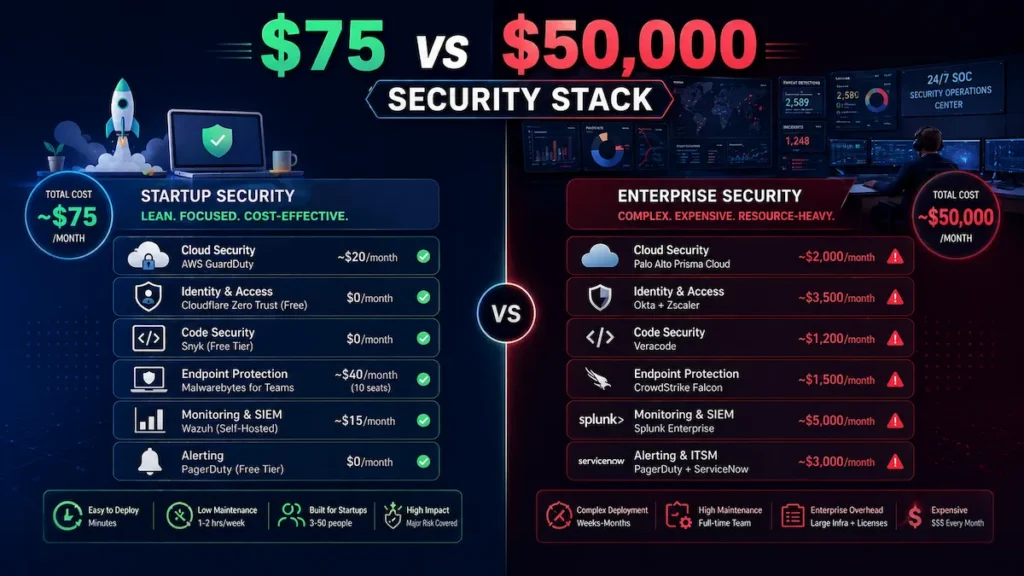
| Layer | Startup Stack (This Guide) | Enterprise Equivalent | Coverage Overlap |
|---|---|---|---|
| Cloud threat detection | AWS GuardDuty (~$20/mo) | Palo Alto Prisma (~$2,000/mo) | ~75% |
| Endpoint protection | Malwarebytes ($40/mo) | CrowdStrike Falcon (~$1,500/mo) | ~70% |
| Code security | Snyk free | Veracode (~$1,200/mo) | ~80% |
| Identity & access | Cloudflare Zero Trust free | Zscaler (~$3,000/mo) | ~65% |
| Log monitoring | Wazuh ($15/mo) | Splunk (~$5,000/mo) | ~60% |
| Total monthly cost | ~$75/month | ~$12,700–$50,000/month | ~70–80% |
The honest takeaway: a well-configured low-cost security architecture delivers roughly 70–80% of enterprise coverage at less than 1% of enterprise cost. The 20–30% gap covers advanced forensics, dedicated SOC response, compliance automation, and threat intelligence depth that most pre-Series B startups genuinely don’t need yet.
This table is also why the “we can’t afford security” argument doesn’t hold up. You can’t afford the breach.
Founder Quick-Start Stack (Implement in One Day)
If you’re busy and need a concrete starting point, implement this sequence today:
Step 1—Turn on AWS GuardDuty (10 minutes) AWS Console → GuardDuty → Enable. It’s now analyzing your CloudTrail logs, VPC flow data, and DNS queries continuously, with zero additional configuration.
Step 2—Enable MFA everywhere (30 minutes) Every platform. No exceptions. Google Workspace, AWS root account, GitHub, Stripe, your CRM, your DNS provider. This single step prevents more breaches than most software tools combined.
Step 3—Install endpoint protection (1 hour) Deploy Malwarebytes or SentinelOne on every device—including contractors and part-time team members. Every unprotected device is your actual attack surface.
Step 4—Add Snyk to GitHub (20 minutes) Install the Snyk GitHub integration from the GitHub Marketplace. Configure it to block pull requests with critical findings. Your code is now being scanned automatically on every commit.
Step 5—Activate Cloudflare Zero Trust (45 minutes) Sign up for the free plan. Connect your identity provider (Google, Okta, or GitHub). Route internal tool access through Cloudflare’s identity-aware proxy. Your VPN dependency is resolved.
Total implementation time: Under 3 hours for meaningful coverage across every critical layer.
First 7 Days Security Plan (Full Implementation Schedule)
Use this schedule to go from zero to a fully operational founder-led security stack:
Day 1—IAM Audit + MFA Everywhere Run AWS IAM Access Analyzer. Remove unused access keys and overly permissive roles. Enable MFA on every account—AWS root, Google Workspace, GitHub, Stripe, DNS provider. This is your highest-ROI security day.
Day 2—Cloud Logging and Detection Enable AWS GuardDuty across all regions. Activate CloudTrail logging. Enable S3 bucket public access blocks and AWS Config. Create a dedicated Slack channel for security alerts and route GuardDuty findings there. Assign a named reviewer.
Day 3—Endpoint Protection Purchase and deploy Malwarebytes for Teams or SentinelOne on every company device—full-time staff, contractors, and any shared machines. Document every device in a simple spreadsheet. Set a quarterly review reminder to add new devices.
Day 4—CI/CD Code Scanning Install Snyk in your GitHub or GitLab environment. Configure it to block PRs with critical or high-severity findings. Review the initial scan results—don’t suppress warnings, triage them. Fix critical findings before next deployment.
Day 5—Identity and Access Control Set up Cloudflare Zero Trust. Connect your identity provider. Require identity-based authentication for all internal tools. Document which tools are covered and which aren’t yet.
Day 6—Log Monitoring Setup Install Wazuh on a dedicated VPS (if you have DevOps capacity) or configure your cloud provider’s native logging. Set alert thresholds carefully. Route medium and high-severity findings to your security Slack channel.
Day 7—Review, Document, Assign Ownership Document your complete security stack: what’s installed, who owns it, what the alert thresholds are, and when each tool was last reviewed. Schedule a monthly 30-minute security review. Assign explicit ownership of each layer to a named team member.
After Day 7, you have a fully operational, documented, owned security stack for under $100/month. That puts you ahead of the majority of startups at your stage.
Step-by-Step Setup for a Complete Startup Security Stack (Execution Layer)
AI security tools on a startup budget require proper setup across all security layers.
Step 1: Map your attack surface before buying anything. List every system your company touches — cloud accounts, team devices, SaaS subscriptions, code repositories, DNS providers, third-party integrations. You cannot protect what you haven’t mapped.
Step 2: Enable native cloud security tools first. Turn on AWS GuardDuty. Enable CloudTrail logging across all regions. Activate S3 bucket public access blocks. Enable AWS Config. These steps cost almost nothing and immediately cover a wide range of common attack patterns.
Step 3: Deploy endpoint protection on every device. No exceptions. The least-protected machine is your real attack surface, regardless of how junior or part-time the user is.
Step 4: Integrate code scanning into your CI/CD pipeline. Configure Snyk to block pull requests with critical or high-severity findings. This stops security debt from compounding with every release.
Step 5: Enforce identity security and access control. Enable MFA everywhere. Use Cloudflare Zero Trust to replace or supplement VPN for internal tool access.
Step 6: Configure alerting with discipline. Set thresholds carefully during initial setup. Alert fatigue is a genuine operational risk that causes real breaches to be silently ignored.
Mistakes that create false security:
- Installing tools but never reviewing dashboards or weekly summaries
- Skipping MFA on “less important” platforms—attackers use lateral movement through exactly those gaps
- Treating free tiers as complete products without understanding their documented coverage limits
- No written documentation—configuration knowledge that lives in one person’s head disappears when they leave
- Tools without named owners—assign explicit accountability with a recurring review reminder
Real Startup Security Stack Under $100/Month (Honest Assessment)
| Layer | Tool | Monthly Cost |
|---|---|---|
| Cloud threat detection | AWS GuardDuty | ~$20 |
| Endpoint protection | Malwarebytes for Teams (10 seats) | $40 |
| Code & dependency security | Snyk (free tier) | $0 |
| Identity & access control | Cloudflare Zero Trust (free tier) | $0 |
| Log monitoring & SIEM | Wazuh (self-hosted VPS) | $15 |
| Alerting | PagerDuty (free tier) | $0 |
| Total | ~$75/month |
Honest limitations: This stack does not address advanced persistent threats from sophisticated actors. It does not provide 24/7 SOC response or deep forensic capability. Insider threat detection is limited to basic log correlation. Physical security is entirely out of scope.
If you’re processing payment card data or protected health information, this stack alone is insufficient—you’ll need additional investment and formal compliance tooling. For a typical B2B SaaS or consumer app startup at pre-Series B, this setup addresses the vast majority of threats you’ll actually face.
Pros and Cons of a Low-Cost AI Security Architecture
AI security tools on a startup budget balance affordability with configuration complexity.
Pros:
- Significantly reduces breach risk at a fraction of traditional enterprise cost
- AI automation compensates meaningfully for the absence of a dedicated security team
- Most tools integrate directly into developer workflows—no separate security department required
- Startup programs and discounts make serious tools genuinely accessible
- Faster, more consistent threat detection than manual monitoring processes
Cons:
- Still requires meaningful technical expertise to configure properly from day one
- Free tiers have real, documented coverage limits—know them before relying on them in production
- Alert fatigue is a serious risk if thresholds aren’t tuned after deployment
- ML-based detection is not infallible—sophisticated attacks can evade behavioral models
- Tool sprawl is dangerous: six half-configured tools are worse than two well-managed ones
Advanced Tips Most Security Articles Miss
AI security tools on a startup budget work best when combined with strong security culture.
1. Your IAM configuration is a bigger risk than your endpoint tools. Run AWS IAM Access Analyzer (free, built into AWS) before spending a dollar on any third-party tool. Fix the findings first.
2. Detection only works if someone reviews the alerts. Assign a named owner. A technical co-founder checking a Slack security channel twice a week is dramatically better than an unreviewed dashboard. Ownership beats tooling.
3. Culture prevents more breaches than most software. Password managers (1Password Teams: $4/seat/month), mandatory MFA, and a clear policy around verifying unexpected requests prevent more breaches than the majority of tools on this list.
4. Use cloud provider startup programs for security credits. AWS Activate, Google for Startups, and Azure for Startups offer credits worth thousands annually. Ask your investors before paying list price for any platform.
5. Security is a revenue asset, not just a cost center. Enterprise customers ask about your security posture during procurement—and it’s increasingly a deal blocker. A documented stack with SOC 2 on the roadmap shortens sales cycles measurably.
6. Sequence your investment to match your actual risk. A three-person pre-revenue startup doesn’t need Lacework. They need MFA, GuardDuty, endpoint protection, and documented access policies.
According to CISA’s guidance for small businesses, the highest-impact security improvements are almost always the simplest: patching, MFA, and basic access control. AI tools amplify these fundamentals—they don’t replace them.
FAQs
AI security tools on a startup budget answer common founder concerns around cost and effectiveness.
What are the best AI security tools for startups on a tight budget?
The best approach is using AI security tools on a startup budget that cover core layers like cloud, endpoints, code, and access control. Tools like AWS GuardDuty, Snyk, and Cloudflare Zero Trust provide strong protection without high costs.
Can a startup be secure without paying for cybersecurity tools?
Yes, but only if configured correctly. AI security tools on a startup budget often include free tiers, but their effectiveness depends on proper setup, alert monitoring, and consistent maintenance across all systems.
Are free AI security tools good enough for startups?
Free tools including Wazuh, Snyk’s free tier, and Cloudflare Zero Trust provide genuine, production-ready value—but each has documented limits. Free tiers typically cap data volume, exclude priority support, and require more manual configuration. They’re a strong starting point, not a complete solution. Plan to invest $50–$100/month for reliable coverage across all critical layers.
What is the most common cybersecurity threat for startups?
The three most common threats are phishing attacks targeting employee credentials, misconfigured cloud storage (exposed S3 buckets and overly permissive IAM roles), and vulnerable third-party dependencies inside your codebase. All three are directly addressable with the low-cost security stack described in this guide.
How do I secure a startup with no dedicated security team?
For small teams, AI security tools on a startup budget automate threat detection, reduce manual monitoring, and quickly identify suspicious behavior, allowing startups to maintain security without a dedicated team.
Do AI security tools replace a security engineer?
No. AI tools automate detection, correlation, and initial response—but they don’t replace human judgment for incident response, architecture decisions, or compliance strategy. At early stage, they meaningfully extend your coverage without a full-time hire. Consider a fractional CISO at Series A when compliance requirements and enterprise customer security reviews become more demanding.
What’s the difference between a SIEM and endpoint protection?
A SIEM (like Wazuh) collects, correlates, and analyzes logs from across your entire infrastructure to detect behavioral patterns at the network level. Endpoint protection (like SentinelOne) monitors individual devices for malware, suspicious processes, and unusual file activity. Both protect different layers—you ideally deploy both for complete coverage.
When should a startup take cybersecurity seriously?
From day one. The moment you start collecting user data, handling logins, or building a product, risk already exists. AI security tools on a startup budget make it possible to implement essential protections early—without waiting for a security team or large budget—so you can prevent breaches before they happen.
Conclusion
AI security tools on a startup budget are the most practical way to reduce startup risk today. Here’s the direct truth: security is the one startup investment where doing nothing costs more than doing something.
You don’t need a $500K enterprise contract. You don’t need a five-person security team. You need smart tool selection, proper initial configuration, clear ownership of the process—and the discipline to maintain it.
A $75/month stack built on AWS GuardDuty, Malwarebytes for Teams, Snyk, Cloudflare Zero Trust, and Wazuh addresses the threats that actually hit startups at your stage. The sophisticated attack you’ve read about in the news is not coming for your seed-stage SaaS. The phishing email targeting your developer’s unprotected laptop is.
Use the First 7 Days plan above. Day 1 alone—IAM audit and MFA enforcement—eliminates more risk than most paid tools. Everything after that builds on a foundation that actually holds.
Security isn’t a Q3 project. It’s a practice you build now, while the stakes are manageable—so you’re not scrambling when they aren’t.
Topic Cluster Navigation
Use this to find the right next article based on your current priority:
→ If cloud security is your biggest gap: AI Cloud Security Solutions for Startups 2026
→ If you need to understand how AI detection actually works: Machine Learning Intrusion Detection for Startups
→ If endpoint security is your immediate concern: AI Endpoint Security for Startups — Full Guide
→ If you’re replacing or setting up access control: Zero Trust Security Tools for Startups — 2026 Guide
→ If you want the full security system blueprint from scratch: How to Secure a Startup With AI Tools — Complete Guide
→ If you need monitoring coverage for a small team: AI Network Security Monitoring for Small Teams
→ If you’re scaling detection as your company grows: AI-Powered Threat Detection Tools for Startups