
This guide is based on real-world startup security practices and industry frameworks used by security teams and compliance auditors.
Cybersecurity Checklist for Early Stage Startups: The Complete Founder Security Guide
Cybersecurity checklist for startups is essential for protecting early-stage companies from data breaches, phishing attacks, and cloud security failures. Most founders ignore security until it’s too late, but having a structured checklist helps prevent costly mistakes from day one.
If you’re building a startup, cybersecurity probably isn’t your first priority. You’re focused on product, funding, and customers. That’s understandable—but it’s also exactly why hackers target early stage startups. No security team. Limited budget. Fast-moving teams with loose controls. If you don’t have a cybersecurity checklist for early stage startups in place right now, you’re leaving the front door wide open.
This guide gives you a practical, no-fluff security roadmap built specifically for founders and small teams. Before you go any further, if you want to see how today’s AI-powered tools compare for startup protection, check out our startup cybersecurity software comparison for 2026—it’ll help you make faster tool decisions as you work through this checklist.
A cybersecurity checklist for startups is not just a technical document—it is a survival framework for protecting early-stage businesses from preventable attacks.
You don’t need to be a security engineer to follow this guide. You just need to act before something goes wrong.
Startup Cybersecurity by the Numbers
This cybersecurity checklist for early stage startups exists because the data is impossible to ignore. Before we dive in, here’s why this matters more than most founders realize:
- 60% of small businesses close within 6 months of a major data breach (National Cybersecurity Alliance)
- 99% of automated account compromise attacks are blocked by MFA (CISA)
- 82% of breaches involve a human element—phishing, stolen credentials, or errors (Verizon DBIR)
- 43% of cyberattacks specifically target small businesses and startups
- The average cost of a data breach for small businesses now exceeds $200,000—enough to shut most early stage startups down permanently
These aren’t abstract numbers. They represent real companies that no longer exist. A cybersecurity checklist for early stage startups is the most direct way to make sure you’re not one of them.
Quick Start: Your 5-Minute Cybersecurity Checklist
Before diving deep, here’s your immediate action list:
- Enable MFA on all critical accounts
- Install a password manager across your team
- Lock down cloud storage access and permissions
- Turn on automatic OS and software updates
- Set up basic monitoring alerts on your cloud infrastructure
Done? Good. Now let’s build the full system.
What Is a Cybersecurity Checklist for Early Stage Startups?
A cybersecurity checklist for early stage startups is a structured set of security controls designed to protect data, systems, and users from common threats during the early growth phase—before a dedicated security team exists and when the cost of a breach is highest.
Think of it as your startup’s security operating system. It doesn’t need to be perfect on day one. It needs to exist, be followed, and improve as you grow.
Why Every Founder Needs a Cybersecurity Checklist for Early Stage Startups
Every founder needs a cybersecurity checklist for startups because early-stage companies are frequent targets for hackers due to weak security systems and limited resources.
Most founders assume cybersecurity is a “Series B problem.” It isn’t. The damage from a breach at the pre-seed or seed stage can permanently kill a company before it ever gets traction. A cybersecurity checklist for early stage startups isn’t a luxury. It’s a basic survival requirement.
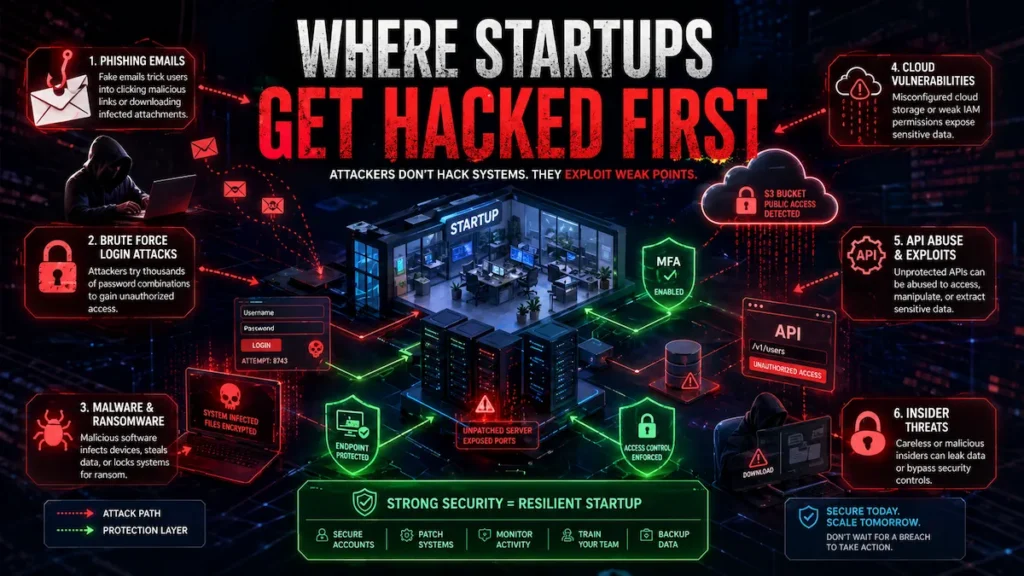
Why Early Stage Startups Are Prime Targets for Hackers
Attackers don’t just go after big companies. Small businesses and early stage startups are increasingly preferred targets because they’re easy. According to Verizon’s annual Data Breach Investigations Report, small organizations are breached at nearly the same rate as large enterprises—but with far less ability to recover.
Why are startups targeted?
- No dedicated security team or IT staff
- Employees using personal devices for work
- Cloud infrastructure misconfigured in a rush
- Rapid headcount growth without security onboarding
- Valuable IP, customer data, and investor information stored in unsecured systems
Hackers know you’re moving fast and probably haven’t locked everything down. That makes you a soft target. So what’s the fix? A solid cybersecurity checklist for early stage startups, applied systematically from day one.
How Data Breaches Destroy Early Stage Startups
The cost of a breach goes far beyond the immediate damage. Here’s what typically happens:
- Regulatory fines if customer data is exposed (GDPR, CCPA, HIPAA depending on your market)
- Lost customer trust—nearly 60% of small businesses close within six months of a major breach, according to the National Cybersecurity Alliance
- Investor confidence collapses—no serious investor wants liability from a poorly run security posture
- Downtime and recovery costs that a young company simply can’t absorb
- Reputational damage that follows the founders, not just the company
One misconfigured S3 bucket. One employee clicking a phishing link. One reused password across your admin accounts. That’s all it takes.
Real Startup Cybersecurity Failures and Lessons
You don’t have to look far to find examples. A fast-growing fintech startup lost access to its entire customer database after a single admin credential was compromised through a phishing email. The attacker used that foothold to exfiltrate data, demand a ransom, and leak samples publicly when the startup refused to pay.
In another case, a SaaS startup had a misconfigured AWS S3 bucket—publicly readable—containing a full backup of their user database including hashed passwords, emails, and payment metadata. A security researcher discovered it before a malicious actor did, but the regulatory and PR fallout still cost them two enterprise deals and a key partnership.
The pattern is always the same: no checklist, no process, no training. The cybersecurity checklist for early stage startups below is designed to prevent exactly these scenarios.
What Most Founders Get Wrong About Startup Security
Before the checklist itself, let’s address the beliefs that keep most founders exposed. This is where the cybersecurity checklist for early stage startups gets ignored—and where breaches actually begin.
Thinking security equals expensive. It doesn’t. A solid baseline security stack for a 10-person startup costs under $500/month. The cost of not having it can be existential.
Waiting until after funding. Attackers don’t wait for your Series A. Pre-funding startups are often the easiest targets because they have valuable data and zero defenses.
Assuming cloud providers handle it. AWS, GCP, and Azure secure their infrastructure. They don’t secure your configuration on top of it. That’s your responsibility—and it’s called the Shared Responsibility Model.
Ignoring the employee risk. Your team is your biggest attack surface. One person clicking one bad link can unravel everything you’ve built. According to Verizon’s DBIR, 82% of breaches involve a human element.
Does any of this sound familiar? If so, keep reading—because the checklist in the next section directly addresses every one of these failure points.
Every cybersecurity checklist for startups should start by identifying the most common attack vectors targeting early-stage companies.
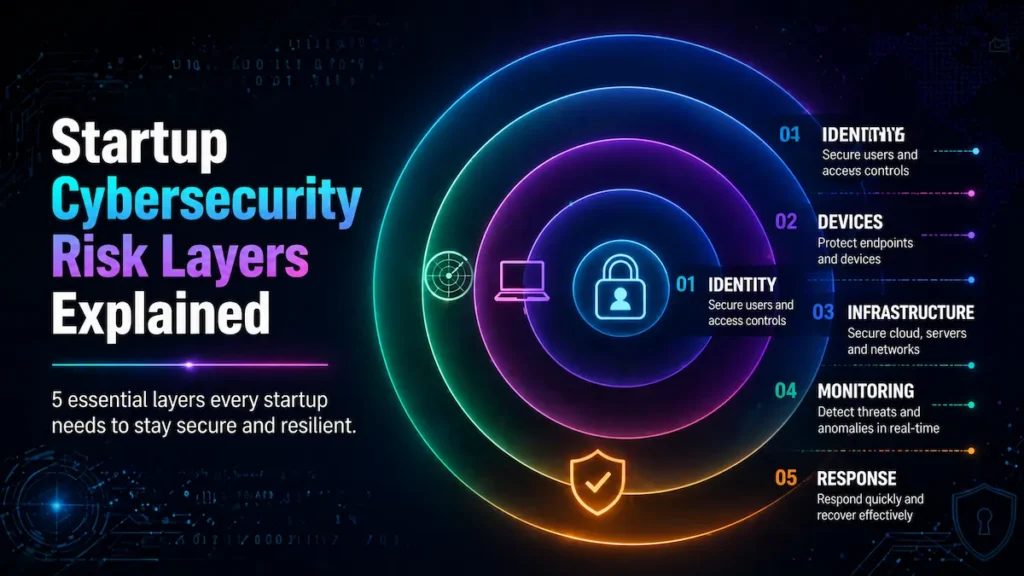
Startup Cybersecurity Risk Layers: A Simple Model
This is why a cybersecurity checklist for startups is critical even for non-technical founders building their first product.
Before jumping into the checklist, here’s a model of how startup security actually works. This is the mental framework behind every item in your cybersecurity checklist for early stage startups—five layers, each protecting the one inside it:
| Layer | Focus Area | Key Controls |
|---|---|---|
| Layer 1: Identity | Who can access what | Passwords, MFA, IAM |
| Layer 2: Devices | What devices touch company data | Endpoint security, encryption |
| Layer 3: Infrastructure | Cloud, APIs, web apps | Config hardening, WAF |
| Layer 4: Monitoring | Detecting threats early | Logs, alerts, SIEM |
| Layer 5: Response | Handling incidents effectively | IR plan, communications |
Every item in the checklist below maps to one of these layers. Understanding this model helps you prioritize intelligently—not just follow a list blindly. And if you’re skipping even two of the items in this checklist, your startup is already exposed.
Essential Cybersecurity Checklist for Early Stage Startups
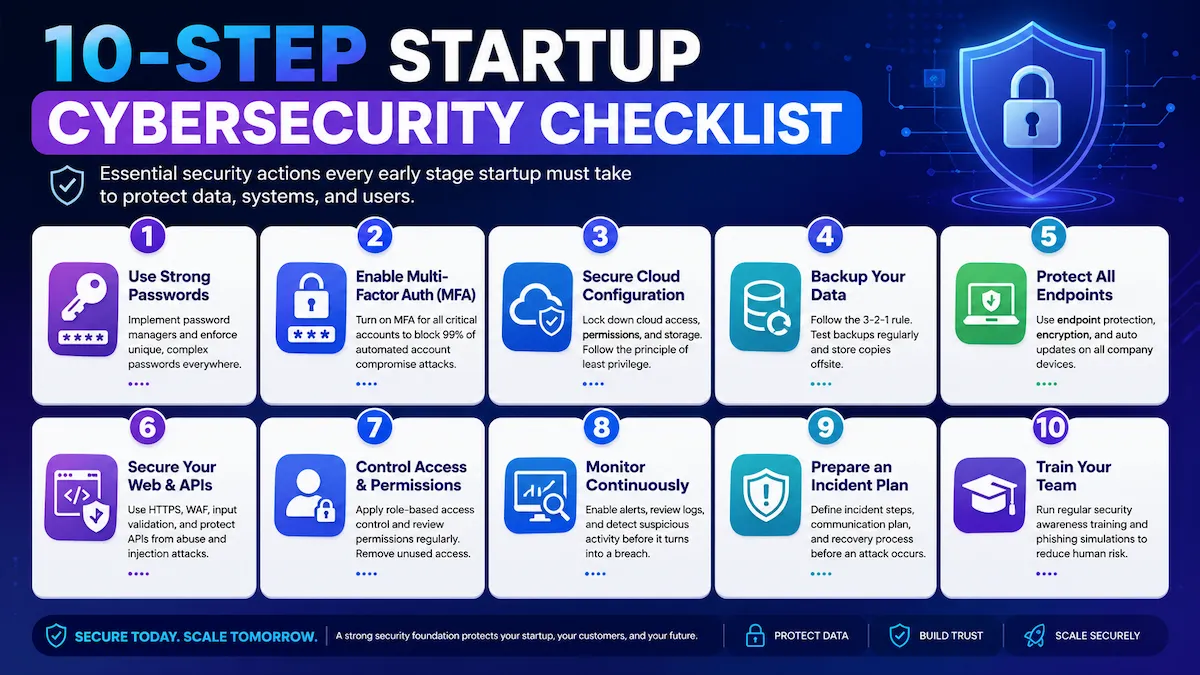
A cybersecurity checklist for startups provides a step-by-step framework to secure accounts, devices, cloud infrastructure, and team workflows.
Work through each item systematically over the next 30–60 days. Not all at once — but with intention and accountability.
Strong Password Policies and Password Managers
A cybersecurity checklist for startups always begins with enforcing strong password policies and mandatory password managers for all team members.
Weak and reused passwords are behind a massive percentage of breaches. Every person on your team needs a password manager—without exception. Tools like 1Password or Bitwarden make it easy to generate unique, complex credentials for every account without requiring anyone to memorize anything.
Your password policy should require:
- Minimum 14-character passwords
- No password reuse across accounts
- Company-wide password manager adoption from day one
- Immediate credential rotation when any team member departs
This single step eliminates a significant chunk of your risk with almost no cost. If you’re not sure where to start, our guide on how to secure a startup with AI tools covers how modern AI-assisted tools can automate much of this process for lean teams.
Multi-Factor Authentication (MFA) Setup
Implementing MFA is a core step in any cybersecurity checklist for startups because it blocks unauthorized access even if passwords are compromised.
MFA is the single most impactful control in any cybersecurity checklist for early stage startups. If a password gets stolen, MFA stops the attacker from using it. Every account that touches company data—email, cloud services, code repositories, admin dashboards—must have MFA enabled without exception.
Prioritize these accounts first:
- Google Workspace or Microsoft 365 accounts
- AWS, GCP, or Azure consoles
- GitHub or GitLab
- Stripe, Salesforce, or any payment or CRM tool
- Internal admin panels and dashboards
Use authenticator apps (Google Authenticator, Authy) or hardware keys (YubiKey) rather than SMS-based MFA, which is vulnerable to SIM-swapping attacks. According to CISA’s official MFA guidance, enabling MFA blocks over 99% of automated account compromise attacks. There is no cheaper or faster win in this entire checklist.
Secure Cloud Infrastructure Configuration
A proper cybersecurity checklist for startups includes securing cloud infrastructure to prevent misconfigurations that expose sensitive data.
Cloud misconfigurations are the number one cause of data exposure for startups. When you spin up infrastructure fast—and you will—mistakes happen.
An improperly configured storage bucket or an overly permissive IAM role can expose your entire database to the public internet with zero warning.
Key steps to lock this down:
- Audit all cloud resource permissions quarterly
- Never use root or admin accounts for day-to-day work
- Enable logging and monitoring on all cloud services (AWS CloudTrail, GCP Audit Logs)
- Block all public access to storage buckets by default
- Apply the principle of least privilege—a core component of both the NIST Cybersecurity Framework and Zero Trust security models
- Enable AWS Trusted Advisor and AWS Security Hub to surface misconfigurations automatically
For teams that want AI-driven automation at this layer, our guide on AI cloud security solutions for startups covers how modern tools detect and fix cloud misconfigurations in real time—before attackers find them.
Employee Cybersecurity Awareness Training
A cybersecurity checklist for startups must include employee training because human error is one of the biggest causes of security breaches.
Are your employees your strongest defense or your weakest link? Without structured training, they default to the latter. Phishing remains the most common initial attack vector—and it works because people simply aren’t trained to recognize it.
Training doesn’t need to be expensive or time-consuming:
- Run monthly simulated phishing tests (KnowBe4 has a free tier)
- Share a brief monthly security tip via Slack or email
- Cover how to spot phishing and spear phishing attempts
- Teach safe file sharing and download practices
- Explain what to do if they suspect a breach or accidentally click something suspicious
- Make security training part of every new hire’s onboarding—not a one-time annual checkbox
This training component of your cybersecurity checklist for early stage startups is where most human-element breaches get prevented before they happen.
Data Backup and Recovery Systems
Ransomware, accidental deletion, and infrastructure failures all have the same cure: reliable backups. If you’re not backing up your data, you’re one incident away from losing everything.
Follow the 3-2-1 backup rule:
- 3 copies of your data
- 2 on different storage types or media
- 1 stored offsite or in a separate cloud region
Test your backups regularly. A backup you’ve never restored is a backup you don’t actually have. Schedule quarterly recovery drills—make it a routine, not a reaction to a crisis.
Endpoint Security for Devices
Every laptop, phone, and tablet that accesses company data is an endpoint—and a potential entry point. Early stage teams often mix personal and company devices, which makes this layer of your cybersecurity checklist for early stage startups especially critical to address early.
Implement across all devices:
- Antivirus and endpoint detection software on all company devices
- Full disk encryption enabled by default (FileVault on Mac, BitLocker on Windows)
- Remote wipe capability for lost or stolen devices
- Automatic OS and software update enforcement
- A BYOD policy that sets clear minimum security requirements
For a comprehensive breakdown of your options, see our full guide on AI endpoint security for startups — including which tools deliver the best protection-to-cost ratio for small teams operating across multiple device types.
Website and API Security Protection
If you have a public-facing website or API—and you almost certainly do—it needs active security controls. Web application attacks including SQL injection, cross-site scripting (XSS), and API abuse are consistently among the most exploited vectors against startups.
The OWASP Top 10 is the definitive industry-standard guide to the most critical web application risks. Every founder should read it at least once.
Key implementation steps:
- Deploy a Web Application Firewall (WAF) — Cloudflare offers a free tier
- Enforce HTTPS across all endpoints without exception
- Run automated vulnerability scans regularly (OWASP ZAP, Burp Suite Community)
- Validate and sanitize all user inputs at every entry point
- Rate-limit your APIs to prevent abuse and brute-force attacks
- Never expose API keys in your codebase—use environment variables and secrets management tools (HashiCorp Vault, AWS Secrets Manager)
Access Control and Permission Management
Not everyone on your team needs access to everything. Identity and Access Management (IAM) controls who can access what—and it’s the operational foundation of a Zero Trust Architecture, where no user or system is trusted by default, regardless of network location.
Implement role-based access control (RBAC) from day one:
- Define roles clearly (admin, developer, marketing, customer support)
- Grant the minimum access each role needs to perform their job
- Review permissions quarterly and revoke access immediately when employees leave
- Maintain an access log for all sensitive systems
- Use Single Sign-On (SSO) where possible to centralize and simplify access management
This principle—least privilege access—is also a foundational requirement for SOC 2 compliance, which enterprise customers will eventually require from you. For hands-on tool recommendations, see our breakdown of Zero Trust security tools for startups.
Continuous Security Monitoring
You can’t respond to what you can’t see. Security monitoring means having systems in place that alert you when something unusual happens—an unexpected login at 3am, an unusual data transfer, or a new admin account created without authorization.
Basic monitoring stack for early stage startups:
- Enable cloud-native security alerts (AWS GuardDuty, Google Security Command Center)
- Use a SIEM tool if budget allows (Datadog Security Monitoring offers startup pricing)
- Set alert thresholds on failed login attempts
- Configure email or Slack notifications for critical system events
- Review logs at minimum weekly—daily if you’re handling sensitive customer data
For teams with limited bandwidth, AI-powered threat detection tools can automate much of this monitoring layer—flagging anomalies without requiring a dedicated security analyst.
For network-level visibility, AI network security monitoring for small teams covers exactly how to build that layer cost-effectively. And for teams that want to go deeper on automated detection, our guide on machine learning intrusion detection for startups covers how ML-driven systems catch what rule-based tools consistently miss.
Incident Response Planning
Every cybersecurity checklist for startups should include an incident response plan to ensure fast action during a security breach.
Despite your best efforts, something will eventually go wrong. The difference between a contained incident and a full-blown breach often comes down to whether you had a plan before you needed it.
Your Incident Response plan should include:
- A clear definition of what counts as a security incident
- Who gets notified first—CEO, legal counsel, affected customers?
- Immediate steps to isolate affected systems
- Pre-written communication templates for internal and external stakeholders
- A post-incident review process to prevent recurrence
Document it, share it with your team, and review it every six months. The NIST Cybersecurity Framework’s incident response lifecycle is the industry-standard structure to base your own plan on—it’s free, well-documented, and widely respected by auditors and investors alike.
Best Cybersecurity Tools for Early Stage Startups
A well-designed cybersecurity checklist for startups also helps founders choose the right tools without overspending or overcomplicating their stack.
Password Management Tools
| Tool | Monthly Cost | Best For |
|---|---|---|
| 1Password Teams | ~$20 | Best UX, strong admin controls |
| Bitwarden | Free / ~$3 per user | Open source, budget-friendly |
| LastPass Teams | ~$4 per user | Solid enterprise upgrade path |
Endpoint Protection Software
| Tool | Monthly Cost | Best For |
|---|---|---|
| CrowdStrike Falcon Go | ~$100 | Lightweight, powerful detection |
| Malwarebytes for Teams | ~$50 | Easy deployment, affordable |
| Microsoft Defender | Free | Built-in Windows protection |
Security Monitoring and Alert Systems
| Tool | Monthly Cost | Best For |
|---|---|---|
| AWS GuardDuty | Pay-as-you-go | AWS infrastructure threat detection |
| Datadog Security | Startup pricing | Combined performance and security |
| Splunk Free | Free | Log management and analytics |
Common Cybersecurity Mistakes Early Stage Startups Make
Ignoring Software Updates
Unpatched software is one of the most consistently exploited attack vectors in existence. The WannaCry ransomware attack—which caused billions in global damage—exploited a Windows vulnerability that had already been patched weeks earlier. The fix existed. Companies just hadn’t applied it.
If your team ignores update prompts, you’re exposed to known, documented, already-weaponized vulnerabilities. Automate updates wherever possible. There’s no justification for skipping this.
Weak Authentication Systems
Relying on passwords alone without MFA is indefensible in 2026. If you’re still not enforcing MFA across your critical tools, that is the single most urgent gap in your cybersecurity checklist for early stage startups. Weak authentication is the most preventable cause of account compromise—and one of the most common failure points across the industry.
No Security Monitoring Strategy
Most startup breaches are only discovered months after the initial intrusion. Without monitoring, you won’t know you’ve been compromised until significant damage is already done. Even basic alerting on failed logins and unusual access patterns makes an enormous difference in response time and damage control.
Low-Cost Cybersecurity Strategy for Early Stage Startups
Cloud misconfigurations remain one of the biggest threats addressed in a cybersecurity checklist for startups.
Affordable Security Stack for Startups
You don’t need a $500K enterprise budget. A strong baseline for a 10-person startup can be built for well under $500 per month:
| Tool | Monthly Cost | What It Covers |
|---|---|---|
| 1Password Teams | ~$20 | Password management |
| Cloudflare Pro | ~$20 | WAF, DDoS protection, HTTPS |
| CrowdStrike Falcon Go | ~$100 | Endpoint security |
| AWS GuardDuty | Pay-as-you-go | Cloud threat detection |
| KnowBe4 Free Tier | Free | Phishing awareness training |
Total estimated baseline cost: ~$150–$200 per month for a lean team. That’s less than most founders spend on SaaS tools they rarely open.
Free Tools That Actually Work
- Bitwarden (free tier)—password manager
- Google Authenticator / Authy—MFA with zero cost
- OWASP ZAP—web vulnerability scanner
- Have I Been Pwned—check if team emails appear in known breach databases
- Cloudflare Free—basic WAF and DDoS protection
- Microsoft Defender—built-in endpoint protection for all Windows users
Pros and Cons of Implementing a Cybersecurity Checklist for Early Stage Startups
| Pros | Cons |
|---|---|
| Significantly reduces breach risk | Requires initial time investment from founders |
| Builds investor and customer trust | Some tools carry upfront costs |
| Creates audit trail for compliance | Team training requires ongoing effort |
| Enables faster enterprise sales cycles | Can feel like overhead during early growth |
| Reduces cyber liability insurance premiums | Requires policy enforcement and accountability |
| Prevents catastrophic data loss | Misconfigured tools can create false sense of security |
| Demonstrates operational maturity to investors | Needs regular review as the company scales |
Your Next 24 Hours: Action Plan
Reading this guide is a good start. Acting on it today is what actually protects your startup. Here’s what to do in the next 24 hours:
- Enable MFA on every critical account—email, cloud, code repos, admin dashboards
- Set up a password manager and invite your full team today
- Audit cloud access permissions—remove any public access that shouldn’t exist
- Enable basic monitoring alerts on your primary cloud platform
- Schedule a 30-minute team security briefing for this week—share this guide as the starting point
None of these steps require a security engineer. They require a founder who takes the threat seriously. That’s you.
Topical Authority Cluster for Startup Cybersecurity
This article is part of a broader content ecosystem designed to cover startup cybersecurity comprehensively. Each topic below represents a supporting pillar—together they build the topical authority needed to dominate the full cybersecurity startup keyword space.
Supporting Articles (Internal SEO Cluster)
Startup Cybersecurity Strategy — Building a multi-year security roadmap that scales from pre-seed to Series A and beyond. Start with our guide on how to secure a startup with AI tools for a practical, modern foundation that any founder can implement.
Cybersecurity Software Comparison—Not sure which tools are actually worth paying for in 2026? Our startup cybersecurity software comparison breaks down the top platforms head-to-head so you can make faster, smarter decisions.
SaaS Security Best Practices — SaaS companies have unique security obligations around multi-tenancy, API access, and customer data isolation. This cluster covers the full compliance and technical picture for SaaS founders.
Cloud Security for Startups—AWS, GCP, and Azure each have distinct security profiles and misconfiguration risks. Our guide on AI cloud security solutions for startups walks through cloud-specific hardening for early teams in detail.
Phishing Prevention Guide—Phishing remains the top initial access vector in breaches. This cluster pillar teaches teams to identify and report phishing attempts before damage occurs.
Endpoint Security Management—How to implement and manage endpoint security across a distributed, remote-first startup. See our full guide on AI endpoint security for startups for a complete tool-by-tool breakdown.
Incident Response Playbook—A step-by-step playbook for responding to a security incident, from detection through containment, communication, and post-incident review.
Ransomware Protection Strategies—Prevention, detection, and recovery strategies specifically for startups that cannot afford extended downtime or extortion demands.
Access Control Systems Explained—A founder-friendly breakdown of IAM, RBAC, and Zero Trust principles with practical implementation steps. See our Zero Trust security tools for startups guide for hands-on tool recommendations.
Security Monitoring Frameworks—How to build a lightweight but effective monitoring practice without a dedicated SOC or enterprise tooling. Our guides on AI network security monitoring and machine learning intrusion detection cover this layer in full depth.
FAQs About Cybersecurity Checklist for Early Stage Startups
What is the most important step in a cybersecurity checklist for early stage startups?
MFA is the single most impactful control. Enabling multi-factor authentication across all critical accounts blocks over 99% of automated account compromise attacks according to CISA—and it costs nothing to implement. If you only do one thing from this guide today, make it MFA.
How much should a startup spend on cybersecurity?
Most early stage startups can build a strong security baseline for under $200–$500 per month depending on team size. Free tools like Bitwarden, Microsoft Defender, and Cloudflare Free cover several layers at zero cost. That investment is minimal compared to the average breach cost of over $200,000 for small businesses.
When should a startup implement cybersecurity measures?
Immediately—before storing any customer or company data. The most common mistake founders make is waiting until after a breach or until a major enterprise customer requires it. By then, the damage is either done or the sales cycle is already blocked. Day one security is always cheaper than post-breach recovery.
Does a small startup really need an incident response plan?
Yes—and it doesn’t need to be complex. A simple one-page document covering who to call, how to isolate affected systems, and how to communicate with customers is infinitely better than having no plan at all. Most founders who’ve been through an incident wish they had one in place before it happened.
What frameworks should a startup follow for cybersecurity?
The NIST Cybersecurity Framework is the most widely respected starting point—it’s free, comprehensive, and recognized by enterprise buyers, auditors, and investors. Pair it with the OWASP Top 10 for web security and Zero Trust principles for access control, and you have a strong, industry-standard foundation that scales as your company grows.
What is the biggest cybersecurity mistake early stage startups make?
Waiting. The vast majority of startup founders treat cybersecurity as a future problem. By the time they act, they’ve often already been compromised—they just don’t know it yet. The average time to detect a breach is over 200 days. Implementing even a basic cybersecurity checklist for early stage startups from day one is the single most effective way to close that window.
Topics Covered in This Guide
This guide helps you understand:
- Startup cybersecurity fundamentals
- Security checklist for early-stage companies
- Cloud and endpoint protection
- MFA and access control best practices
- Phishing and ransomware prevention
- Incident response basics
- Startup security tools and frameworks
👉 This gives SEO relevance without looking like keyword stuffing.
Conclusion
Implementing a cybersecurity checklist for startups ensures that security grows alongside your company instead of becoming an afterthought.
There’s no version of building a successful startup that doesn’t eventually require taking security seriously. The question is whether you address it proactively—before something goes wrong—or reactively, when the damage is already done and the cost is already counted.
The cybersecurity checklist for early stage startups in this guide isn’t about achieving perfection. It’s about eliminating the most common, most damaging attack vectors with practical steps any founder can take regardless of technical background. Start with MFA and password management today. Build toward monitoring and incident response over the next 60 days. Revisit and tighten the full checklist every quarter as your team and product grow.
The startups that survive long enough to scale are the ones that treat security as a foundational operating practice—not a feature to ship someday, and not a problem to solve after the first breach. Your investors, customers, and team are counting on you to get this right.
Following a cybersecurity checklist for startups consistently is what separates resilient startups from those that fail after a preventable breach.
Lock the door before someone else opens it.